23SUMMIT
7. Equalizer
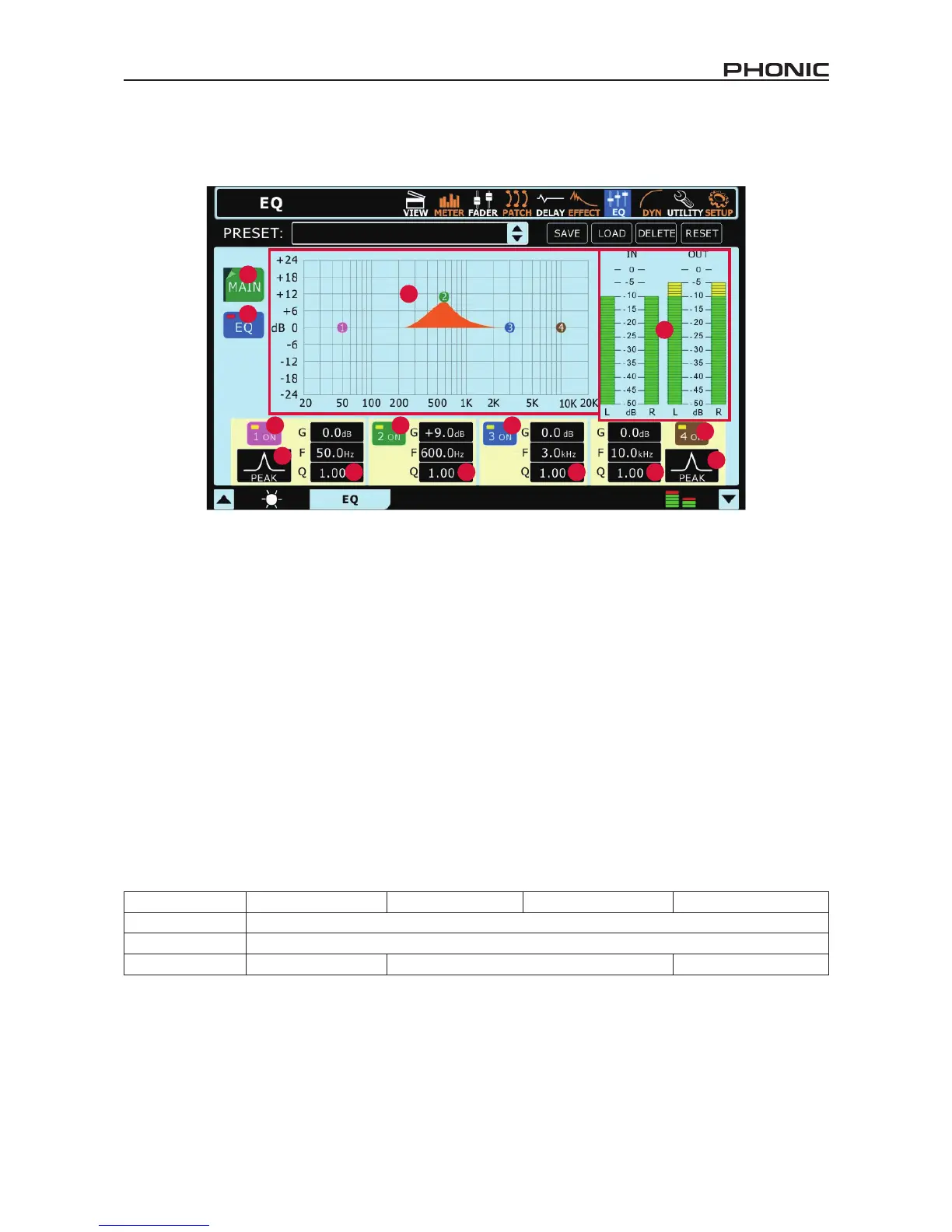
The SUMMIT provides a 4-band parametric equalizer on each input channel, Multi 1 to 8 outputs and Main Mix. All parameters are adjusted
using the data encoders or touch-screen. Users are able to select a boost or cut of up to 18 dB on frequencies between 20 Hz and 20kHz.
The Q of these signals can also be adjusted to give a wider or narrower band, as necessary.
7.1 Signal Source
Here users can select which channel’s EQ to set. An equalizer can be applied to any of the input channels, any of the Multi outputs and
the main mix..
7.2 EQ On/Off Button
This button can turn the Equalizer for the currently selected channel on and off.
7.3 EQ Grid/Curve
Here users can view the EQ curve. The small circles that appear on the graph represent one of the four bands, and can help to effectively
adjust the frequency and boost/cut properties of that particular band. The touch screen can be used to help adjust the bands.
7.4 EQ Band On and Off
Use these buttons to turn the corresponding EQ bands on and off. While not named specically, these bands can be thought of as the
low, low-mid, high-mid and high frequency bands on your average 4-band EQ.
7.5 EQ Type
For the rst and fourth bands on the EQ, users can select the type of curve used for the EQ.
Band 1: EQ Band (PEAK), Low Shelf Filter (SHELF), High Pass Filter (CUT)
Band 4: EQ Band (PEAK), High Shelf Filter (SHELF), Low Pass Filter (CUT)
The Low/High Pass Filters will cut frequencies above and below the selected frequencies at 18 dB per octave. High and Low Shelf lters
act similarly, but cut frequencies below the selected frquency by the preset level determined by the user.
7.6 EQ Parameters
The EQ offers users the ability to view or edit various parameters/properties of their EQ bands, including the Gain, the frequency and the
Q of the EQ frequency. The following parameter table offers details on the range available to users on each parameter.
Parameter 1 (Low) 2 (Low-Mid) 3 (High-Mid) 4 (High)
Gain -18 dB to +18 dB
Frequency 20 Hz to 20 kHz
Q 10 to 0.1, HPF, L Shelf 10 to 0.1 10 to 0.1, LPF, H Shelf
7.7 EQ In / Out Level Meters
These level meters give visual representations of levels going into and out of the equalizer.


 To Next Page