24 SUMMIT
8. Dynamics
The SUMMIT provides a built-in Gate, Expander, Compressor and Limiter on each input Channel, Multi 1 to 8 outputs and Main Mix. Dynamics
are not limited by DSP resources, and can be congured as pre- or post-EQ/Delay for each channel. All built-in dynamics parameters are
adjusted using the touch-screen and onboard controls.
A noise Gate is a dynamic process that turns off or signicantly attenuates the audio signal passing through it when the signal level falls
below a user adjustable threshold. An Expander helps to make troublesome background noise (such as humming) inaudible by reducing
signals with low amplitudes. A Compressor reduces signals over a user-dened threshold by a user-dened amount/ratio. Limiters work
just as Compressors do, with a ratio permanently set to innity-to-1.
To bypass the current dynamics processor, simply push the ON/OFF button or press the “GATE”, “EXP”, “COMP” and “LIM” buttons to
toggle the individual processes on and off.
Each of the pages/tabs in the Dynamics menu is essentially the same, providing similar attributes for the individual processes.
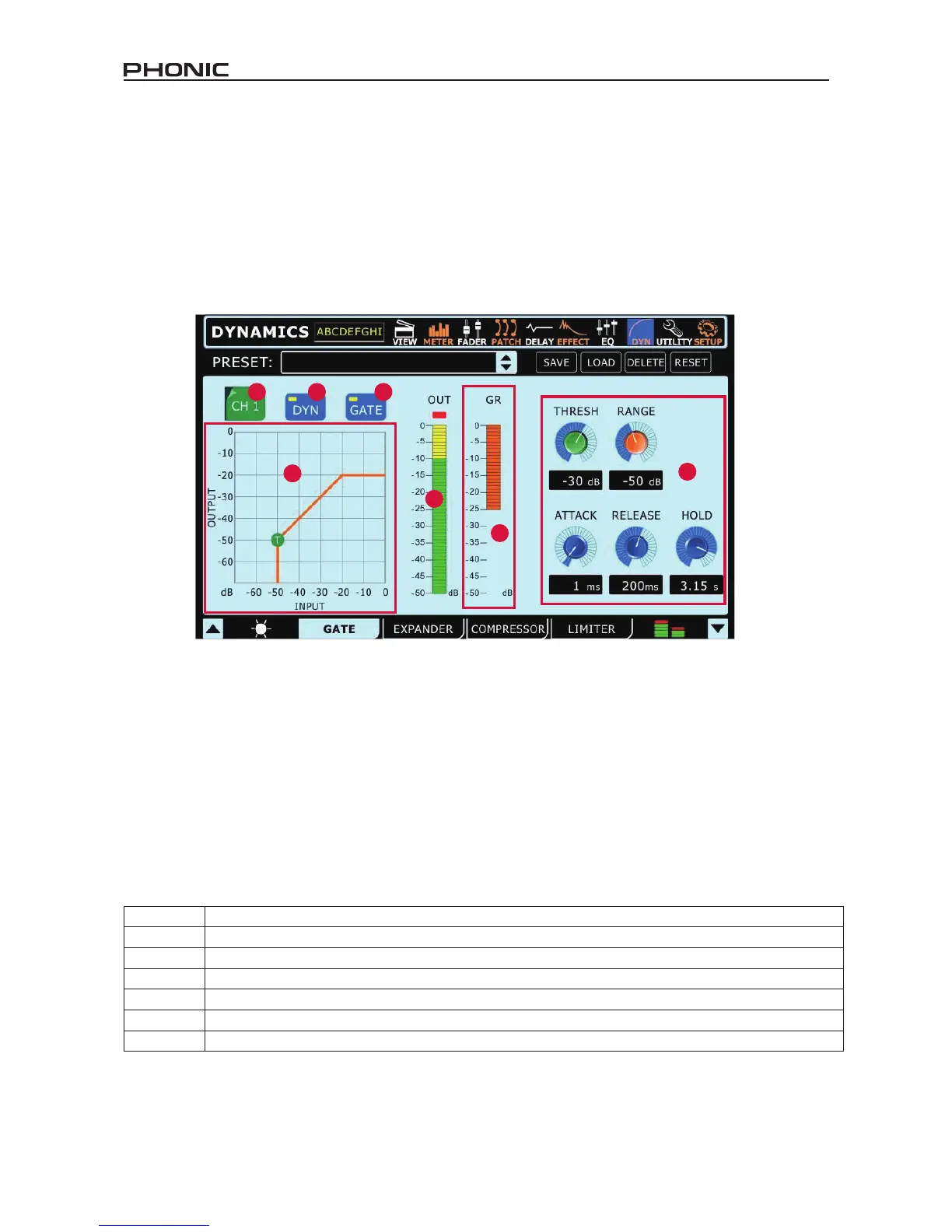
8.1 Channel Select
Use this button and the subsequent menu to select the channel you wish to apply the dynamic effect to. Users can select from any of the
input channels, any of the multi outputs, and the main stereo mix.
8.2 Dynamic Processor On/Off
Use this button to turn dynamic processor on and off for the currently selected channel.
8.3 Gate/Expander/Compressor/Limiter On/Off
This button turns the currently selected dynamic process on and off.
8.4 Output Level Meter
This meter gives the nal output level of the dynamic effect for the currently selected channel.
8.5 Gain Reduction Meter
This meter shows the amount of gain reduction that is applied to the currently selected dynamic process. This is essentially the decrease
in gain applied when the signal crosses the selected threshold of the dynamic process.
8.6 Paramaters
Each of the dynamic processes has its own user-deneable parameters. Please consult the table below for details on each parameter.
Parameter What it does
Ratio Adjusts the compressor or expander input to output signal ratio
Thresh Adjusts the threshold of the gate, compressor, expander effect
Attack Adjusts the time it will take for the effect to kick in after the signal rises above the set threshold
Release Adjusts the time it will take for the effect to deactivate after the signal falls below the set threshold
Output Gain Increases the nal output signal of the compressor
Range On the gate function, the range parameter allows users to select the level (in decibels) by which the signal will attenuate.
8.7 Dynamic Chart
This graph gives a visual representation of the dynamic processor’s function. Currently active processes will be indicated in orange, while
the process you’re currently adjusting is indicated in blue. Users are able to adjust the threshold and ratio of functions using the appropriate
onscreen icons.


 To Next Page