
 Need help?
Do you have a question about the PHOTONIS TacFusion and is the answer not in the manual?
Details FCC compliance, conditions, and related information for the device.
Covers EU conformity, WEEE, battery directives, and general warnings/cautions for safe operation.
Essential safety procedures and guidelines for operating the device.
Lists all items included in the product package.
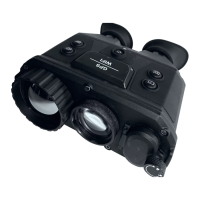
Provides a general description of the TacFusion binoculars and their purpose.
Details the key functionalities of the device, including thermal view, fusion, and connectivity.
Identifies and describes the main physical components of the TacFusion unit.
Explains the connection and function of the included aviation plug cables.
Details the function and operation of the main buttons on the device.
Instructions for charging the device batteries properly before first use.
Step-by-step guide for installing batteries into the device's compartment.
Procedures for turning the TacFusion device on and off.
Guidance on connecting the aviation plug cable to the device and its interfaces.
Instructions on how to adjust the focus for optimal image clarity.
Overview of the device's menu structure and navigation.
How to view the TacFusion image on an external display unit.
Steps to export videos and snapshots from the device to a PC.
Configuration options for screen brightness, contrast, and display features.
How to use and configure the cursor for target indication and measurement.
Enabling and adjusting the digital zoom function for image magnification.
Instructions for configuring the On-Screen Display (OSD) options.
How to select and adjust color palettes for thermal and visible views.
Using a mobile app for remote control and operation of the TacFusion.
Information on enabling and using the GPS system for location tracking.
Procedure to restore the device to its original factory default settings.
Instructions for capturing still images (snapshots) with the device.
Guidance on recording, playing back, and deleting video files.
Technical dimensions and physical specifications of the TacFusion device.
Table of common materials and their emissivity values for thermal imaging.

 To Next Page
 General