1 S
2 GND
3 Z
4 A
5 /A
6 /Z
7 B
8 /B
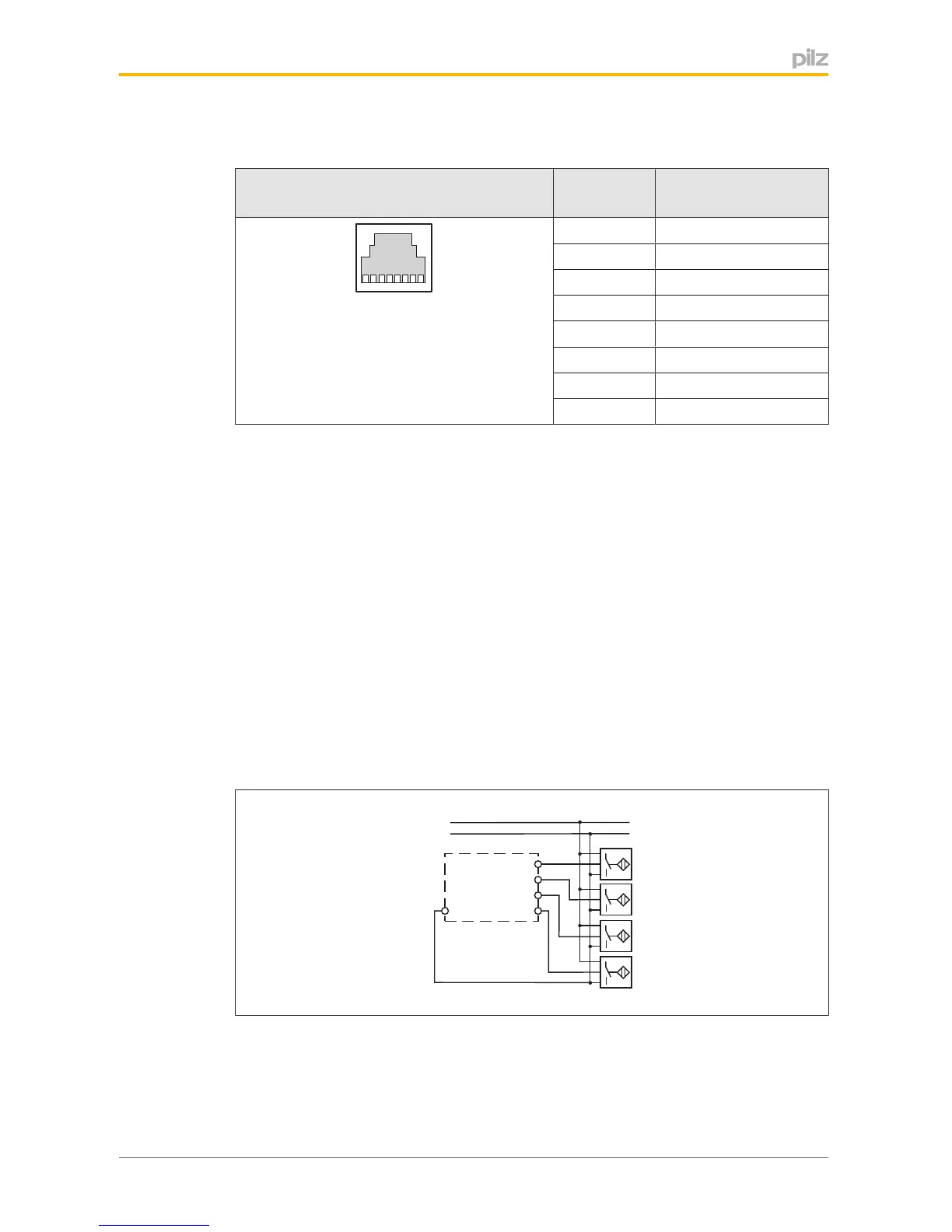
6.3 Connectionofproximityswitches
Proceedasfollowswhenconnectingproximityswitches:
} TerminalsI10andI11:connecttheproximityswitchforaxis1
} TerminalsI20andI21:connecttheproximityswitchforaxis2.
} Ifonlyoneaxisistobemonitored,eitherterminalsI10andI11orterminalsI20andI21
willremainfree.
} Whenconnectingincrementalencodersandproximityswitchesonanaxis:
– TerminalsI10:connectproximityswitchforaxis1(I11isnotused)
– TerminalsI20:connectproximityswitchforaxis2(I21isnotused)
} Theproximityswitchmustalwaysbeconnectedtoa0Vterminalofthespeedmonitor.
The0Vterminalsareconnectedinternally.
} Connectproximityswitchto24VDCofthepowersupplyorthespeedmonitor(the24V
terminalsofthespeedmonitorareconnectedinternally)


 To Next Page
 Loading...