11
Basic Operation
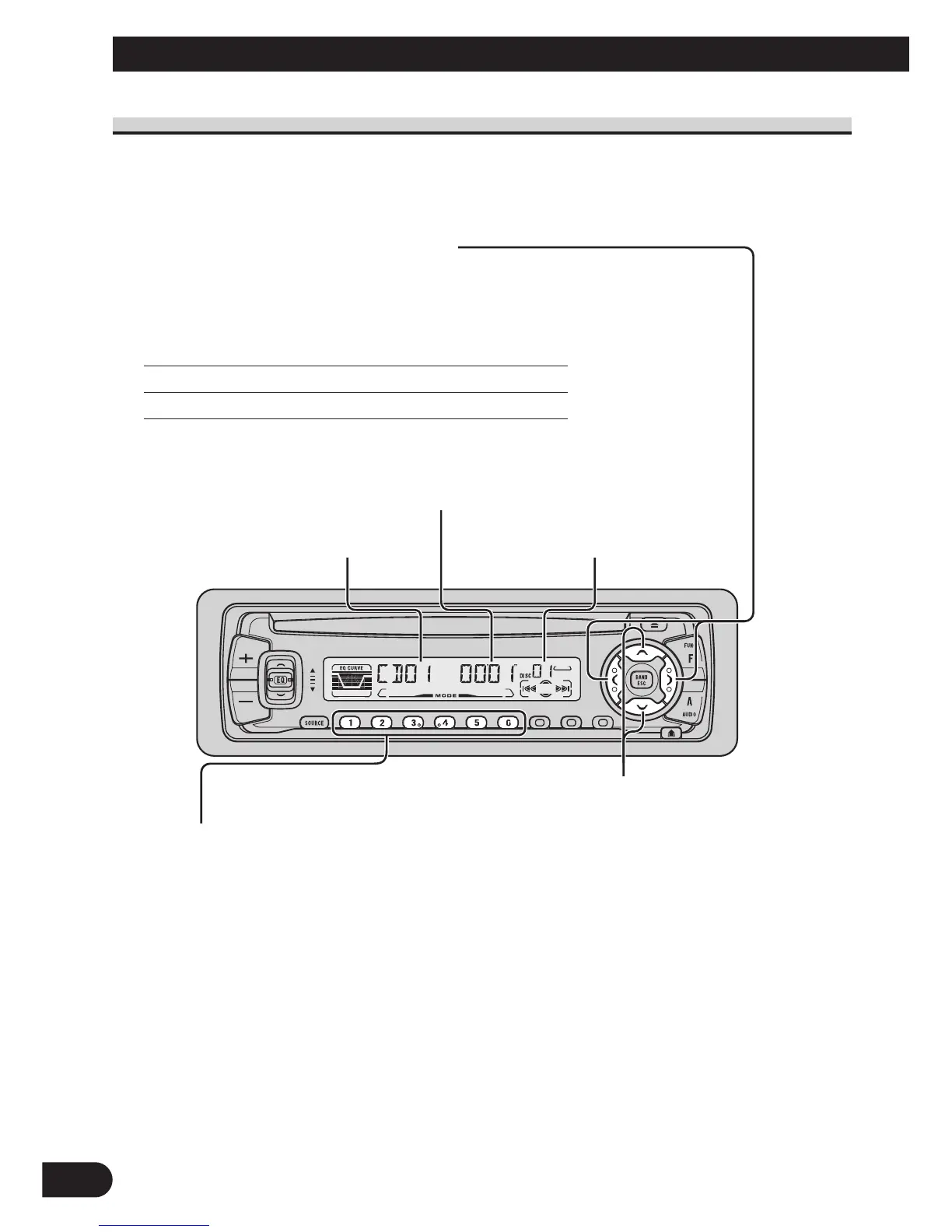
Basic Operation of Multi-CD Player
This product can control a Multi-CD player (sold separately).
Track Search and Fast Forward/Reverse
• You can select between Track Search or Fast
Forward/Reverse by pressing the 2/3 button
for a different length of time.
Track Search 0.5 seconds or less
Fast Forward/Reverse Continue pressing
Disc Number Search (for 6-Disc, 12-Disc types)
• You can select discs directly with the 1 to 6 buttons. Just press the number
corresponding to the disc you want to listen to.
Note:
• When a 12-Disc Multi-CD Player is connected and you want to select disc 7 to 12, press the 1 to 6
buttons for 2 seconds or longer.
Note:
• The Multi-CD player may perform a preparatory operation, such as verifying the presence of a disc
or reading disc information, when the power is turned ON or a new disc is selected for playback.
“READY” is displayed.
• If the Multi-CD player cannot operate properly, an error message such as “ERROR-14” is dis-
played. Refer to the Multi-CD player owner’s manual.
• If there are no discs in the Multi-CD player magazine, “NO DISC” is displayed.
Play Time Indicator
Disc Search
Disc Number IndicatorTrack Number Indicator






 To Next Page