EasyManua.ls Logo

Pioneer SA-708 - Block Diagram; Circuit Descriptions; Phono Circuit; Tone Controls Circuit

Pioneer SA-708
12 pages
Print Icon
To Next Page IconTo Next Page
To Previous Page IconTo Previous Page
Loading...
{
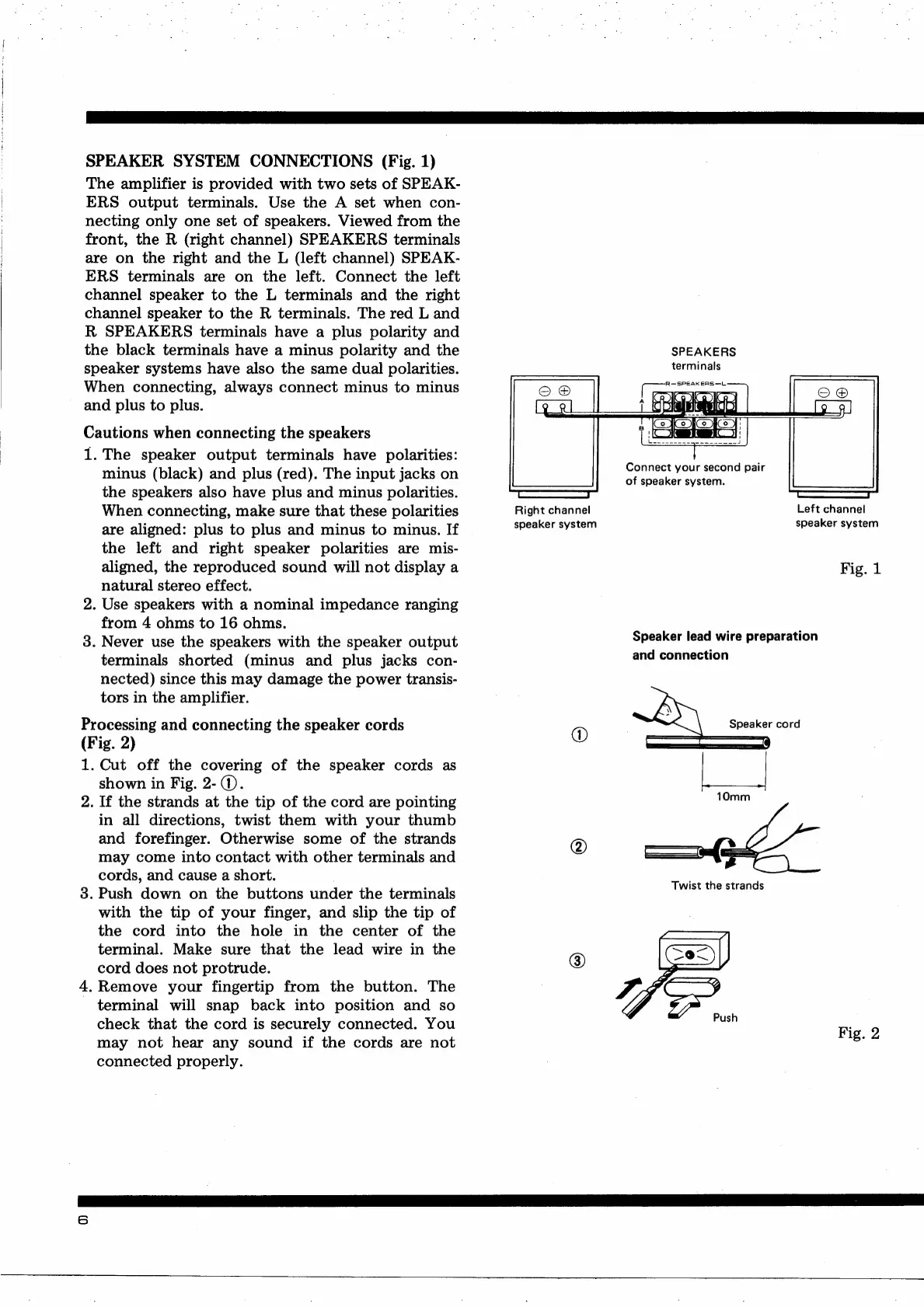
SPEAKER
SYSTEM
CONNECTIONS
(Fig.
1)
The
amplifier
is
provided
with
two
sets
of
SPEAK-
ERS
output
terminals.
Use
the
A
set
when
con-
necting
only
one
set
of
speakers.
Viewed
from
the
front,
the
R
(right
channel)
SPEAKERS
terminals
are
on
the
right
and
the
L
(left
channel)
SPEAK-
ERS
terminals
are
on
the
left.
Connect
the
left
channel
speaker
to
the
L
terminals
and
the
right
channel
speaker
to
the
R
terminals.
The
red
L
and
R
SPEAKERS
terminals
have
a
plus
polarity
and
the
black
terminals
have
a
minus
polarity
and
the
speaker
systems
have
also
the
same
dual
polarities.
When
connecting,
always
connect
minus
to
minus
and
plus
to
plus.
Cautions
when
connecting
the
speakers
1.
The
speaker
output
terminals
have
polarities:
minus
(black)
and
plus
(red).
The
input
jacks
on
the
speakers
also
have
plus
and
minus
polarities.
When
connecting,
make
sure
that
these
polarities
are
aligned:
plus
to
plus
and
minus
to
minus.
If
the
left
and
right
speaker
polarities
are
mis-
aligned,
the
reproduced
sound
will
not
display
a
natural
stereo
effect.
2.
Use
speakers
with
a
nominal
impedance
ranging
from
4
ohms
to
16
ohms.
3.
Never
use
the
speakers
with
the
speaker
output
terminals
shorted
(minus
and
plus
jacks
con-
nected)
since
this
may
damage
the
power
transis-
tors
in
the
amplifier.
Processing
and
connecting
the
speaker
cords
(Fig.
2)
1.
Cut
off
the
covering
of
the
speaker
cords
as
shown
in
Fig.
2-
@.
2.
If
the
strands
at
the
tip
of
the
cord
are
pointing
in
all
directions,
twist
them
with
your
thumb
and
forefinger.
Otherwise
some
of
the
strands
may
come
into
contact
with
other
terminals
and
cords,
and
cause
a
short.
3.
Push
down
on
the
buttons
under
the
terminals
with
the
tip
of
your
finger,
and
slip
the
tip
of
the
cord
into
the
hole
in
the
center
of
the
terminal.
Make
sure
that
the
lead
wire
in
the
cord
does
not
protrude.
4.
Remove
your
fingertip
from
the
button.
The
-
terminal
will
snap
back
into
position
and
so
check
that
the
cord
is
securely
connected.
You
may
not
hear
any
sound
if
the
cords
are
not
connected
properly.
Right
channel
speaker
system
SPEAKERS
terminals
Connect
your
second
pair
of
speaker
system.
Left
channel
speaker
system
Fig.
1
Speaker
lead
wire
preparation
and
connection
Fig.
2

Other manuals for Pioneer SA-708

Related product manuals