EasyManua.ls Logo

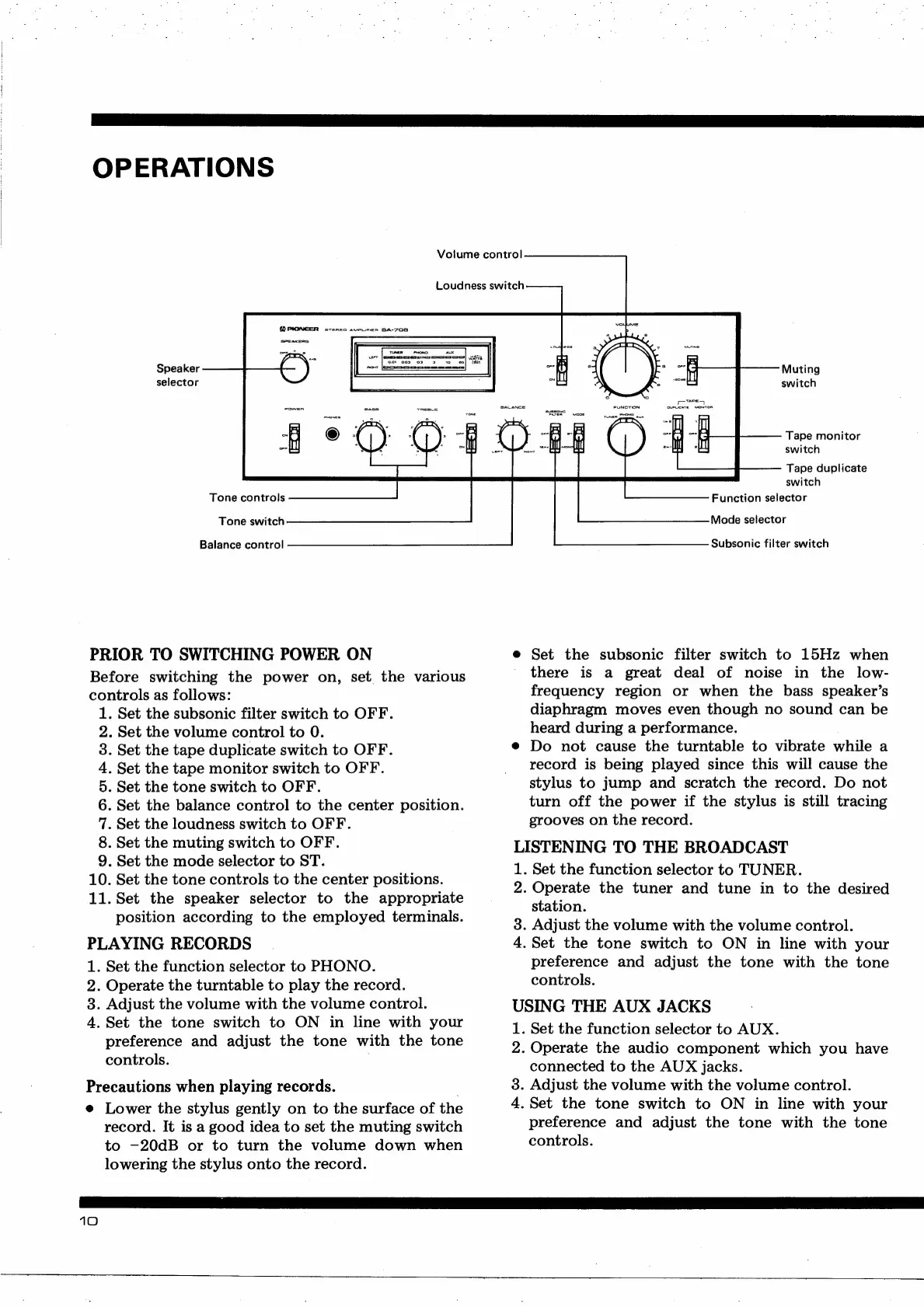
Pioneer SA-708 - Front Panel Parts Location; Front Panel Views; Front View with Panel Removed

Pioneer SA-708
12 pages
Print Icon
To Next Page IconTo Next Page
To Previous Page IconTo Previous Page
Loading...
OPERATIONS
Volume
control
Loudness
switch
Speaker
selector
Tone
controls
Tone
switch
Balance
control
PRIOR
TO
SWITCHING
POWER
ON
Before
switching
the
power
on,
set
the
various
controls
as
follows:
1.
Set
the
subsonic
filter
switch
to
OFF.
.
Set
the
volume
control
to
0.
.
Set
the
tape
duplicate
switch
to
OFF.
.
Set
the
tape
monitor
switch
to
OFF.
Set
the
tone
switch
to
OFF.
Set
the
balance
control
to
the
center
position.
Set
the
loudness
switch
to
OFF.
Set
the
muting
switch
to
OFF.
.
Set
the
mode
selector
to
ST.
Set
the
tone
controls
to
the
center
positions.
.
Set
the
speaker
selector
to
the
appropriate
position
according
to
the
employed
terminals.
PLAYING
RECORDS
1.
Set
the
function
selector
to
PHONO.
2.
Operate
the
turntable
to
play
the
record.
3.
Adjust
the
volume
with
the
volume
control.
4.
Set
the
tone
switch
to
ON
in
line
with
your
preference
and
adjust
the
tone
with
the
tone
controls.
HOODIA
AWN
et
Precautions
when
playing
records.
.
e
Lower
the
stylus
gently
on
to
the
surface
of
the
record.
It
is
a
good
idea
to
set
the
muting
switch
to
—20dB
or
to
turn
the
volume
down
when
lowering
the
stylus
onto
the
record.
10
Muting
switch
Tape
monitor
switch
Tape
duplicate
switch
Function
selector
Mode
selector
Subsonic
filter
switch
e
Set
the
subsonic
filter
switch
to
15Hz
when
-
there
is
a
great
deal
of
noise
in
the
low-
frequency
region
or
when
the
bass
speaker’s
diaphragm
moves
even
though
no
sound
can
be
heard
during
a
performance.
e
Do
not
cause
the
turntable
to
vibrate
while
a
record
is
being
played
since
this
will
cause
the
stylus
to
jump
and
scratch
the
record.
Do
not
turn
off
the
power
if
the
stylus
is
still
tracing
grooves
on
the
record.
LISTENING
TO
THE
BROADCAST
1.
Set
the
function
selector
to
TUNER.
2.
Operate
the
tuner
and
tune
in
to
the
desired
station.
3.
Adjust
the
volume
with
the
volume
control.
4.
Set
the
tone
switch
to
ON
in
line
with
your
preference
and
adjust
the
tone
with
the
tone
controls.
USING
THE
AUX
JACKS
1.
Set
the
function
selector
to
AUX.
2.
Operate
the
audio
component
which
you
have
connected
to
the
AUX
jacks.
3.
Adjust
the
volume
with
the
volume
control.
4,
Set
the
tone
switch
to
ON
in
line
with
your
preference
and
adjust
the
tone
with
the
tone
controls.

Other manuals for Pioneer SA-708

Related product manuals