EasyManua.ls Logo

Pioneer SA-708 - Internal & Rear Panel Parts Location; Top View Parts; Rear Panel Views

Pioneer SA-708
12 pages
Print Icon
To Next Page IconTo Next Page
To Previous Page IconTo Previous Page
Loading...
USING
THE
TAPE
DECKS
PLAYBACK
1.
As
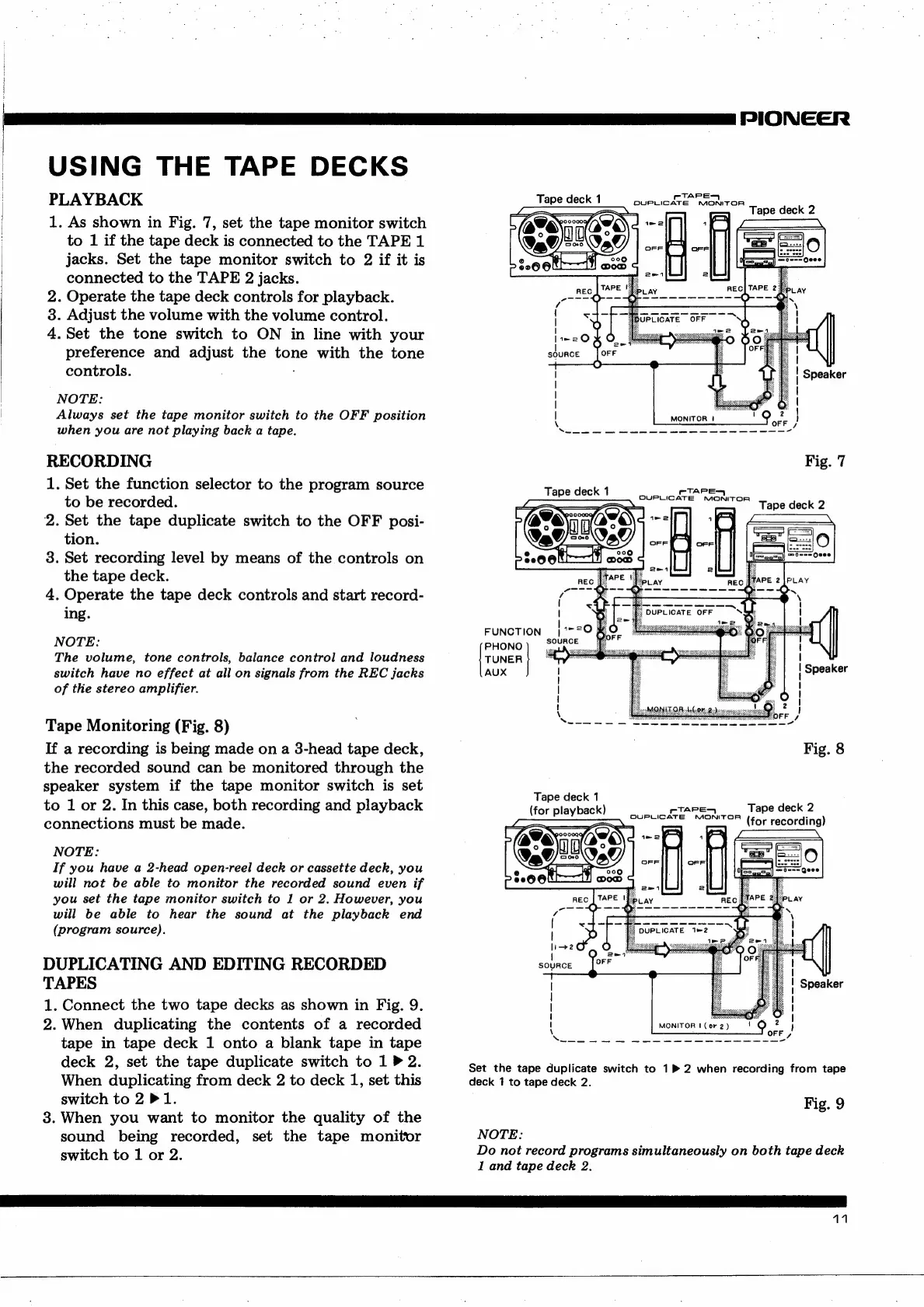
shown
in
Fig.
7,
set
the
tape
monitor
switch
to
1
if
the
tape
deck
is
connected
to
the
TAPE
1
jacks.
Set
the
tape
monitor
switch
to
2
if
it
is
connected
to
the
TAPE
2
jacks.
2.
Operate
the
tape
deck
controls
for
playback.
3.
Adjust
the
volume
with
the
volume
control.
4.Set
the
tone
switch
to
ON
in
line
with
your
preference
and
adjust
the
tone
with
the
tone
controls.
NOTE:
Always
set
the
tape
monitor
switch
to
the
OFF
position
when
you
are
not
playing
back
a
tape.
RECORDING
1.
Set
the
function
selector
to
the
program
source
to
be
recorded.
2.
Set
the
tape
duplicate
switch
to
the
OFF
posi-
tion.
3.
Set
recording
level
by
means
of
the
controls
on
the
tape
deck.
4.
Operate
the
tape
deck
controls
and
start
record-
ing.
NOTE:
The
volume,
tone
controls,
balance
control
and
loudness
switch
have
no
effect
at
all
on
signals
from
the
REC
jacks
of
the
stereo
amplifier.
Tape
Monitoring
(Fig.
8)
If
a
recording
is
being
made
on
a
3-head
tape
deck,
the
recorded
sound
can
be
monitored
through
the
speaker
system
if
the
tape
monitor
switch
is
set
to
1
or
2.
In
this
case,
both
recording
and
playback
connections
must
be
made.
NOTE:
If
you
have
a
2-head
open-reel
deck
or
cassette
deck,
you
will
not
be
able
to
monitor
the
recorded
sound
even
if
you
set
the
tape
monitor
switch
to
1
or
2.
However,
you
will
be
able
to
hear
the
sound
at
the
playback
end
(program
source).
DUPLICATING
AND
EDITING
RECORDED
TAPES
1.
Connect
the
two
tape
decks
as
shown
in
Fig.
9.
2.
When
duplicating
the
contents
of
a
recorded
tape
in
tape
deck
1
onto
a
blank
tape
in
tape
deck
2,
set
the
tape
duplicate
switch
to
1
P
2.
When
duplicating
from
deck
2
to
deck
1,
set
this
switch
to
2
P
1.
3.
When
you
want
to
monitor
the
quality
of
the
sound
being
recorded,
set
the
tape
monitor
switch
to
1
or
2.
PIONEER
TAPE
Tape
deck
1
BUSCIGATE.
KRAOMITOR
Tape
deck
2
MONITOR
|
Fig.
7
Tape
deck
1
TAPE
OVUPLICATE
NONITOR
Tape
deck
2
FUNCTION
|
7770
%
PHONO)
SOuRce
[rower
|
AUX
Tape
deck
1
(for
playback)
rTAPES
Tape
deck
2
Set
the
tape
duplicate
switch
to
1P
2
when
recording
from
tape
deck
1
to
tape
deck
2.
Fig.
9
NOTE:
Do
not
record
programs
simultaneously
on
both
tape
deck
1
and
tape
deck
2.
11

Other manuals for Pioneer SA-708

Related product manuals