Page 49 of 69 USER MANUAL
Figure 28 Adjust the current user mode page
Adjust the current user mode, turn it on to expert mode, turn it off to novice mode,
and the top status bar will hint which mode it is in real time. (Figure 28)
Introduction of novice mode and expert mode:
In expert mode, users can modify the parameters of the official protocol when they
enter the official scheme. After entering ready mode or click “save”, the modified
scheme parameters will be saved. When reading the official protocol again, the
modified parameters will be read. Novice mode can’t modify the parameters of the
official protocols, and even when the parameters of the official protocol has been
modified in expert mode, it will still be the original official program when reading this
program in the novice mode.
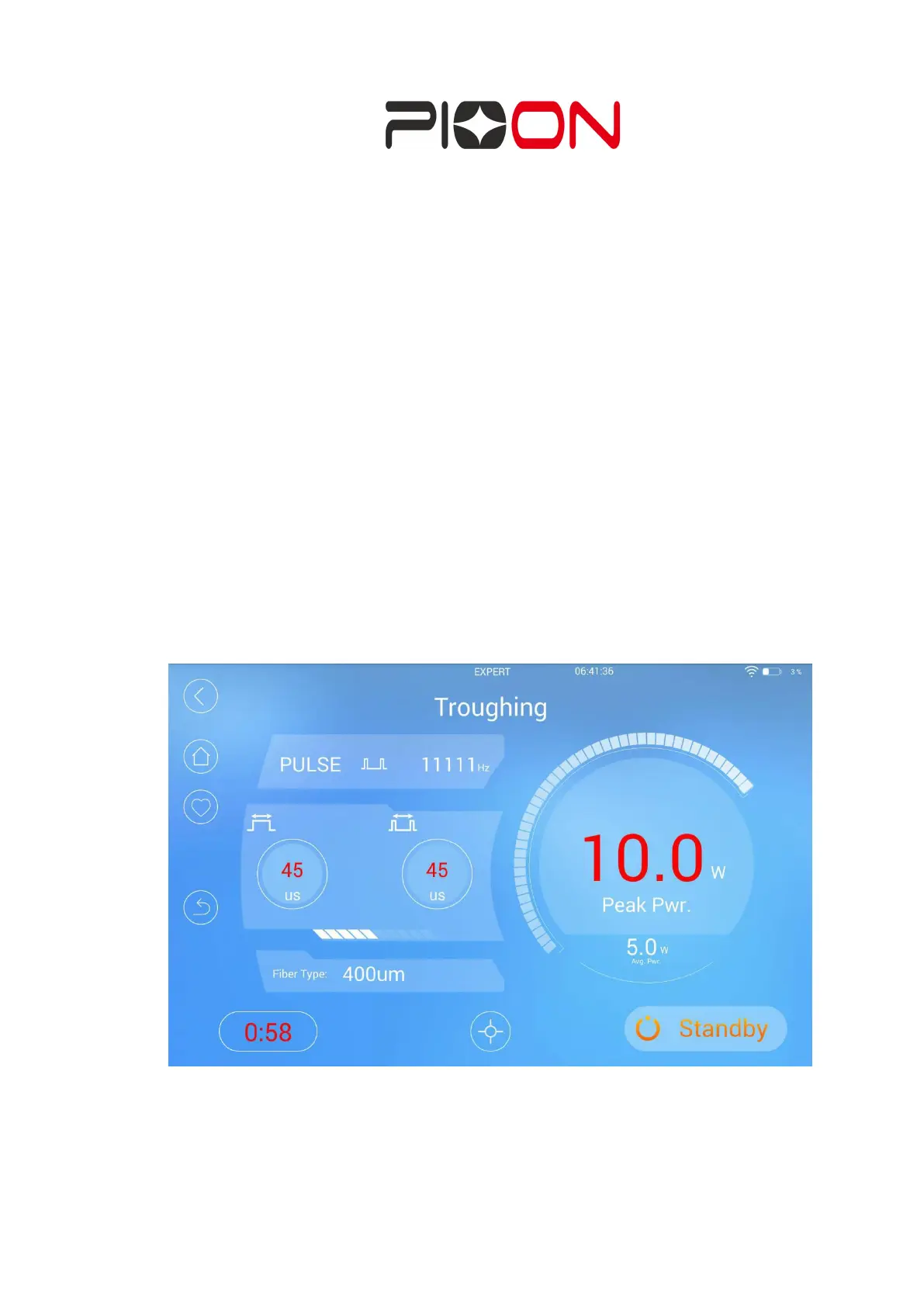
In expert mode, the official scheme can be modified. When the parameters are
changed, they will be displayed in red. Once the save button is clicked or the ready
mode is entered, a copy of the scheme will be saved. Next time enter this protocol in
the expert mode, the revised parameters will be read, and showed as red. There will
be a revocation buttons in expert mode, click it, the parameters will be restored to
the original program data. See Figure 29.
Figure 29 modified official program parameters interface in expert mode
B. Aiming Mode: Adjust the indicating light brightness, with 5 brightness adjustment
functions. (Figure 30)


 To Next Page