7/124
7 /20
EN
This manual is the property of PIUSI S.p.A. Any reproduction, even partial, is forbidden.
translated from italian
K24
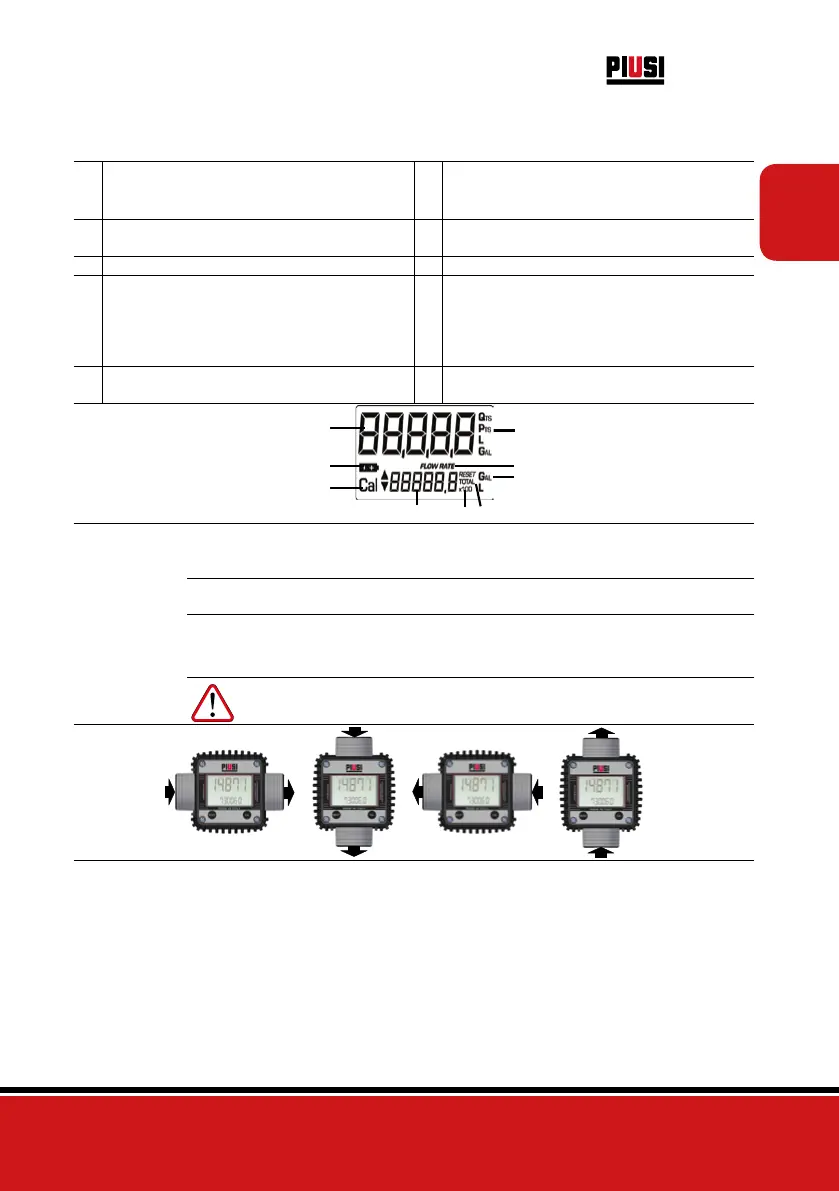
4.2 DISPLAY LCD
FOREWORD
The “LCD” of the METER features two numerical registers and various indications dis-
played to the user only when the applicable function so requires.
1 Partial register (5 figures with moving comma
FROM 0.1 to 99999) indicating the volume dis-
pensed since the reset button was last pressed
6 Indication of type of total, (TOTAL / Reset
TOTAL);
2 Indication of battery charge 7 Indication of unit of measurement of Totals:
L=Litres Gal=Gallons
3 Indication of calibration mode 8 Indication of Flow Rate mode
4
Totals register (6 figures with moving comma
FROM 0.1 to 999999), that can indicate two
types of Total:
4.1.
General Total that cannot be reset (TOTAL)
4.2. Resettable total (Reset TOTAL)
9
Indication of unit of measurement of Partial:
Qts=Quarts Pts=Pints
L=Litres Gal=Gallons
5 Indication of total multiplication factor (x10 /
x100)
4
5
6
9
7
1
2
3
8
4.3 DISPLAY POSITIONING (METER VERSION ONLY)
FOREWORD
The square shape of the k24 body allows the card to be rotated in its housing, thus ensur-
ing great versatility in positioning
This allows easy display readings in any position. The card housing is closed by a
plastic cover sealed through a rubber protection acting as a gasket as well. This can
be easily removed unscrewing the 4 screws that fix both the cover and the card (1).
ATTENTION While fixing the K24 card, make sure the battery contact cable is not
placed above the circular housing of the bulb.



 To Next Page