?
14 /20
Use, maintenance and calibration
M0171G
8.2.2 IN FIELD CALIBRATION
FOREWORD
This procedure calls for the fluid to be dispensed into a graduated sample container
in real operating conditions ( flow rate, viscosity, etc.) requiring maximum precision.
ATTENTION For correct K24 calibration, it is most important to:
1 When the Factory Factor is confirmed, the old User factor is deleted from the
memory
2 use a precise Sample Container with a capacity of not less than 5 litres, featuring
an accurate graduated indicator.
3 ensure calibration dispensing is done at a constant flow rate equivalent to that of
normal use, until the container is full;
4 Not reduce the flow rate to reach the graduated area of the container during the
final dispensing stage (the correct method during the final stages of sample con-
tainer filling consists in making short top-ups at normal operation flow rate) ;
5 after dispensing, wait a few minutes to make sure any air bubbles are eliminated
from the sample container; only read the Real value at the end of this stage, dur-
ing which the level in the container could drop.
6 Carefully follow the procedure indicated below.
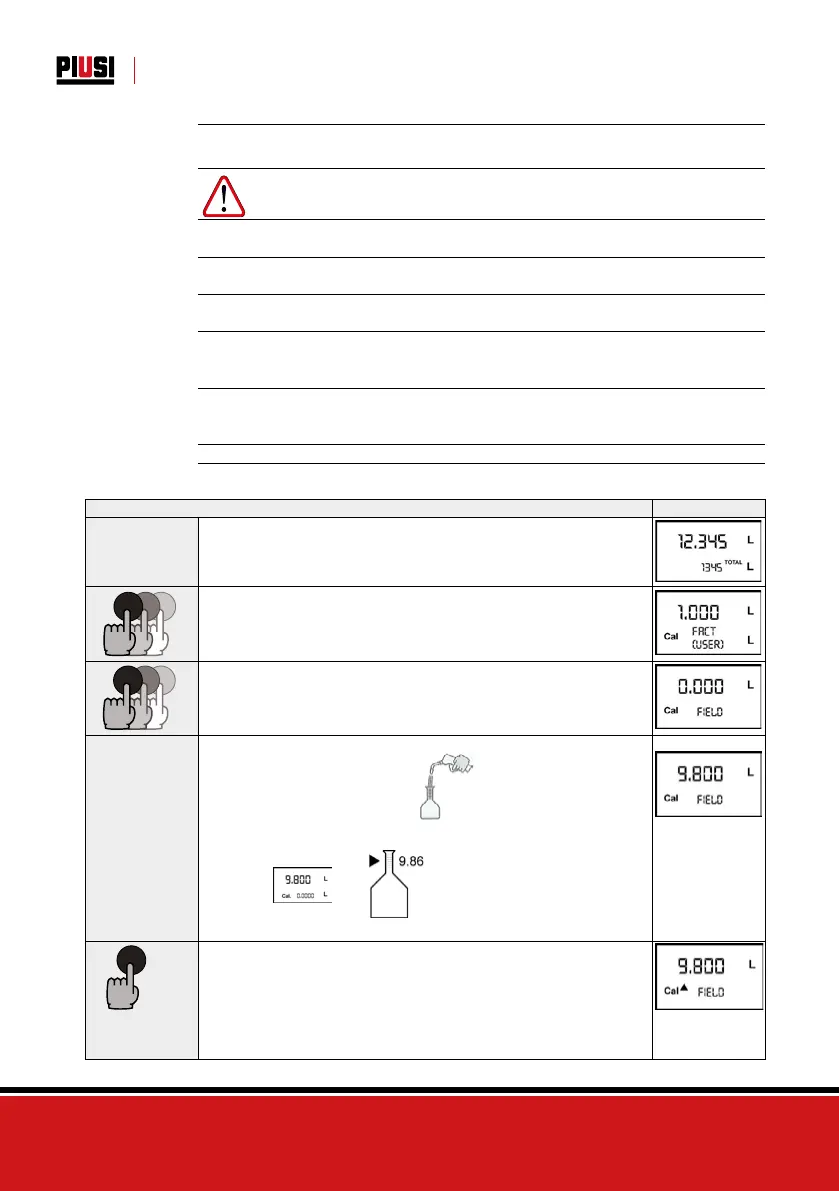
8.2.2.1 IN-FIELD CALIBRATION PROCEDURE
ACTION DISPLAY
1
NONE
Meter in Standby
2
CALCAL
CAL
LONG CAL key keying
The Meter enters calibration mode, shows <<CAL>> and displays the calibration
factor in use instead of partial. The words “Fact” and “USER” indicate which of
the two factors (factory or user) is currently in use. Important: This factor is that
which the instrument also uses for field calibration measurement operations
3
RESET
RESET
RESET
LONG RESET key keying
The Meter shows “CAL” and the partial at zero. The Meter is ready to perform
in-field calibration.
4
DISPENSING INTO SAMPLE CONTAINER
Without pressing any key,
start dispensing into the sample container
Dispensing can be interrupted and started again at will. Continue dispensing until
the level of the fluid in the sample container has reached the graduated area. There
is no need to reach a preset quantity.
Indicated value Real value
5
RESET
SHORT RESET key keying
The Meter is informed that the calibration dispensing operation is finished.
Make sure dispensing is correctly finished before performing this operation. To
calibrate the Meter, the value indicated by the partial totaliser (example 9.800)
must be forced to the real value marked on the graduated sample container. In the
boom le part of the display an arrow appears (upwards and downwards), that
shows the direction (increase or decrease) of the value change displayed when the
following operations 6 or 7 are performed.



 To Next Page