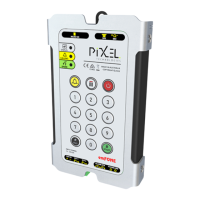
Telephone Line Powered Auto Dialing emFONE
Copyright © 2014 Pixel Technologies Pty. Ltd
10. Safety and Handling Precautions ................................................................................................. 27
11. Warranty ...................................................................................................................................... 27
12. Contact ......................................................................................................................................... 27
Figures
Figure 1 - Wiring Diagram .......................................................................................................................... 7
Figure 2 - Top and Side View .................................................................................................................... 22
Figure 3 - Stud Mounting & Grill Cut-out Positioning .............................................................................. 23
Figure 4 - Installation using Mounting Clips............................................................................................. 24
Figure 5 - External Speaker & Microphone Kit Stud Mounting and Dimensions ..................................... 25
Tables
Table 1 - Revision History ........................................................................................................................... 2
Table 2 - Advanced System Settings ........................................................................................................ 13
Table 3 - Audio & Relay Settings .............................................................................................................. 14
Table 4 - Telephone Line Settings ............................................................................................................ 15
Table 5 - RPMS Settings ........................................................................................................................... 16
Table 6 - RPMS Settings ........................................................................................................................... 16
Table 7 - Membrane Keypad Buttons ...................................................................................................... 17
Table 8 - LED Diagnostic Indicators .......................................................................................................... 18
Table 9 - Troubleshooting ........................................................................................................................ 20
Table 10 - Technical Specifications .......................................................................................................... 21
Table 11 - Replacement Parts .................................................................................................................. 26


 To Next Page