User’s Manual of WGSW-20160HP/WGSW-24040HP series
Setup steps
1. Create VLAN Group
Set VLAN Group 1 = Default-VLAN with VID (VLAN ID) =1
Add two VLANs – VLAN 2 and VLAN 3
VLAN Group 2 with VID=2
VLAN Group 3 with VID=3
2. Assign VLAN Member :
VLAN 2 : Port-1,Port-2 and Port-3
VLAN 3 : Port-4, Port-5 and Port-6
VLAN 1 : All other ports – Port-7~Port-10
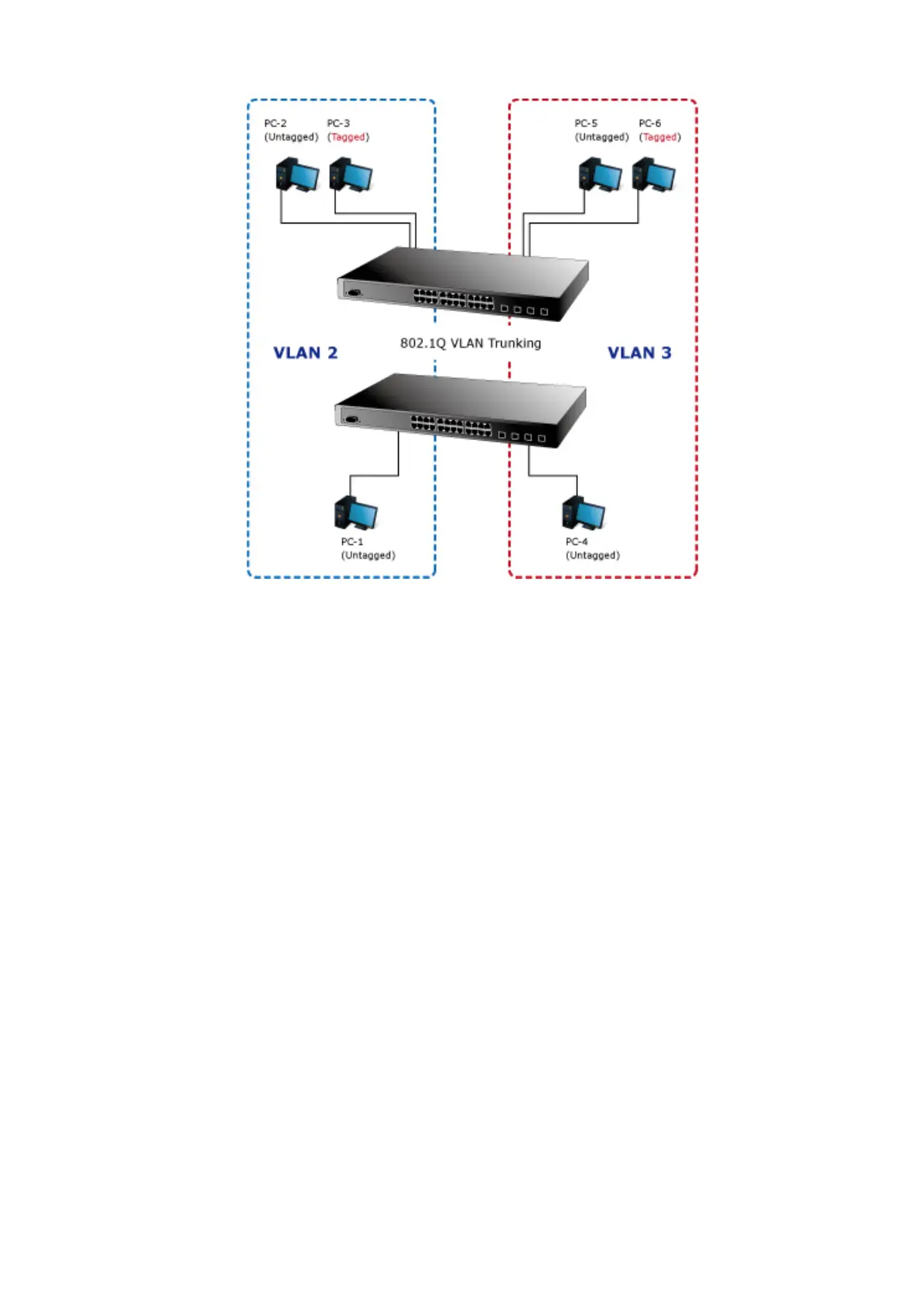
For the VLAN ports connecting to the hosts, please refer to 4.6.10.1 examples. The following steps will focus on the VLAN
Trunk port configuration.
1. Specify Port-8 to be the 802.1Q VLAN Trunk port.
2. Assign Port-8 to both VLAN 2 and VLAN 3 at the VLAN Member configuration Page.
3. Define a VLAN 1 as a “Public Area” that overlapping with both VLAN 2 members and VLAN 3 members.
4. Assign the VLAN Trunk Port to be the member of each VLAN – which wants to be aggregated. At this sample, add Port-8 to
be VLAN 2 and VLAN 3 member port. The screen in Figure 4-6-12 appears.



 To Next Page
 Loading...











