EasyManua.ls Logo

Plantronics .Audio 655 - Voicemail Features; Setting Up Quick Voicemail; Checking Voicemail

Plantronics .Audio 655
60 pages
Print Icon
To Next Page IconTo Next Page
To Previous Page IconTo Previous Page
Loading...
Page 24
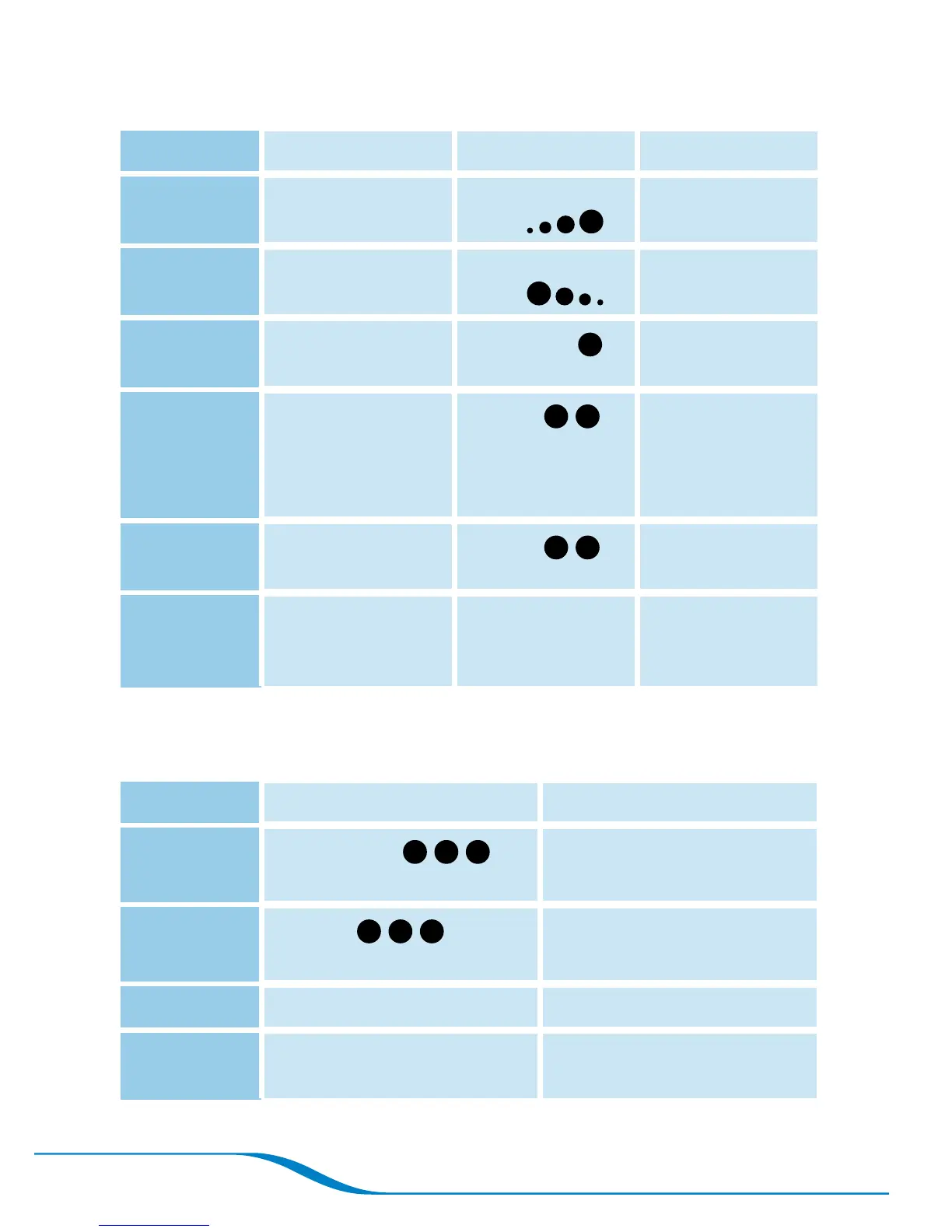
Table 1: Headset button functions
Function Button Action Sounds Indicator Light
Turn headset
on
Press and hold for
2 seconds
4 ascending
beeps
Flashes blue
every 10 seconds
Turn headset
off
Press and hold for
4 seconds
4 descending
beeps
Answer/end
a call
Press for 1 second
1 high beep
Adjust
volume
Press up or down
(not inward)
2 beeps
when maximum/
minimum volume
is reached
Redial last
number
Press twice
2 beeps
Pair with
mobile
phone
While powered off,
press and hold for
6 seconds
Alternates
flashing blue and
red
Table 2: Headset alerts
Alert Sounds Indicator Light
Incoming call
3 rapid beeps
with each ring
Flashes blue rapidly while
phone is ringing
Low battery
3 beeps
every 30 seconds
Flashes red 3 times every
3 seconds
Charging
Glows solid red
Fully charged
Glows solid blue in charging
base

Table of Contents

Related product manuals