Page 25
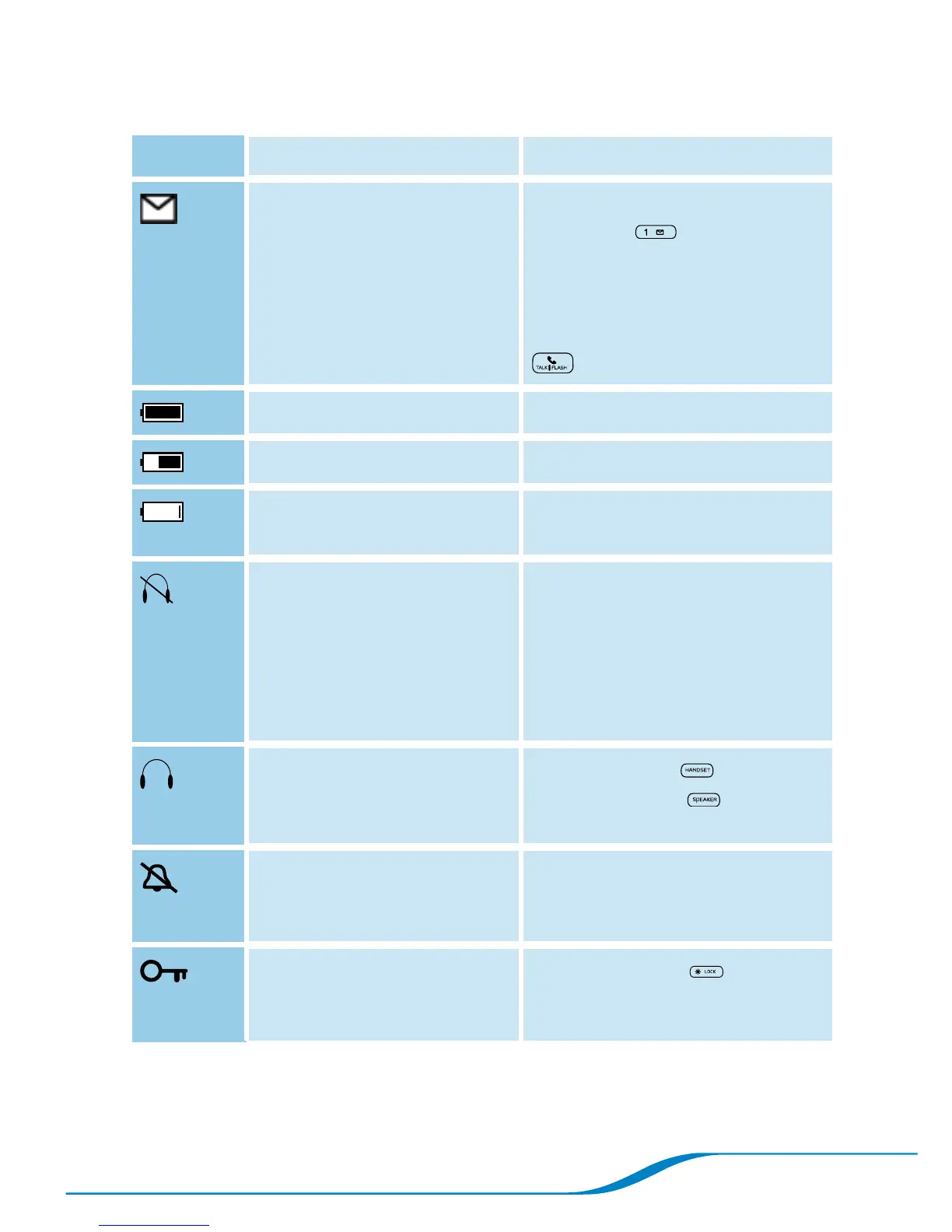
Table 3: Handset screen icons
Icon Meaning Action
You have new voicemail
messages.*
If set up as a speed dial, press
and hold 1 to retrieve
messages (see “Checking
voicemail” on page 30);
otherwise, dial your voicemail
number and press Talk/Flash
.
Battery is fully charged.
Battery is partially charged. Charge battery if desired.
Battery is low. Place handset in handset
charging cradle to charge.
Headset is out of range of
handset, has low batteries,
or is powered off.
Bring handset within range,
charge headset, or power on
headset.
May need to re-pair your
headset and handset (see
“Troubleshooting” on page 42).
Call is active on headset
(not on handset or
speakerphone).
Press Handset or
Speakerphone to move
audio from headset.
Ringer is turned off. Increase ringer volume if desired
(see “Adjusting the ringer
volume” on page 26).
Keypad is locked.
Press and hold * to unlock
keypad (see “Locking the
keypad” on page 28).
*You must subscribe to voicemail service from a service provider.
For troubleshooting, see page 42.0




 To Next Page