
 Need help?
Do you have a question about the Plugwise Anna and is the answer not in the manual?
Log in to the Anna HTML interface via a web browser.
View system status, check firmware updates, and change settings.
Adjust current temperature and switch between presets.
Activate schedules and manage home heating modes.
Set custom temperature points and time slots.
Anna learns lifestyle and provides tips for schedule improvement.
Choose to accept or reject Anna's temperature suggestions.
Quickly change temperature settings with predefined presets.
Set custom temperatures for home, night, away, and vacation modes.
Access graphs showing measured, set, and water temperatures.
Review burn hours, highest, lowest, and average temperatures.
View product, firmware, and hardware information.
Monitor WiFi connection, signal strength, and link quality.
Authorize data usage and privacy settings.
Configure date, time, and language settings.
Enable remote operation and adjust device presence sensor.
Readjust presence detection sensor settings or switch it off.
Restart the device and apply temperature compensation values.
Input or update housing type, construction date, and occupants.
Connect the Smile to a WiFi network and enter password.
Troubleshoot WiFi connection issues and reset network settings.
Configure DHCP client for static IP or use router-assigned IP.
Adjust maximum boiler temperature and heating modes.
Specify or recheck the boiler's communication protocol.
Install updates and maintain the device with cleaning.
Understand behavior after power loss and ensure ventilation.
Access online tips, FAQs, and contact information.
Set up a temporary connection for remote support.
Definitions for firmware, protocols, IP address, SSID, etc.
 General
| Type | Smart Thermostat |
|---|---|
| Connectivity | Wi-Fi, Zigbee |
| Temperature Range | 5°C to 30°C |
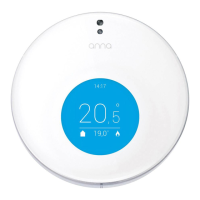
| Display | LCD Touchscreen |
| Control | App Control, Voice Control |

 To Next Page
