2.3 WIRING SPECIFICATIONS AND
PROCEDURES
2.3.1 Power Requirements
The Recorder operates on external 120Vac power with to the line cord.
A.
Scanner Operating Power Connection
Power connections to the Scanner are made by connecting line cord to a 120Vac outlet.
This will automatically charge the batteries and power up the Scanner.
B.
Batteries and power
The Scanner, when installed, powers itself from the line cord. It requires less than 2.5
watts. This means the Scanner does not contain large internal batteries that must be
recharged or replaced; the Scanner can be retrieved from the field, downloaded, and
reinstalled elsewhere minutes later.
A small, coin-shaped lithium battery takes care of the Scanner’s minimal power needs
while the Scanner is not connected to a power source. This battery never needs
recharging and only needs replacing every five years. With this battery intact, the
Scanner can literally sit on a shelf for up to five years after being initialized and still be
ready for installation. Its memory can also hold recorded data for up to five years.
A 12-volt power adapter is provided to power the Scanner during downloads in the
office or in the field if the Scanner has been disconnected from the line cord voltage.
2.3.2 Installing the Scanner
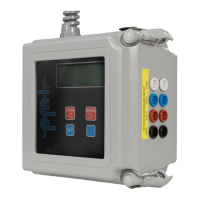
This chapter explains the physical installation of the SVM-10™ Scanner, and shows
how certain settings may be altered using the Scanner keypad. Installing the Scanner is
not difficult for a professional familiar with similar equipment, although the same care
used required when working with any high-voltage equipment must be taken to


 To Next Page