Use the arrow keys to view the readings for other channels. Or, if you select AUTO in
the SET menu, the Scanner will automatically move from one channel to the next after
pausing several seconds on each screen.
4 CH
Select this option from the main LCD menu by using the arrow keys to highlight it, then
hitting the SET KEY. The LCD will show the ongoing readings for RMS voltage on all
four channels.
The fourth option in the main LCD menu—SET—is used to initialize the Scanner, to
start or stop recording, and to adjust the recording interval and significant change
threshold during field installation. Do not confuse the SET option with the SET KEY,
as they are not directly related.
2. Changing settings using the keypad
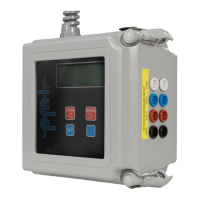
Using the keypad on the Scanner’s faceplate, you can start the initialization countdown,
start and stop recording, and adjust the interval and significant change threshold
settings. The keypad can also be used while the Scanner is recording to display real-time
levels of volts.
To view the main LCD menu, hit the BLUE KEY on the keypad. The functions used to
initialize the Scanner are found under the SET menu option of this main menu. To open
the SET menu, use the arrow keys to highlight SET at the right end of the main menu,
then hit the SET KEY to select the option.
Five options are available in the SET menu. They are:
INIT
Highlighting this option then hitting the SET KEY initializes the Scanner; that is,
it starts the two-minute initialization countdown discussed earlier in this chapter.
STRT (or STOP when the Scanner is recording)
This option starts (or stops) the Scanner recording. If STRT is used to begin a
recording, the Scanner will use stored settings to determine how it records data.
Selecting STOP when the Scanner is recording halts recording functions. The time
the unit is stopped will appear in reports as a power outage if the unit is restarted
using STRT.
PARM (Parameters)


 To Next Page