EasyManua.ls Logo

Polyaire airtouch - Page 8

Polyaire airtouch
68 pages
Print Icon
To Next Page IconTo Next Page
To Previous Page IconTo Previous Page
Loading...
8
Note:
Install the console at least 20mm away from any other wall control to avoid
potential interference.
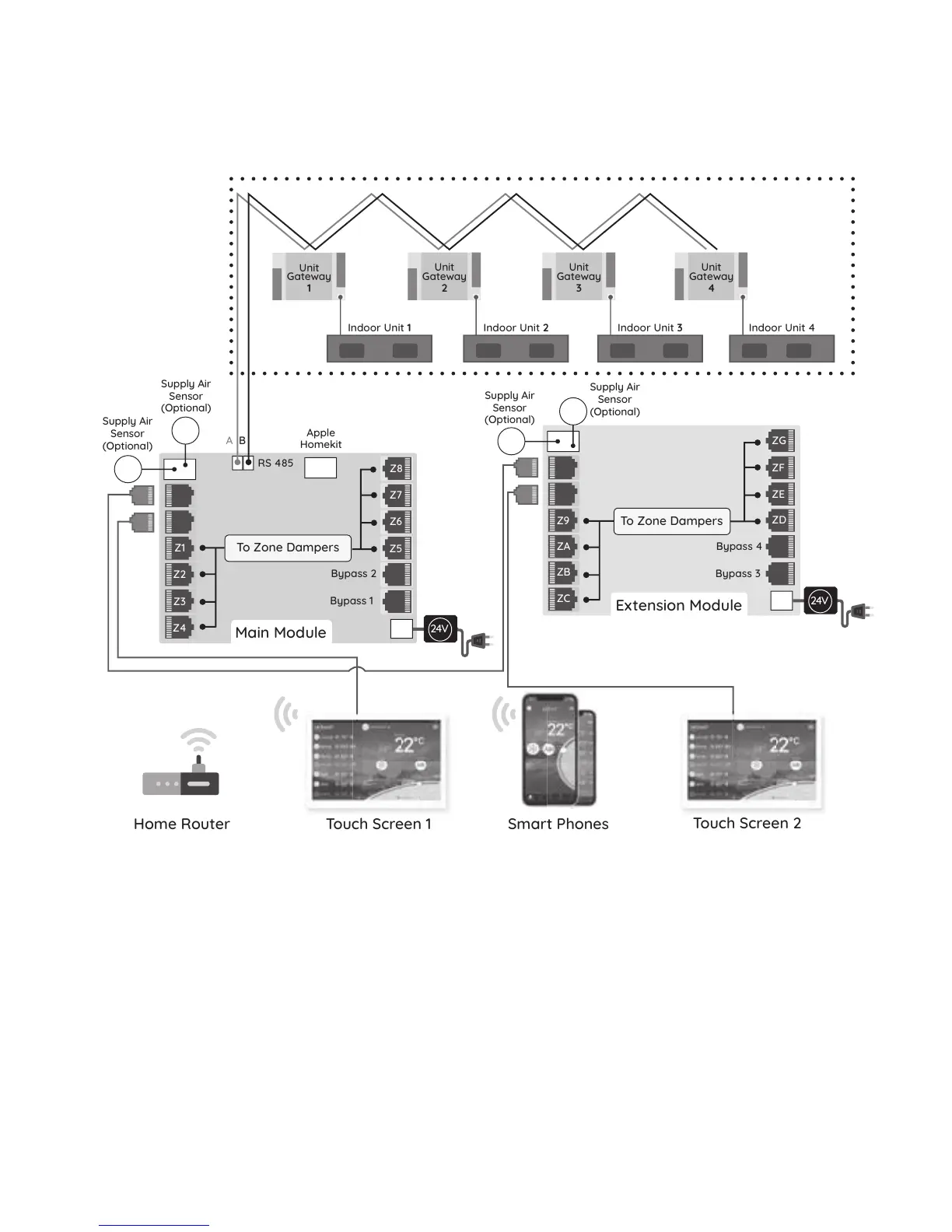
Configuration contd.
1 Console per board
Unit
gateways
wired in
sequence
24V
24V
Touch Screen 1Home Router
Touch Screen 2
Smart Phones
Main Module
Extension Module
To Zone Dampers
Bypass 2
RS 485
Unit
Gateway
1
A B
Indoor Unit 1 Indoor Unit 2 Indoor Unit 3 Indoor Unit 4
Bypass 1
Supply Air
Sensor
(Optional)
Supply Air
Sensor
(Optional)
Supply Air
Sensor
(Optional)
Supply Air
Sensor
(Optional)
Apple
Homekit
Bypass 4
Bypass 3
To Zone Dampers
Z1
Z2
Z3
Z4
Z8
Z7
Z6
Z5
ZD
ZC
ZB
ZA
Z9
ZE
ZF
ZG
Unit
Gateway
2
Unit
Gateway
3
Unit
Gateway
4
24V
24V
Touch Screen 1Home Router
Touch Screen 2
Smart Phones
Main Module
Extension Module
To Zone Dampers
Bypass 2
RS 485
Unit
Gateway
1
A B
Indoor Unit 1 Indoor Unit 2 Indoor Unit 3 Indoor Unit 4
Bypass 1
Supply Air
Sensor
(Optional)
Supply Air
Sensor
(Optional)
Supply Air
Sensor
(Optional)
Supply Air
Sensor
(Optional)
Apple
Homekit
Bypass 4
Bypass 3
To Zone Dampers
Z1
Z2
Z3
Z4
Z8
Z7
Z6
Z5
ZD
ZC
ZB
ZA
Z9
ZE
ZF
ZG
Unit
Gateway
2
Unit
Gateway
3
Unit
Gateway
4
24V
24V
Touch Screen 1Home Router
Touch Screen 2
Smart Phones
Main Module
Extension Module
To Zone Dampers
Bypass 2
RS 485
Unit
Gateway
1
A B
Indoor Unit 1 Indoor Unit 2 Indoor Unit 3 Indoor Unit 4
Bypass 1
Supply Air
Sensor
(Optional)
Supply Air
Sensor
(Optional)
Supply Air
Sensor
(Optional)
Supply Air
Sensor
(Optional)
Apple
Homekit
Bypass 4
Bypass 3
To Zone Dampers
Z1
Z2
Z3
Z4
Z8
Z7
Z6
Z5
ZD
ZC
ZB
ZA
Z9
ZE
ZF
ZG
Unit
Gateway
2
Unit
Gateway
3
Unit
Gateway
4

Related product manuals