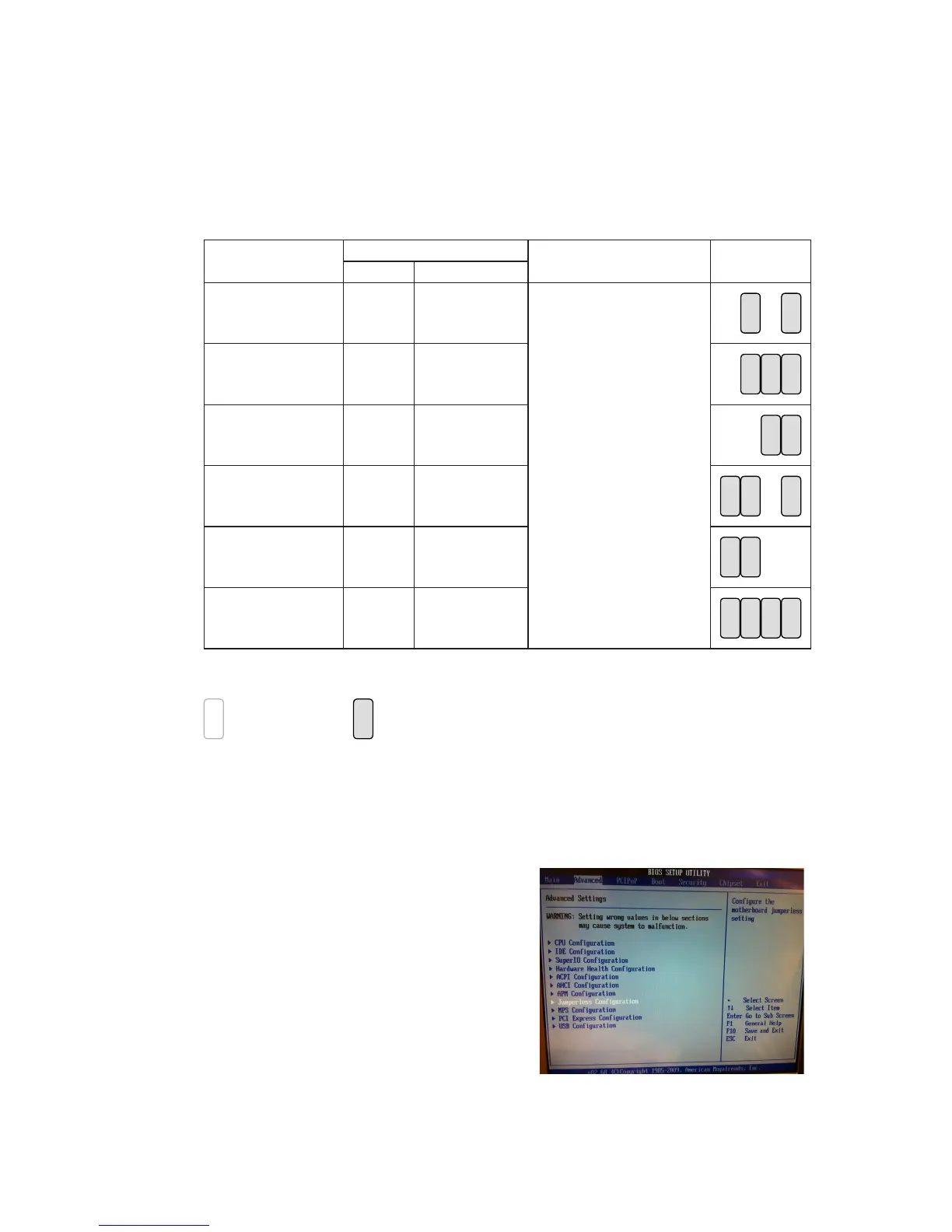
LCD ID Setting
Several congurations are applied to different sizes of panel. Please refer to the
followings to complete relevant settings.
• Jumper Setup
Resolution
LVDS
Output Interface JP8
Bits Channel
800 x 600 24 Single
1st: LCD Panel
2nd: VGA port
8
5 7
2
1 3
64
1024 x 768 24 Single
8
5 7
2
1 3
64
1366 x 768 24 Single
8
5 7
2
1 3
64
800 x 600 18 Single
8
5 7
2
1 3
64
*800 x 600 18 Single
8
5 7
2
1 3
64
1024 x 768 18 Single
8
5 7
2
1 3
64
*remark: specialized for Sharp 12.1” LQ121S1LG41/LQ121S1LG42 panel.
2
1
Jumper open
2
1
Jumper short
• 2nd VGA Power Setting
VGA port power must be on through BIOS/Utility for default is “No Power“.
BIOS/Utility setup
Press <DEL> key to enter BIOS 1.
SETUP UTILITY when system
boot up.
Find tab "Advanced".2.
Select "Jumperless 3.
Conguration" and press <Enter>
to go to sub screen.



 To Next Page