EasyManua.ls Logo

Potterton Paramount three 95 - Page 50

Potterton Paramount three 95
140 pages
Print Icon
To Next Page IconTo Next Page
To Previous Page IconTo Previous Page
Loading...
2.
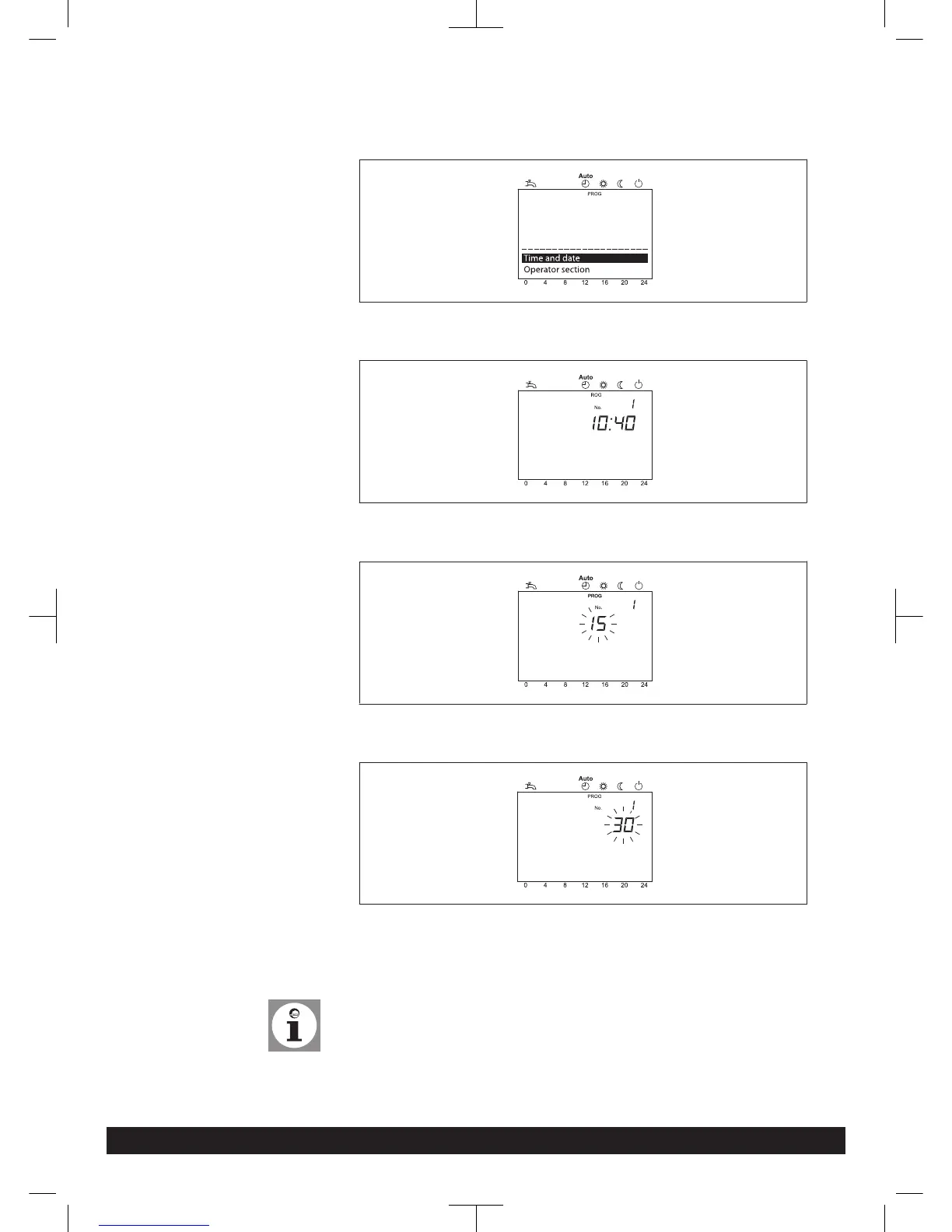
Select the menu point Time and date with the control knob
3. Press OK button
4.
Time and date
Hours / minutes
Select the menu point hours/minutes with the control knob
5. Press OK button
6.
Time and date
Hours / minutes
Carry out hour setting (e.g. 15 hours) with the control knob.
7. Press OK button
8.
Time and date
Hours / minutes
Carry out minute setting (e.g. 30 minutes) with the control knob.
9. Press OK button
10. Leave programming level by pressing the operation mode button heating oper-
ation
Tip:
The previous menu point will be called-up by pressing the ESC-button without
taking over previously modified values. If no settings are carried out for approxi-
mately 8 minutes, the basic display is called-up without taking over previously
modified values.
Programming
50 Paramount three 30-115 kW 7308272-03 03.14


Table of Contents

Related product manuals