www.powerbox-systems.com
25
You will now see twelve grey elds, together with a P+ button and a P- button. The P+ button can be used to
create additional pages, so that more telemetry widgets can be displayed. You can move to and from between
the pages by swiping with your nger. The P- button is used to erase empty pages.
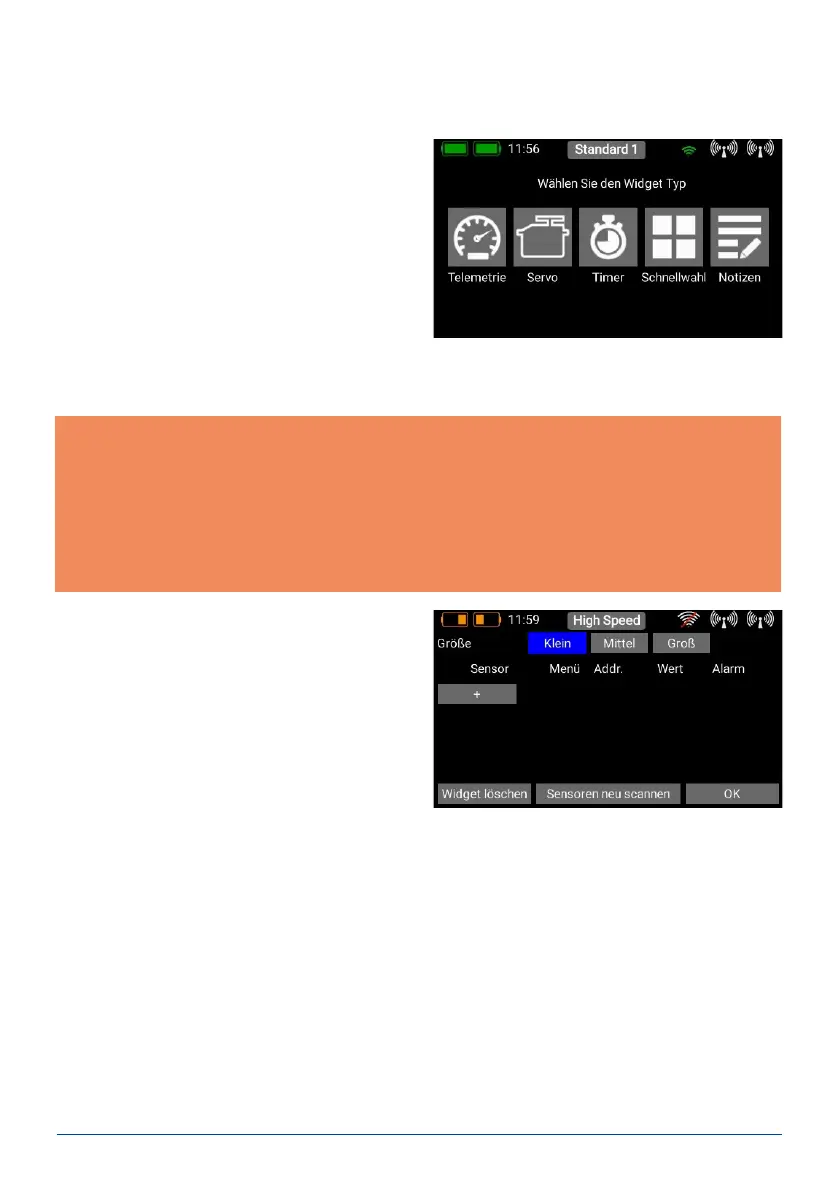
Touch one of the grey elds, and this screen display
appears:
Technical information: the PowerBox CORE telemetry system and the P²BUS are designed in such a way
that each sensor supplies its own information, including sensor name, unit, number of sensor values, decimal
point, priority and other data. A new sensor designed for use with the P²BUS can be connected to the system
at any time without updating the transmitter.
The advantage of the system is that all the text information relating to the sensor values is collected only
when the system is switched on, i.e. when the system is booting.
Once the system is running, only the pure sensor values are transferred; this permits very fast data transmis-
sion with maximum exibility, and ensures a thoroughly user-friendly system.
- Creating a telemetry widget
If you select the Telemetry widget type, this screen
display appears:
At this screen you can adjust the size of the widgets using the Small, Medium and Large buttons. The Delete
widget function can be found at bottom left
Rescan sensors is required if you wish to plug in new sensors when the system is running; this action causes all
sensor information to be re-collected on the P²BUS. Basically all sensor information is automatically collected
when the system is switched on.
a) Telemetry
This can be used to display all the sensors connected to the P²BUS, and show the data they generate. This
information also includes the receiver and transmitter data.



 To Next Page