26 PowerBox-Systems − World Leaders in RC Power Supply Systems
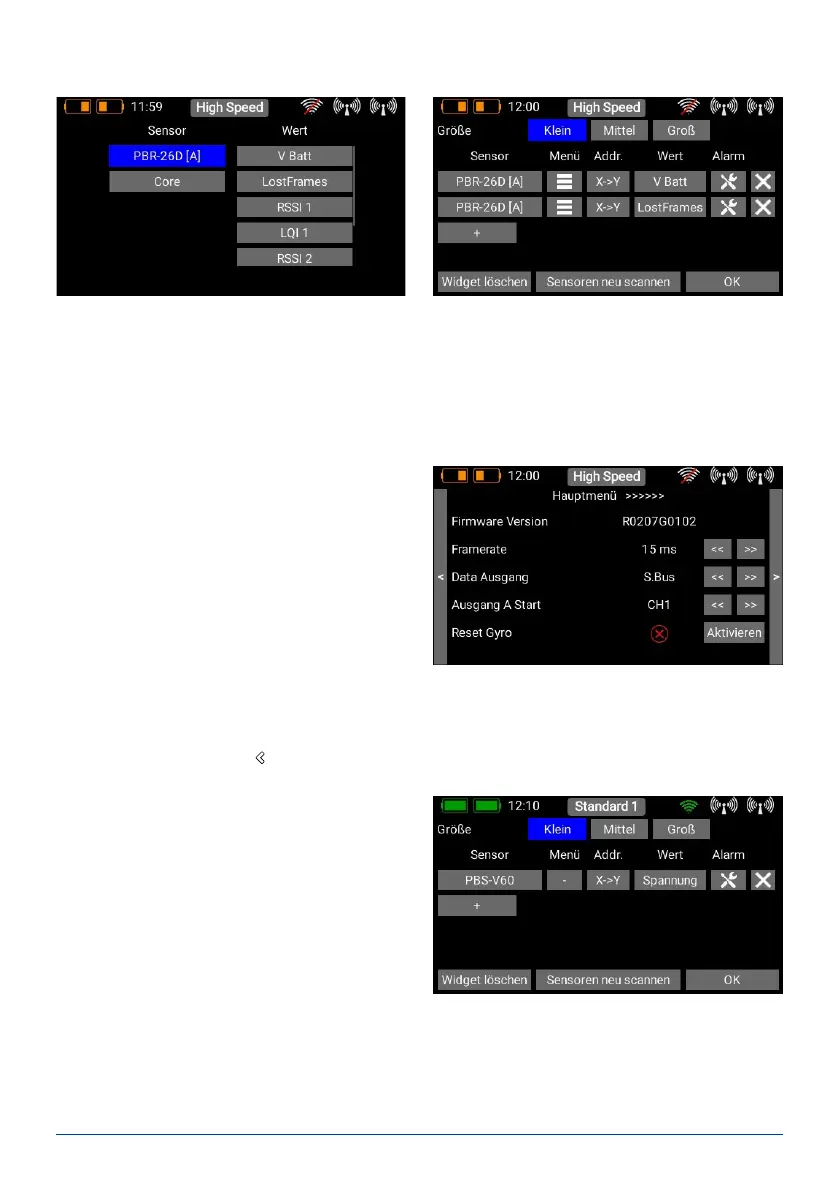
The left-hand column shows all the connected sensors, while the right-hand column shows all the values which
these sensors supply. The P²BUS is an in-house development, and is capable of transmitting up to 255 sensors
each with 32 individual values – and at a speed of up to 800 values per second!
It is possible to set up each widget to display multiple sensor values, even from different sensors; these values
are then displayed in turn by the widget. This is accomplished by selecting one or more sensor values which you
want your widget to display, then conrming your choice with OK.
- Telemetry menu
The Telemetry menu is an important function, since
it enables you to congure and set up sensors and
other devices which are connected to the P²BUS.
An example of this is the iGyro SAT, which can be
connected to PBR receivers
Pressing the Menu button at the appropriate sen-
sor calls up the associated menu:
The arrow buttons at top left and right can be used to navigate through any sub-menus which the sensor of-
fers. Briey pressing the arrow buttons to the right of the sensor values allows you to alter the sensor values. A
longer press on the arrow buttons causes larger values to change more rapidly.
To leave the menu press the
-button at the bottom of the touch-screen.
- Connecting several sensors of the same type
The Addr. button is important if you wish to connect
several sensors of the same type, e.g. if you are set-
ting up an electric-powered model tted with two
telemetry-enabled ESCs. This is the procedure:
Connect one of the sensors, and carry out a rescan.
Press + in order to select one or more telemetry
values for this sensor; the sensor now appears in the
list. In the example on the right this is the PBS-V60:
At this point you can select sensor values using the + button:



 To Next Page