8 PowerBox-Systems − World Leaders in RC Power Supply Systems
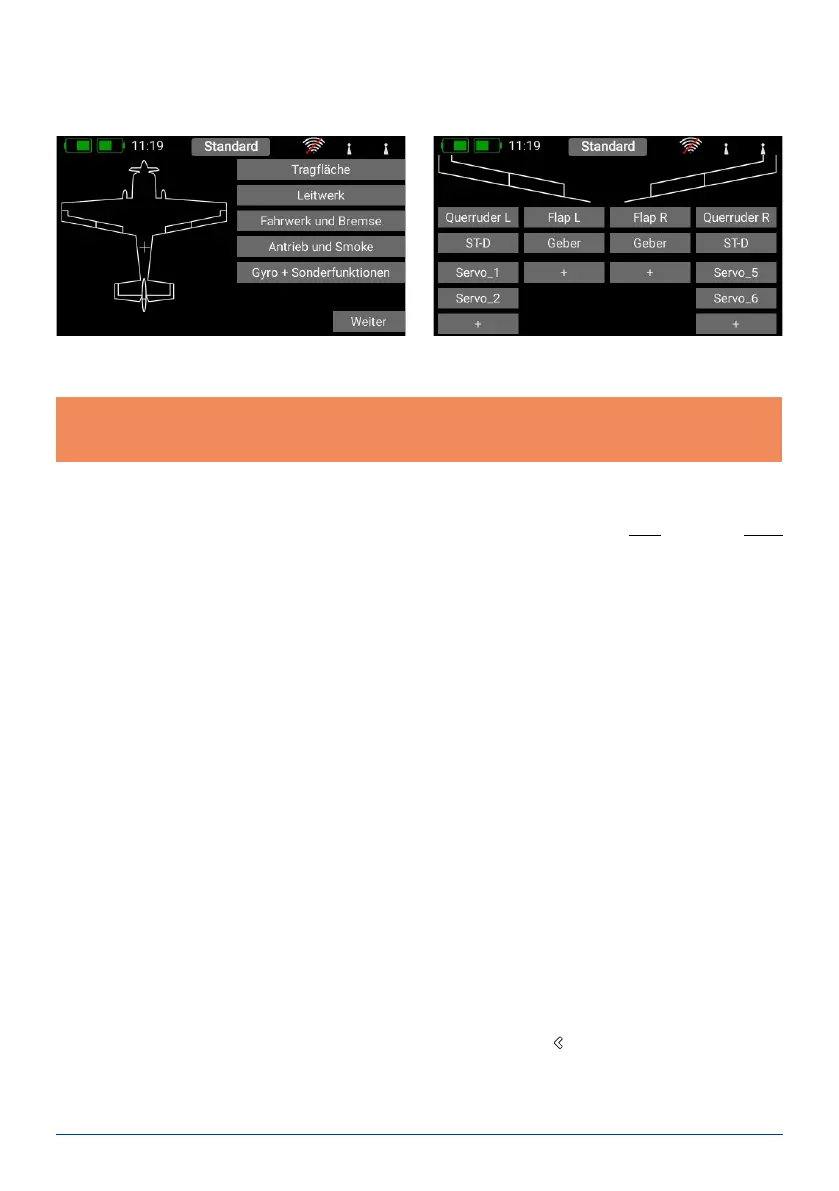
On the next screen you select one of the ranges on the right-hand side, e.g. Wing. The screen now shows a dia-
gram of a wing corresponding to your chosen type. If your conguration is more specialised, that presents no
problems: at a later stage you can very easily program individual functions manually.
Now you select a transmitter control which is to control the left aileron; this will be the left or right primary stick,
depending on the transmitter mode you prefer.
Note: the software of the CORE has no modes – it is only the mechanical settings of the transmitter sticks
which determines the stick mode.
If you now leave the Select screen again, you will see that the same transmitter control has also been assigned
automatically to the right aileron. The next step is to select the servo outputs to which you intend to connect
the aileron servos; this is accomplished by pressing +. Note that you can assign up to eight servos to a single
function.
If your model is an aerobatic aircraft, you would naturally select two or three servos at this point, if you have
multiple servos mechanically connected to a single control surface. At a later stage you will be able to set the
travel, direction of rotation and center position for each servo separately. If these parameters are too coarse for
your application, you can set an individual curve with up to 17 points for each servo.
Back in the Assignment screen it is also possible to rename the functions to suit your own preference.
If you decide to assign the wing aps at this point, you will learn to appreciate one of the truly unique features of
the CORE. As with the ailerons, you again assign a transmitter control to the aps. If each ap is operated by a
separate servo, you won’t notice anything unusual: you simply assign the aps to your preferred servo outputs.
However, if you also want the ailerons to double as aps, or want the ailerons to be mixed in to the aps, you
also assign the aileron outputs to the ap function. These functions are now superimposed, i.e. the mixing is
accomplished simply by assigning the servos. At a later stage you can adjust the servos individually, both for the
Aileron function and the Flap function. Servo travel, center and direction can be set separately for both functions!
An even clearer example of this exceptional feature relates to models with a delta wing. If you select a delta using
the Assistant, the correct functions are assigned automatically. To clarify this, the manual method would be as
follows:
As an example servos 1 and 5 are assigned to Aileron. Servos 1 and 5 are also assigned to Elevator. Since the
servos are installed in a mirror-image arrangement, it is logical that the servos always operate as ailerons, re-
gardless of whether the pilot moves the elevator stick or the aileron stick. Now we switch to the Elevator function
and reverse the direction of rotation of one servo. The elevator function now works correctly, but the “reversed”
elevator function has no effect on the servo direction when an aileron command is applied, i.e. the ailerons still
work correctly. That’s all there is to setting up a “delta mixer”.
Back to our Wing screen: when all the assignments are complete, press the
-button amongst the quick-select
buttons at the bottom in order to return to the overview. You can now continue assigning transmitter controls and
servos to all the remaining functions. When everything is nished, touch Continue at bottom right. The functions
and servo assignments are complete.



 To Next Page