INDEX
38
T-SERIES | SERVICE MANUAL
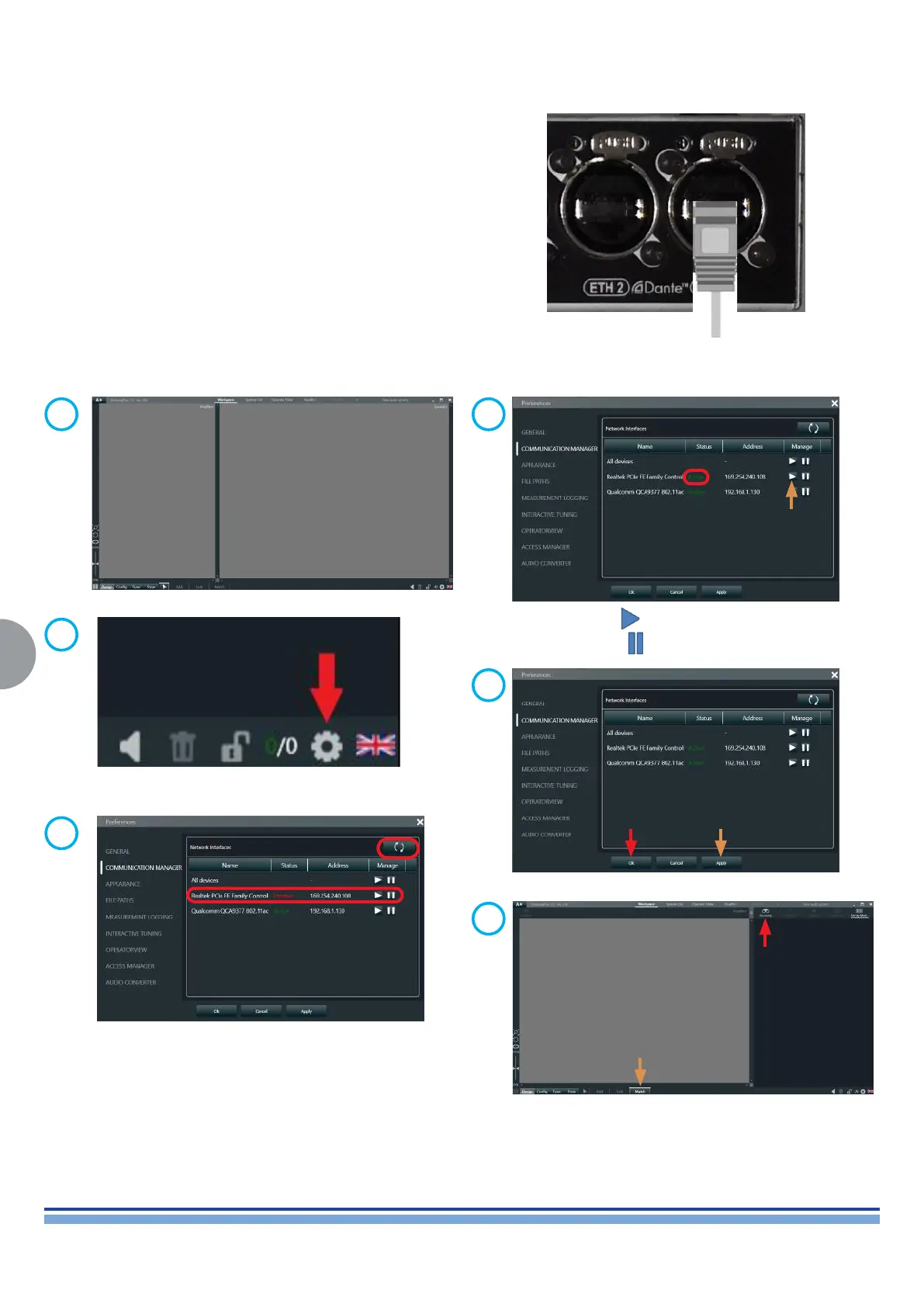
10. Testing the Unit via ArmonìaPlus 1.3
Connect the unit to a PC via the Ethernet slots
GREEN led ON (flashing)
Link/Activity indicator: Blinking – There is activity on this port.
Off – No link is established
GREEN led ON (solid)
Connection is correctly established between the two devices
YELLOW led ON ETH speed connection
Amber on – Operating as a Gigabit connection (1000 Mbps)
Green on – Operating as a 100-Mbps connection.
Off – Operating as a 10-Mbps connection.
Open ArmoniaPlus Application
Click on the “Shortcut” Icon to open up
“Communication Manager”
Press “Refresh” & wait for Connection to establish”
Click on to activate the network
Click on to pause the network
1
3
2
4
Click on Apply, and click on OK
5
Click on “Match” and click on “Discovery”
6



 To Next Page
 Loading...











