I"",
:: I -~
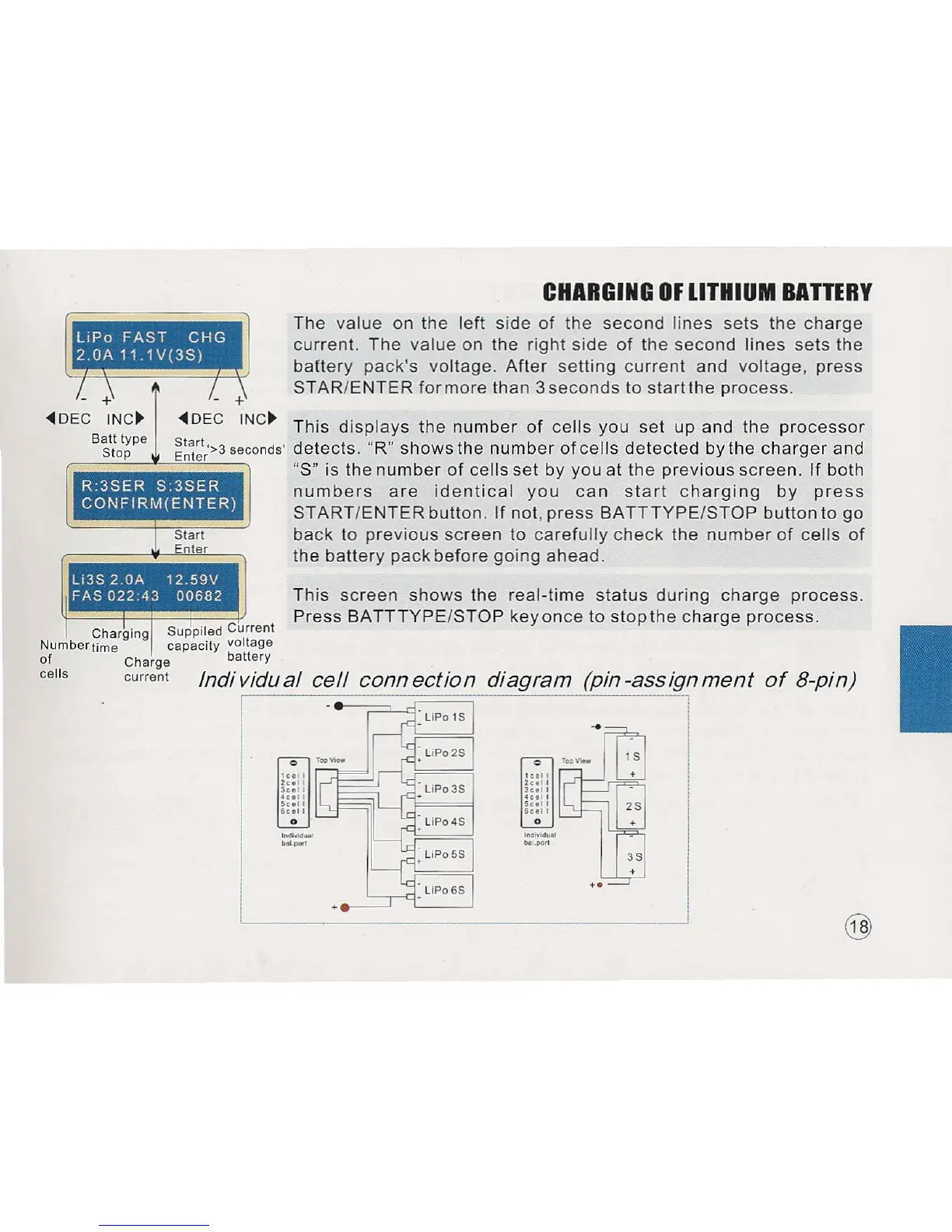
~DEC INC~ ~DEC INC~ This displays the number of cells you set up and the processor
B~;ot~pe ~~~:t?3 seconds'
detects. "R" shows the number of cells detected by the charger and
"S" is the number of cells set by you at the previous screen. If both
numbers are identical you can start charging by press
START/ENTER button. If not, press BATTTYPE/STOP button to go
back to previous screen to carefully check the number of cells of
the battery pack before going ahead.
R 3SER S 3SER
CONFIRM(ENTER)
LI3S 2.0A 12 59V
FAS 02243 00682
,
CHARGING OF LITHIUM BATTERY
The value on the left side of the second lines sets the charge
current. The value on the right side of the second lines sets the
battery pack's voltage. After setting current and voltage, press
STAR/ENTER formore than 3seconds to start the process.
This screen shows the real-time status during charge process.
Press BATTTYPE/STOP key once to stop the charge process.
Charging Suppiled Current
Numbertime capacity voltage
of Charge battery
cells current
Individual cell connection diagram (pin-assignment of B-pin)
I
I
@



 To Next Page