26
PART NUMBER SMART MONITOR VDC
Description:
The Smart Monitor 47268 provides an under speed switch by monitoring 6-3,000 pulses per minute (PPM) and has a user-programmable
0-30 second ramp-up timer. The Smart Monitor is designed to be located in an electrical panel or O.E.M. control box. A removable plate
allows for mounting to a DIN rail. The digital display shows the current PPM in real time. This eliminates setting “guesswork” by constantly
showing the actual PPM being monitored.
Installation:
1. Disconnect AC power before proceeding with installation
2. Mount the Smart Monitor inside and existing control panel or other suitable protective
enclosure. See Figure A5.5 for Smart Monitor mounting dimensions.
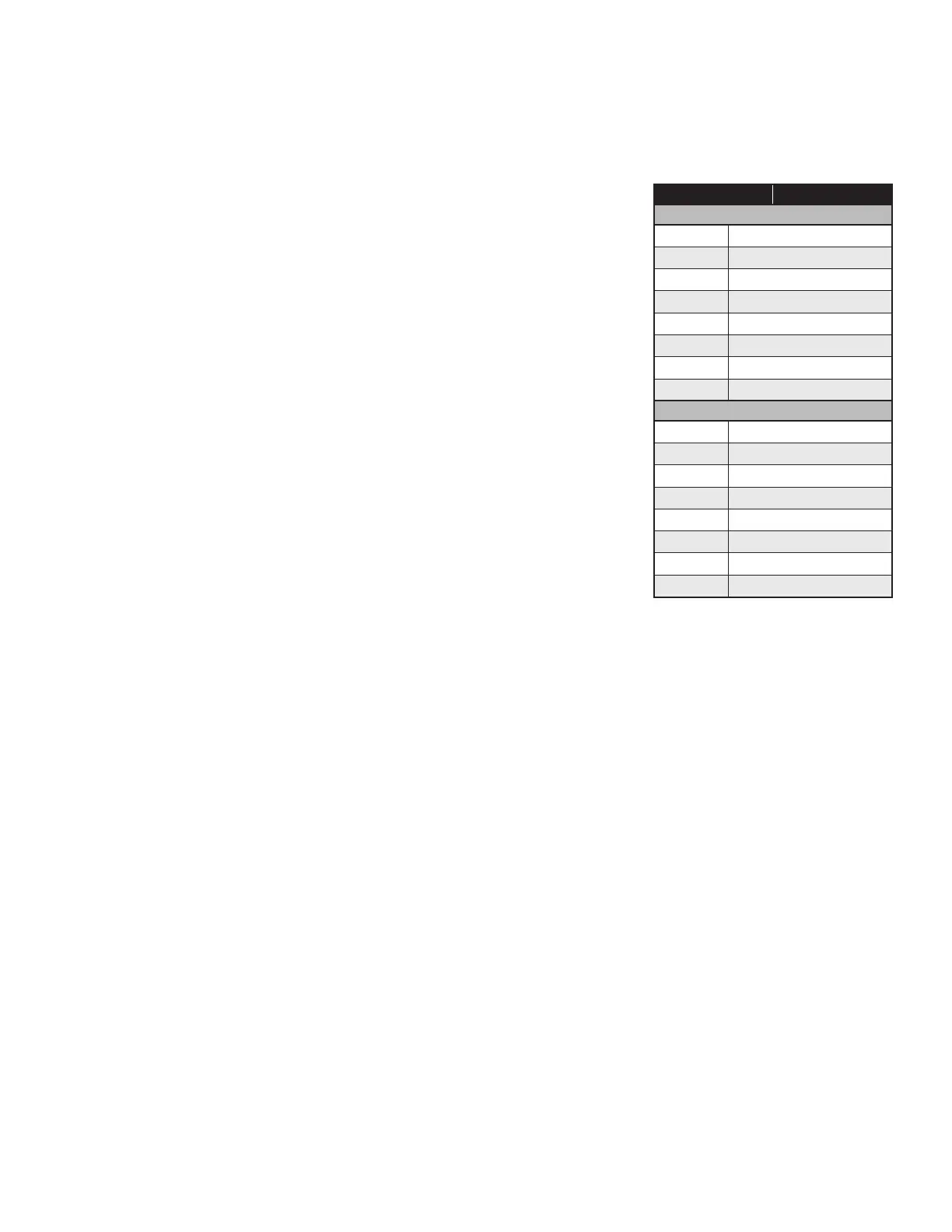
3. Table A5.4 shows connection details for the terminal strip. Make needed connections.
4. Install Smart Roll. See Section 2: “Installing and Mounting the Smart Roll.”
Trip Point Set-up:
Apply power to Smart Monitor. If this is the first time powering unit up, the default trip point
is 6 RPM or PPM, the built-in ramp-up timer is disabled and the relay is off (TRIP: 0006 /
RAMP: 0S / REL: OFF). Read through the following instructions before starting the set-up
procedure.
• Momentarily depress the down arrow button once to highlight “TEST.”
• Momentarily depress the down arrow a second time to highlight “TRIP.”
• Momentarily depress the SET button to begin setting unit to the trip speed desired,
starting with the 4 digit (the 1000s place). When highlighted, use the up/down arrow
buttons to change number as needed. When 4th place is set correctly, momentarily
depress the SET button to begin setting the 3rd (100s place) digit. Again use the up/down
arrow buttons to change the number. When set correctly, momentarily depress the SET
button to begin setting the 2nd (10s place) digit. Use up/down arrow buttons as before to
change the number, and once set, momentarily depress the SET button to begin setting
the 1st and final digit.
• Review your settings for accuracy. If a digit needs to be adjusted, momentarily depress
the SET button one or more times to get to the proper digit, then use the up/down arrows
to switch number and when satisfied, press and hold the SET button – the RPM setting
will highlight and then go back to normal. The SET button can then be released. The RPM setting will be maintained in non-volatile
memory until changed by the operator.
Ramp-up Timer Set-up:
The default setting for the ramp-up timer is 0 seconds (timer disabled). To set the timer for a 1 to 30 second ramp-up period, follow the
procedure below:
• Momentarily depress the down arrow to highlight “RAMP.”
• Momentarily depress the SET button to highlight the timer in seconds.
• Use the up/down arrow buttons to increment the timer from 0 seconds up to a max of 30 seconds.
• When satisfied, press and hold the SET button – the timer setting will highlight then return to normal.
Testing Procedure:
A test function has been provided to allow the operator to de-energize the internal control relay and stop the monitored equipment. To
activate a test shutdown,
• Momentarily depress the down arrow button once to highlight “TEST.”
• Depress and HOLD the SET button for approximately 3 seconds – the control relay will de-energize.
• Release the SET button. There is a safety delay that will keep the control relay off for 10 seconds after it has de- energized. The relay will
automatically re-energize after the delay if RPM speed above the programmed trip point is detected.
TERMINAL CONNECTION
FRONT
1
No connection
2 No connection
3 No connection
4 No connection
5 No connection
6 No connection
7 Sensor Input (+)
8
Sensor Input Common (-)
BACK
9
N/C (2)
10 Common (2)
11 N/O (2)
12 N/C (1)
13 Common (1)
14 N/O (1)
15 (-) 9-36VDC
16
(+) 9-36VDC
TABLE A5.4:
47268 Smart Monitor terminal connections


 To Next Page