27
Adjusting Ramp-up Timer after Smart Monitor is Installed and Wired into Control Circuit:
There may be times when after installation the ramp-up timer is found to be set to too short
a period of time. This presents a problem because when the equipment being monitored
is shut down, there is also no power going through the Smart Monitor. The following
procedure should be performed to allow setting of the ramp-up timer on the next equipment
start-up cycle:
• Before starting the monitored equipment, depress and hold the SET button until the
equipment start-up sequence has been initiated – the display of the Smart Monitor will
be powered on, “RAMP” will be highlighted and the control relay (REL) will be “ON”
(energized).
• Release the SET button then use the up arrow button to increment the ramp-up timer to
the desired number of seconds (max of 30).
• Depress and release the SET button to “write” the new ramp-up timer setting in to the
Smart Monitor. The new setting will be used on the next equipment start-up sequence.
Specification - 47268 Smart Monitor 9-36 VDC
• DC Input: 9-36 VDC
• Fuse Protected: 1 amp
• Speed Range: 6-3000 pulses per minute
• Relay Contacts: DPDT 5 amp @ 120VAC
• Safety Delay 1 second
• Response Time: 1 second or less
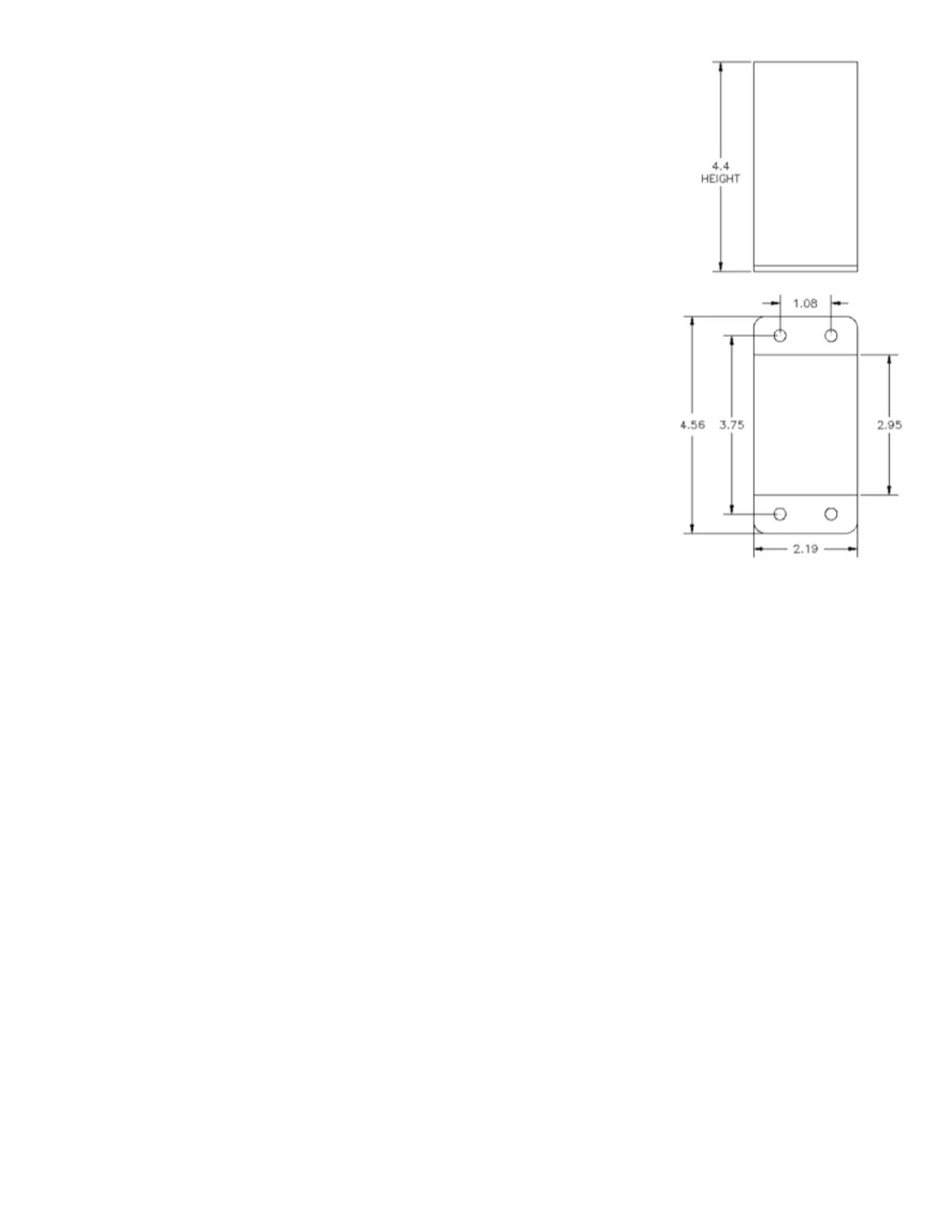
FIGURE A5.5: 47268 Smart Monitor dimensions.


 To Next Page