b)
c)
d)
e)
8.4
a)
b)
c)
d)
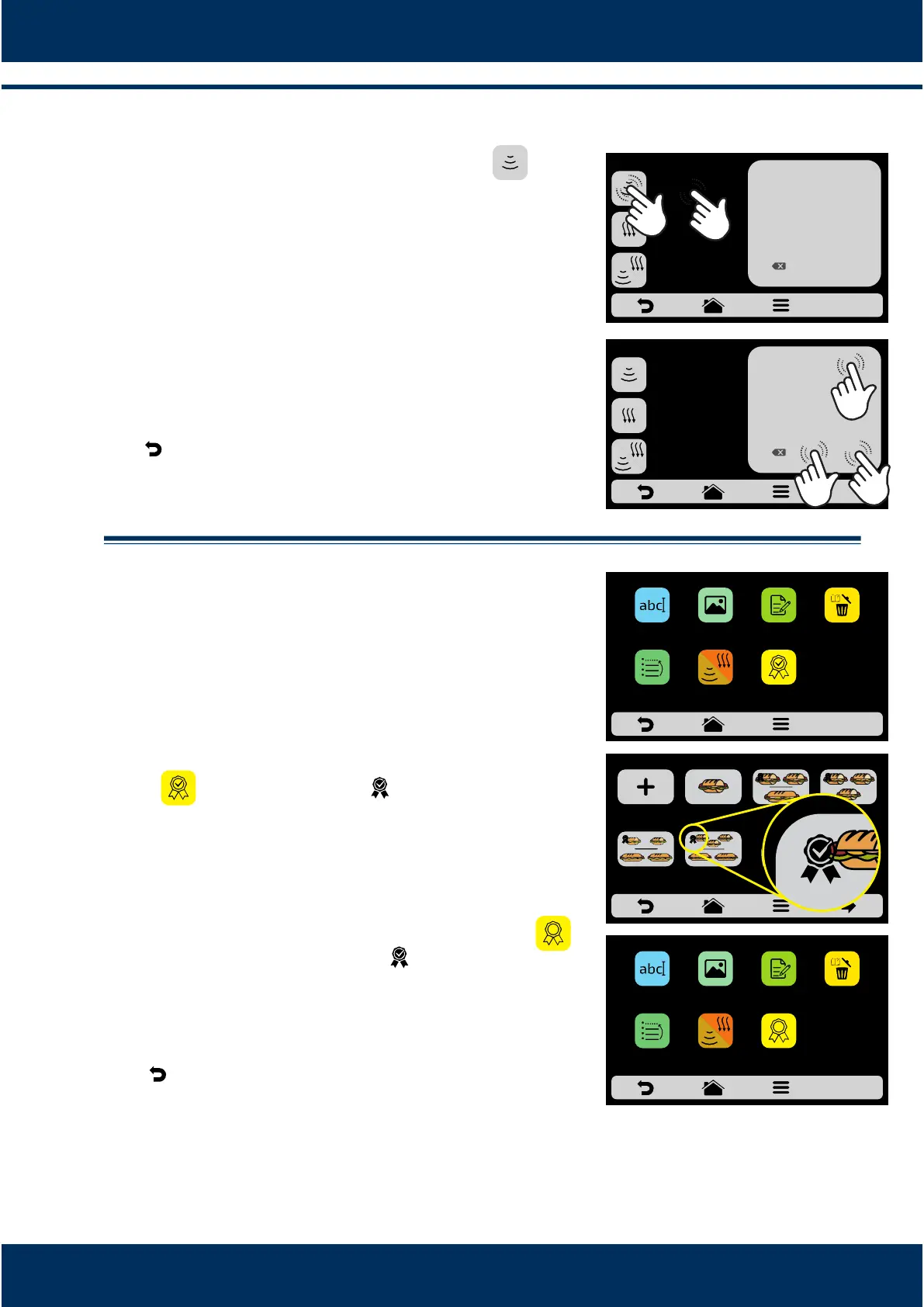
To define the me, just click on the icon or on
the value locaon, as the indicaons on the screen
show.
Use the number pad to inform the me and click on
OK.
The Cook/Brown More funcon may be disabled in
the Sengs of Edit Accesses (see page 34).
Use to return to the recipe eding opons.
.2.7. Add / Remove from Favorites.
The Favorites funcon may be accessed through the
opons screen in the fixed bar. However, it will be
explained in detail on page 36.
To add the recipe to the favorites, click on the
icon . A small ribbon will be added in the
upper le corner of the recipe icon.
To remove the recipe from the favorites, just do the
same process. In the recipe edion opons screen,
the Remove from Favorites icon will appear: ,
when clicking on it, the ribbon will disappear from
the icon and the recipe will be removed from the
Favorites list.
Use to return to the user eding opons.
31
EDIT COOK/BROWN
1
4
7
2
5
8
0
3
6
9
OK
__s
BROWN MORE
__s
COOK/BROWN MORE
__s
COOK MORE
EDIT COOK/BROWN
1
4
7
2
5
8
0
3
6
9
OK
30s
BROWN MORE
__s
COOK/BROWN MORE
__s
COOK MORE
DELTE
RECIPE
EDIT
STEPS
ADD
TO
FAVORITES
SNACKS: 1 SUB 15cm
EDIT
IMAGE
EDIT
NAME
ORDER EDIT
COOK/
BROWN MORE
2 SUB 15cm
or 2 SUB 30cm
3 SUB 15cm
2 SUB 30cm
1 SUB 15cm 2 SUB 15cm
1 SUB 30cm
3 SUB 15cmCREATE NEW
RECIPE
SELECT THE RECIPE- page 1
RELETE
RECIPE
EDIT
STEPS
REMOVE
FROM
FAVORITES
SNACKS: 1 SUB 15cm
EDIT
IMAGE
EDIT
NAME
ORDER EDIT
HEAT/
BROWN MORE



 To Next Page