Functional characteristics
Resetting JOBs (welding tasks) to the factory settings
50 Item No.: 099-004838-PRA01
5.6 Resetting JOBs (welding tasks) to the factory settings
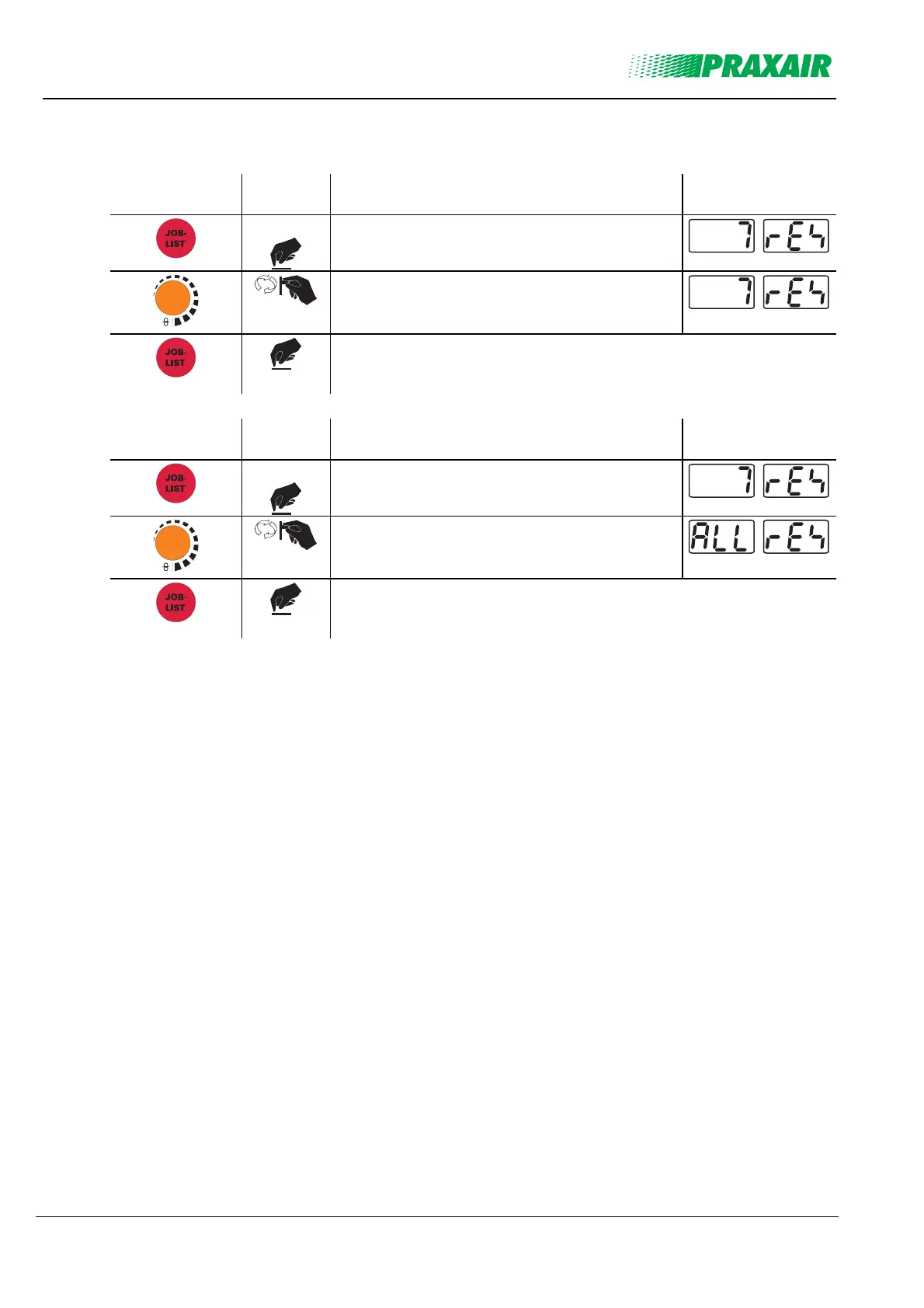
5.6.1 Resetting a single JOB
Operating
element
Action Result Display
3 sec.
Select JOB Reset
m/min
Set the JOB number to be reset
Confirm JOB reset.
(If not pressed within approx. 3 seconds, the machine switches to the
last parameters displayed and the JOB reset process is cancelled)
5.6.2 Resetting all JOBs
Operating
element
Action Result Display
3 sec.
Select JOB Reset
m/min
Set "All Reset" (after JOB 251)
Confirm JOB reset.
(If not pressed within approx. 3 seconds, the machine switches to the
last parameters displayed and the JOB reset process is cancelled)



 To Next Page