BACK TO CONTENTS
OUTPUTS
QBASS
GAIN
INPUT -12dB
HP/LP
XOVER
ON/OFF
R
L
-
+
0 12
INPUTS
L R
L- L+ REM R+ R-
7
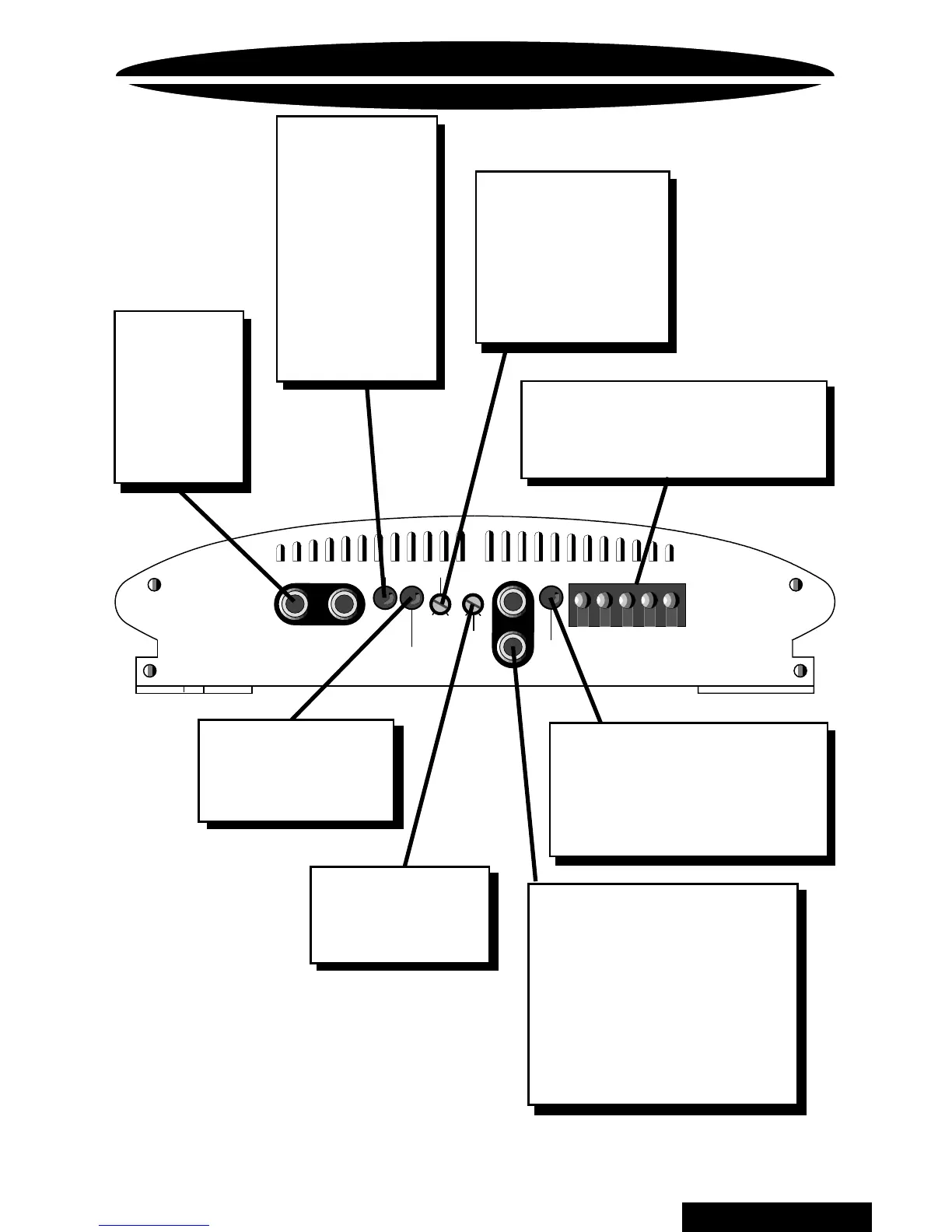
ENDPLATE DIAGRAM
QBASS
™
Control
Rotate clockwise
to boost 40Hz up
to 12dB.
XOVER ON/OFF Button
Push this button in to turn
on the 90Hz crossover to
the speaker outputs (see
page 9).
Speaker/Remote Connector
After connecting remote and
speaker wires, plug in the
PowerLock
connector here.
INPUTS
Plug in the
RCA leads
from your
head unit
here (see
page 8).
GAIN Control
Use this control to
match the output
level of the head
unit to the input of
the amplifier
(see page 10).
HP/LP Switch
This switch
is used to
select whether
the amplifier
will provide a
highpass (in) or
lowpass (out)
signal to the
speakers.
(see page 9).
INPUT Attenuation
For use with high
level inputs
( 4V up to 12V) .
RCA OUTPUTS
Left and Right RCA
outputs provide either
high or low pass signal to
another amplifier. This
signal will be low pass if
you've selected high pass
for the speaker outputs,
and vice versa.



 To Next Page