32 Creating Discs on a PC
E. USING KIOSK MODE
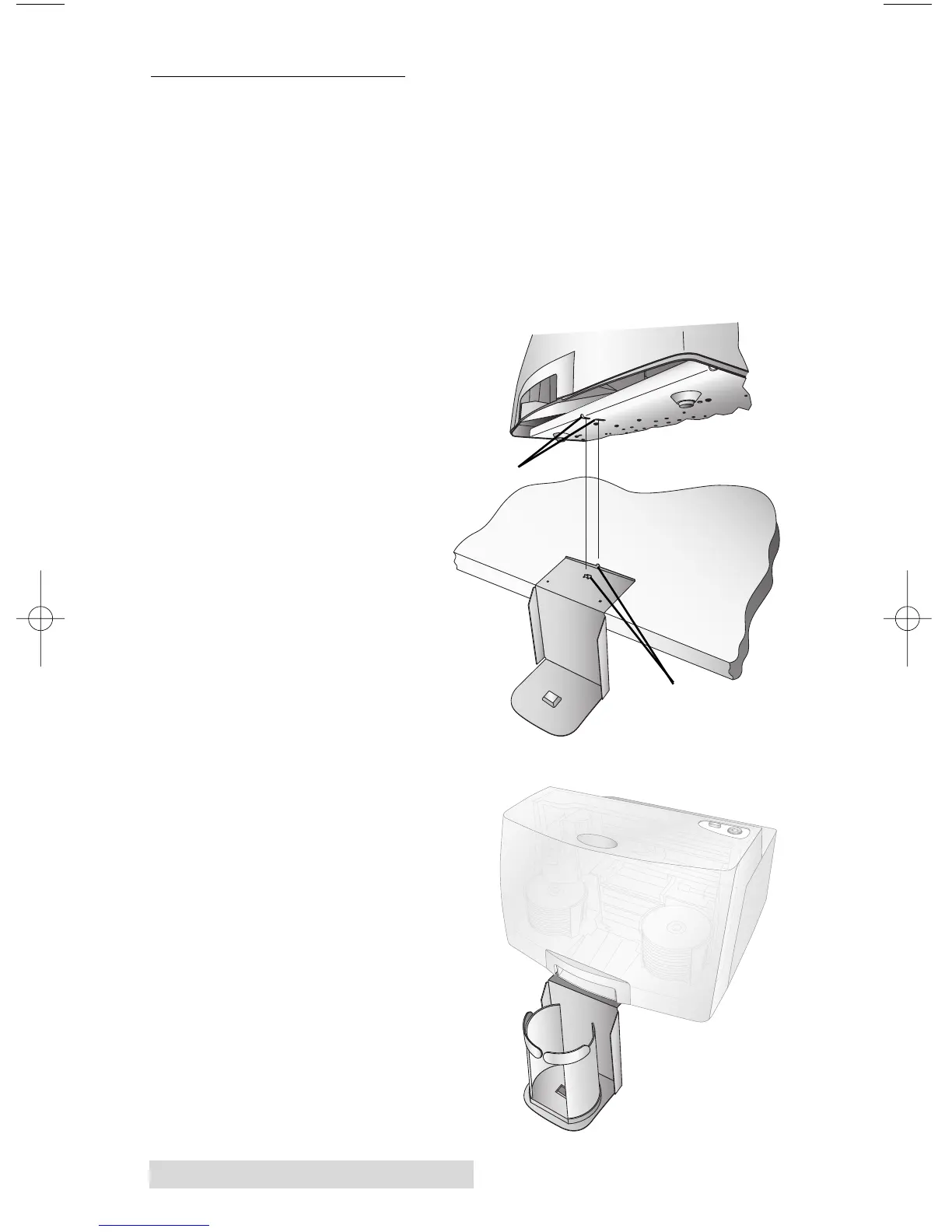
Kiosk Mode allows you to use both of Publisher's Bins as
input, doubling your disc capacity from 50 discs to 100 discs.
In this mode, the finished discs will be deposited out through
the front "reject area" of the Publisher. In Kiosk mode all discs
would be ejected in this manner. Rejects can be identified in the
stack because they will not be printed in the same manner as
successfully recorded discs. Refer to the Kiosk Kit installation
instructions below.
• Attach the Output
Bin Holder as
shown, aligning the
Locating Tabs on
the Output Bin
Holder with the
Slots located on the
underside of the
Publisher allowing
the holder to hang
off the edge of the
table. Notice the
slots do allow for
adjusting the
position of the
output bin. If your
discs are not falling
into the bin, you
will be able to
move the bin
slightly to align it.
• Place the Output
Bin on the Output
Bin Holder as
shown.
Slots
Locating Tabs














 To Next Page