54 Printing from a Mac
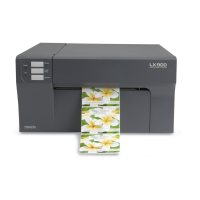
2. Set the Paper Size in the Print Options. Once your
document is created and ready to print go to File – Print.
The following screen will appear. Before doing anything
else, click the Page Setup button and set the paper size for
the printer. This should correspond to the label size
installed in your printer. If your label size is not listed you
will need to create a custom page size. See instructions in
the next step.
INDEX
TOC


 To Next Page