27
English
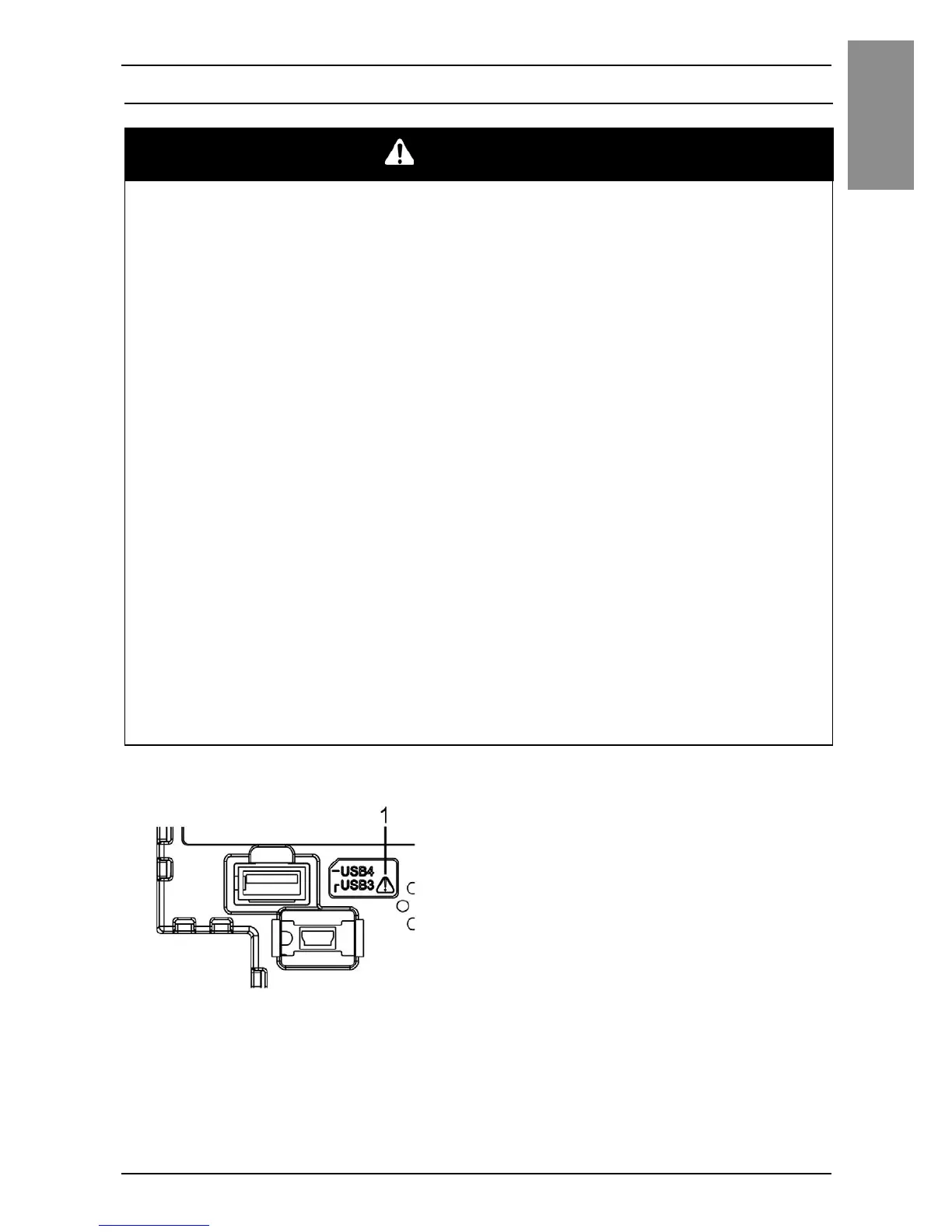
Connecting to the USB Interface
Connecting to the USB Interface
USB Interface
1 Safety alert symbol (see the safety messages above)
DANGER
POTENTIAL FOR EXPLOSION
• Verify that the power, input and output (I/O) wiring are in accordance with
Class I, Division 2 wiring methods.
• Substitution of any component may impair suitability for Class I, Division 2.
• Do not disconnect equipment while the circuit is live or unless the area is
known to be free of ignitable concentrations.
• Remove power before attaching or detaching any connectors to or from this
product.
• Ensure that power, communication, and accessory connections do not place
excessive stress on the ports. Consider the vibration in the environment when
making this determination.
• Securely attach power, communication, and external accessory cables to the
panel or cabinet.
• Use only commercially available USB cables.
• Use only non-incendive USB configurations.
• Suitable for use in Class I, Division 2, Groups A, B, C, D Hazardous Locations.
• Confirm that the USB cable has been attached with the USB cable clamp
before using the USB interface.
• Use the USB (mini-B) interface for temporary connection only during
maintenance and setup of the device.
• Do not use the USB (mini-B) interface in hazardous locations.
Failure to follow these instructions will result in death or serious injury.


 To Next Page