30
English
AUX Connector
AUX Connector
Recommendations:
• AUX Connector: PFXZCDCNAUX1 by Pro-face
• Screwdriver: SZS 0.4 X 2.0 (Product No. 1205202) manufactured by Phoenix
Contact
If you use another manufacturer, be sure the part has the following dimensions:
• point depth: 0.4 mm (0.02 in)
• point height: 2.0 mm (0.08 in)
Point shape should have isolation properties meeting DIN 5264 and EN60900.
NOTE :
• Wire should be AWG 28 to AWG 20 thick and twisted.
• Applicable wire sizes are Style 1015 and Style 1007.
• Be sure to strip 8.0 mm (0.31 in) of cover from the wire.
• Use copper wire rated for 75 °C (167 °F).
DANGER
ELECTRIC SHOCK
• Remove the AUX connector from this product prior to wiring.
• Strip wires only to the required length.
• Do not solder the wire itself.
Failure to follow these instructions will result in death or serious injury.
Step Action
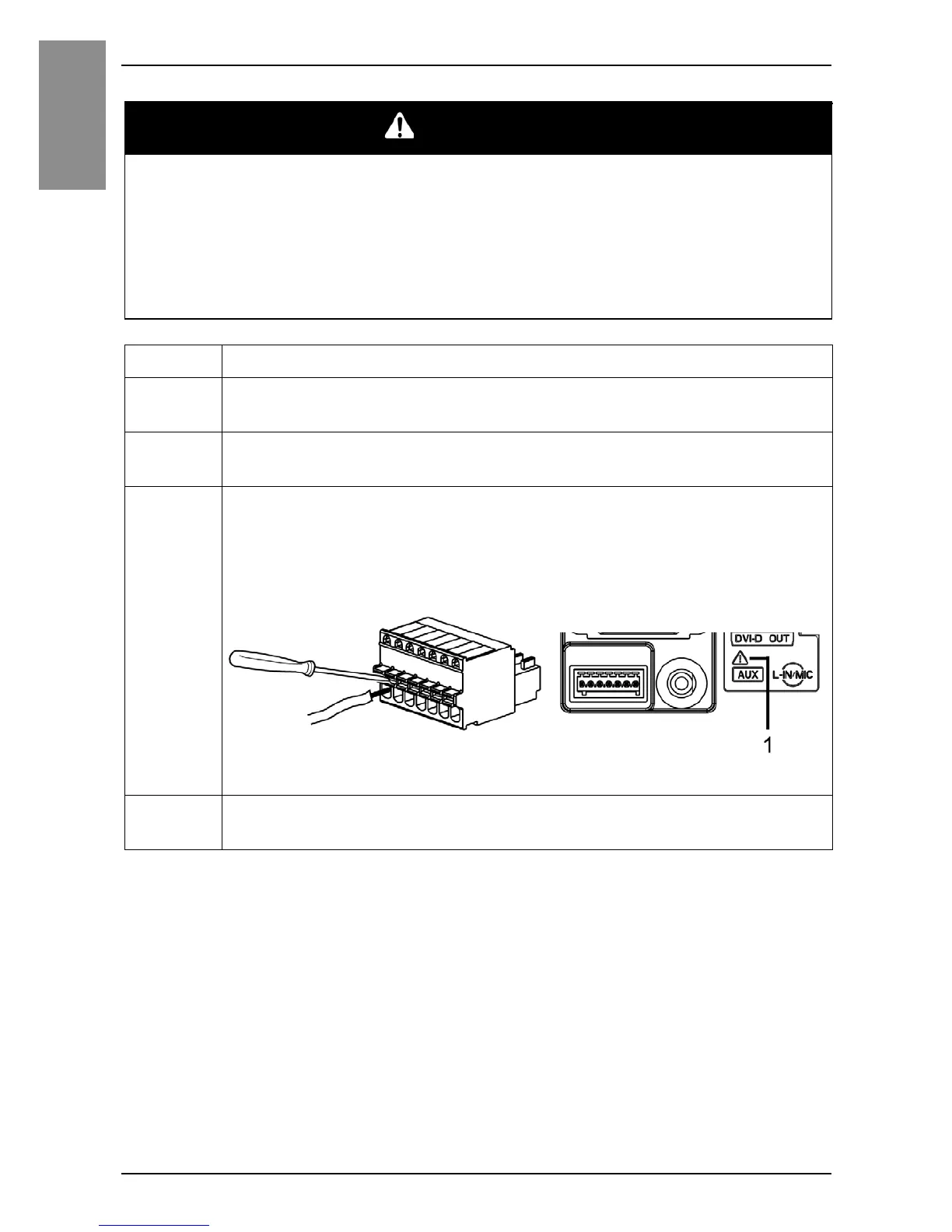
1 Insert the screwdriver into the opening button. This will open the
wire’s round-shaped hole.
2 Hold the screwdriver and insert the wire into the wire’s round-
shaped hole.
3 Take out the screwdriver from the opening button. The round-
shaped hole will then close, and the wire will be held securely in
place. To remove the wire, re-insert the screwdriver into the
opening button and when the wire’s spring clamp releases, pull the
wire out.
1 Safety alert symbol (see the following NOTE)
4 Insert the wired AUX connector into the Auxiliary Output/Speaker
Output Interface (AUX) of this product.


 To Next Page