EasyManua.ls Logo

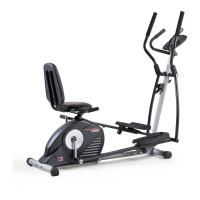
Pro-Form HYBRID TRAINER - User Manual

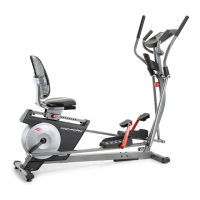
Pro-Form HYBRID TRAINER
36 pages
Print Icon
To Next Page IconTo Next Page
Loading...
CAUTION
Read all precautions and instruc-
tions in this manual before using
this equipment. Keep this manual
for future reference.
Model No. PFEL05814.0
Serial No.
Write the serial number in the space
above for reference.
USER’S MANUAL
www.proform.com
Serial Number
Decal
To register your product and
activate your warranty today,
go to www.proformservice.com/
registration.
For service at any time, go to
www.proformservice.com.
Or call 1-888-533-1333
Mon.–Fri. 6 a.m.–6 p.m. MT
Sat. 8 a.m.–12 p.m. MT
Please do not contact the store.
ACTIVATE YOUR
WARRANTY
CUSTOMER CARE
Question and Answer IconNeed help?

Do you have a question about the Pro-Form HYBRID TRAINER and is the answer not in the manual?

Summary

Warranty and Support

Activate Your Warranty

Register product and activate warranty online for upgrades and offers.

Customer Care Contact Information

Contact for service via website or phone.

Warning Decal Placement

Key Safety Warning Labels

Lists critical safety warnings for machine use, including user weight and children.

Important Precautions

Pre-Exercise Safety Guidelines

Read precautions, consult physician, use as described, keep dry, maintain clearance, inspect parts, keep children/pets away.

Exercise Safety Best Practices

Wear appropriate clothing, hold handlebars, tighten pedals, understand heart rate monitor, note no freewheel, maintain posture, avoid overexertion.

Assembly Hardware

Hardware Identification Chart

Identifies small parts and hardware needed for assembly with key numbers and quantities.

Assembly

Assembly Setup and Product Registration

Outlines requirements like two people, tools, and registering the product.

Attaching Front Frame Components

Instructions for attaching the Front Stabilizer to the Front Frame using screws.

Securing Front Frame Assembly

Instructions for attaching the Front Frame with screws, bolts, and locknuts, and aligning stabilizers.

Attaching Rear Frame Components

Instructions for attaching the Rear Stabilizer to the Rear Frame using screws.

Connecting Frame Wiring Harness

Details how to connect wires between the Front and Rear Frames.

Using the Hybrid Trainer

Console Overview and iFit

Console Features and Modes

Workout Modes

Onboard Workout Operation

Guide on selecting, starting, and following onboard workouts, including resistance and speed adjustments.

Set-A-Goal Workout Operation

Instructions on setting calorie, distance, or time goals and executing the workout.

iFit Workout Operation Guide

Steps for inserting the iFit module, selecting users, and starting iFit workouts.

Console Settings Configuration

Maintenance and Troubleshooting

Drive Belt Adjustment Procedure

Instructions on how to adjust the drive belt if pedals slip.

Reed Switch Adjustment Procedure

Step-by-step guide to adjust the reed switch for accurate feedback.

Exercise Guidelines

Parts List

Replacement Parts and Warranty

Product Limited Warranty Terms

Details the warranty period for frame, parts, and labor, and conditions for voiding the warranty.

Summary

Warranty and Support

Activate Your Warranty

Register product and activate warranty online for upgrades and offers.

Customer Care Contact Information

Contact for service via website or phone.

Warning Decal Placement

Key Safety Warning Labels

Lists critical safety warnings for machine use, including user weight and children.

Important Precautions

Pre-Exercise Safety Guidelines

Read precautions, consult physician, use as described, keep dry, maintain clearance, inspect parts, keep children/pets away.

Exercise Safety Best Practices

Wear appropriate clothing, hold handlebars, tighten pedals, understand heart rate monitor, note no freewheel, maintain posture, avoid overexertion.

Assembly Hardware

Hardware Identification Chart

Identifies small parts and hardware needed for assembly with key numbers and quantities.

Assembly

Assembly Setup and Product Registration

Outlines requirements like two people, tools, and registering the product.

Attaching Front Frame Components

Instructions for attaching the Front Stabilizer to the Front Frame using screws.

Securing Front Frame Assembly

Instructions for attaching the Front Frame with screws, bolts, and locknuts, and aligning stabilizers.

Attaching Rear Frame Components

Instructions for attaching the Rear Stabilizer to the Rear Frame using screws.

Connecting Frame Wiring Harness

Details how to connect wires between the Front and Rear Frames.

Using the Hybrid Trainer

Console Overview and iFit

Console Features and Modes

Workout Modes

Onboard Workout Operation

Guide on selecting, starting, and following onboard workouts, including resistance and speed adjustments.

Set-A-Goal Workout Operation

Instructions on setting calorie, distance, or time goals and executing the workout.

iFit Workout Operation Guide

Steps for inserting the iFit module, selecting users, and starting iFit workouts.

Console Settings Configuration

Maintenance and Troubleshooting

Drive Belt Adjustment Procedure

Instructions on how to adjust the drive belt if pedals slip.

Reed Switch Adjustment Procedure

Step-by-step guide to adjust the reed switch for accurate feedback.

Exercise Guidelines

Parts List

Replacement Parts and Warranty

Product Limited Warranty Terms

Details the warranty period for frame, parts, and labor, and conditions for voiding the warranty.

Pro-Form HYBRID TRAINER Specifications

General IconGeneral
Resistance Levels16
DisplayLCD
Transport WheelsYes
Resistance SystemMagnetic
Hybrid TypeElliptical and Recumbent Bike

Related product manuals