© Pro-Ject Audio Systems · Pro-Ject Essential I I I Flex i- Rang e · Revision 2018.05.15
10
ESSENTIAL III SB SPECIFIC INFORMATIONS
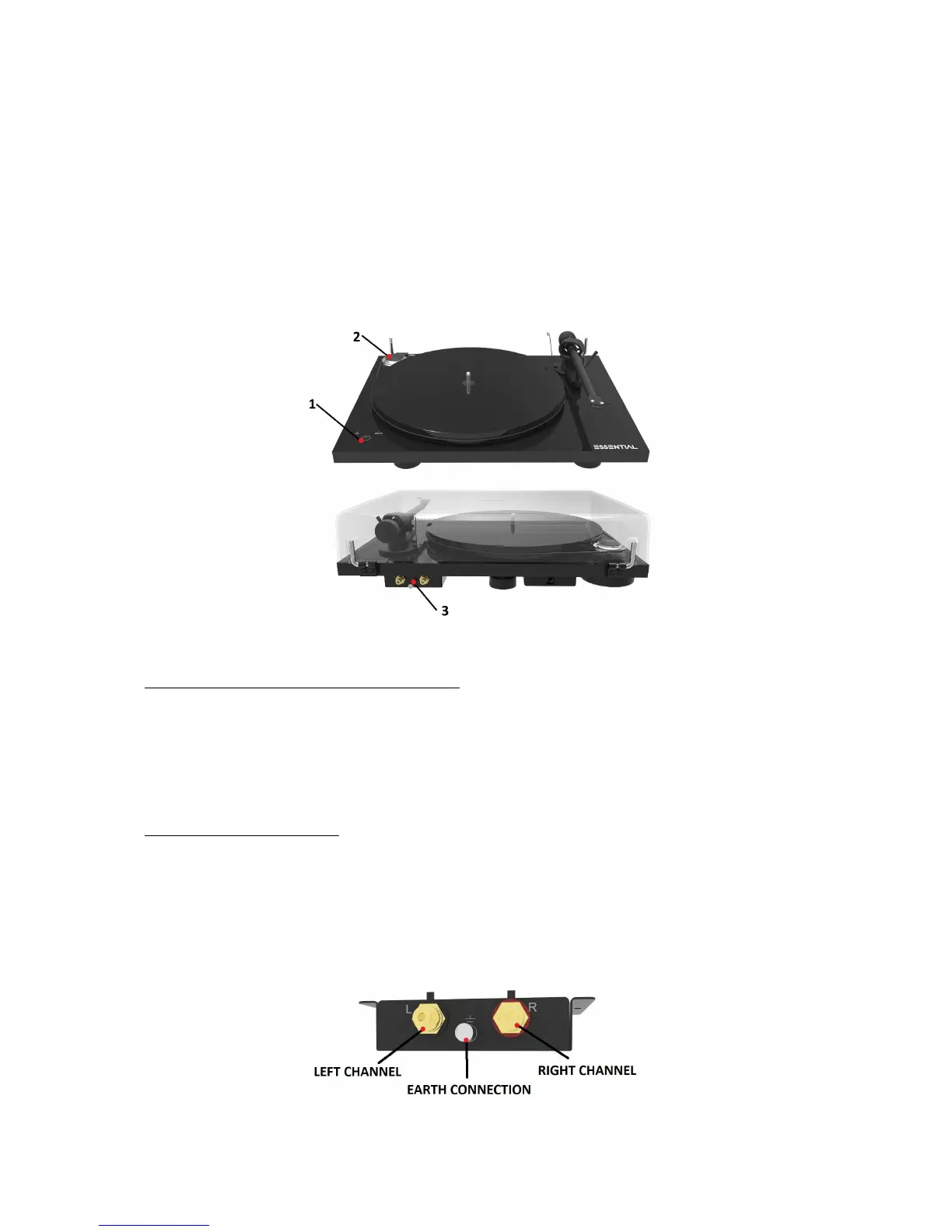
Controls, features and connections
1 SPEED CONTROL
2 DRIVE PULLEY
3 PHONO OUTPUT, EARTH CONNECTION
___________________________________________________________________________________________________________
Switching on and off, changing replay speed
To play records at 33 r.p.m. press the speed control switch to starts the motor. Pressing the ON/OFF
switch two times selects 45 r.p.m.. The selected speed is shown respectively by the flashing LED. When
the platter has attained full speed, the LEDs stop flashing.
A long (more than three seconds) press on the ON/OFF switch stops the motor.
Connection to the amplifier
Connect the tonearm cable provided with the accessories to the RCA tonearm output that is located at
the rear of the turntable, behind the tonearm. Connect the grounding cable on the earth connection
screw.
If your amplifier does not have an input suitable for phono cartridges you will require a separate
phono amplifier stage for MM or MC cartridges which is then connected between the record player and
a free line level input of the amplifier.


 To Next Page