© Pro-Ject Audio Systems · Pro-Ject Essential I I I Flex i- Rang e · Revision 2018.05.15
7
ESSENTIAL III SPECIFIC INFORMATIONS
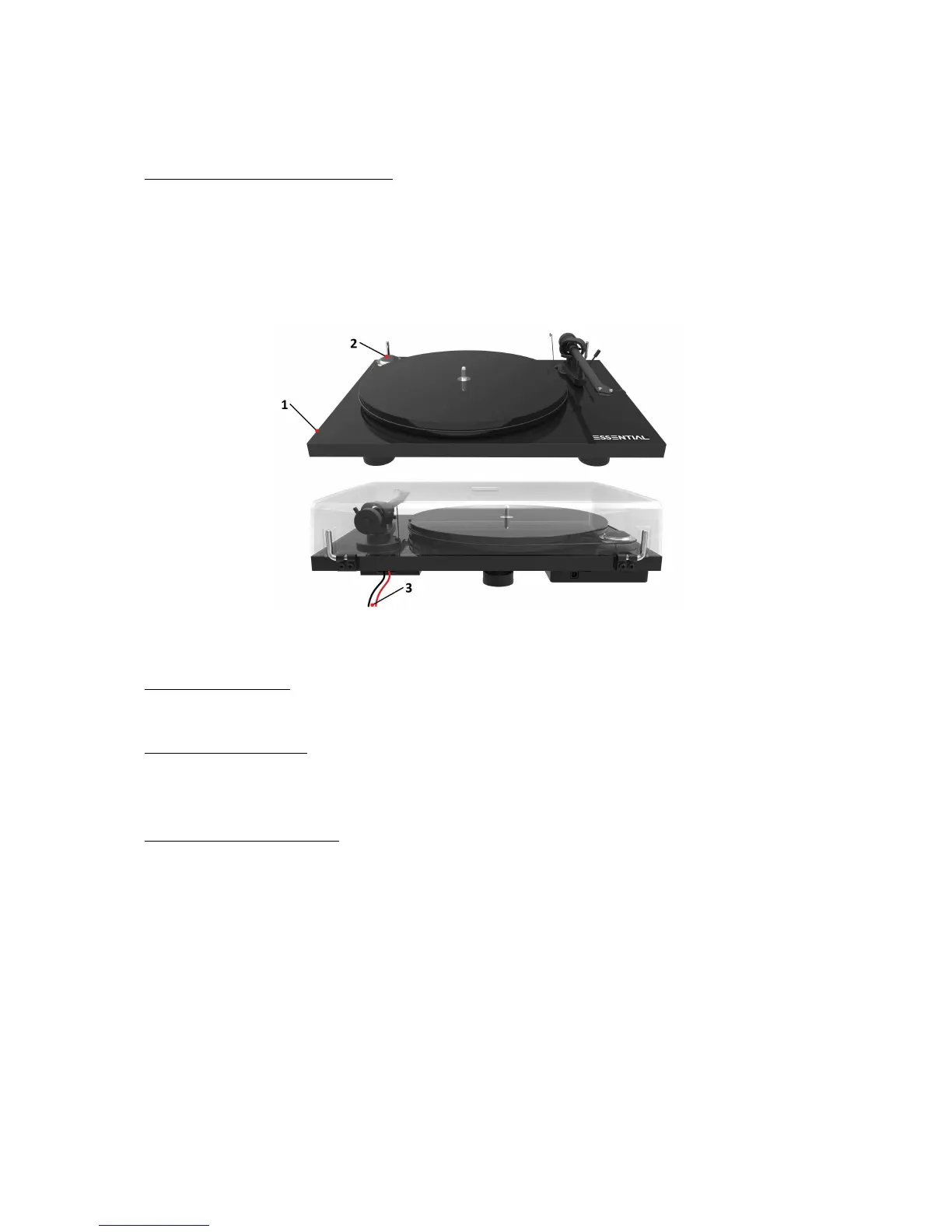
Controls, features and connections
1 ON/OFF SWITCH
2 STEPPED DRIVE PULLEY
3 OUTPUT CABLE CONNECT IT E
_____________________________________________________________________________________________________________
Switching on and off
Pressing the ON/OFF switch alternately starts or stops the motor.
Changing replay speed
To play 45 r.p.m., put the drive belt over the larger diameter part of the motor pulley. To revert to 33
r.p.m. repeat the proceedings using the smaller step on the pulley.
Connection to the amplifier
The record player has a captive tonearm signal lead for connection to the amplifier. Use the Phono input on
your amplifier. Make sure that the phono input offers correct matching and amplification for the type of
cartridge used. Line inputs (such as CD, Tuner, Tape or Video) are not suitable.
Take care to connect the left and right channels correctly. The right channel is usually marked red, the
left channel black or white. Check the manual supplied with your amplifier for relevant information.
The earthing wire of the tonearm lead should be connected to the earth terminal on your amplifier (if
provided).
If your amplifier does not have an input suitable for phono cartridges you will require a separate
phono amplifier stage for MM or MC cartridges which is then connected between the record player and
a free line level input of the amplifier.


 To Next Page