© Pro-Ject Audio Systems · Pro-Ject Essential I I I Flex i- Rang e · Revision 2018.05.15
6
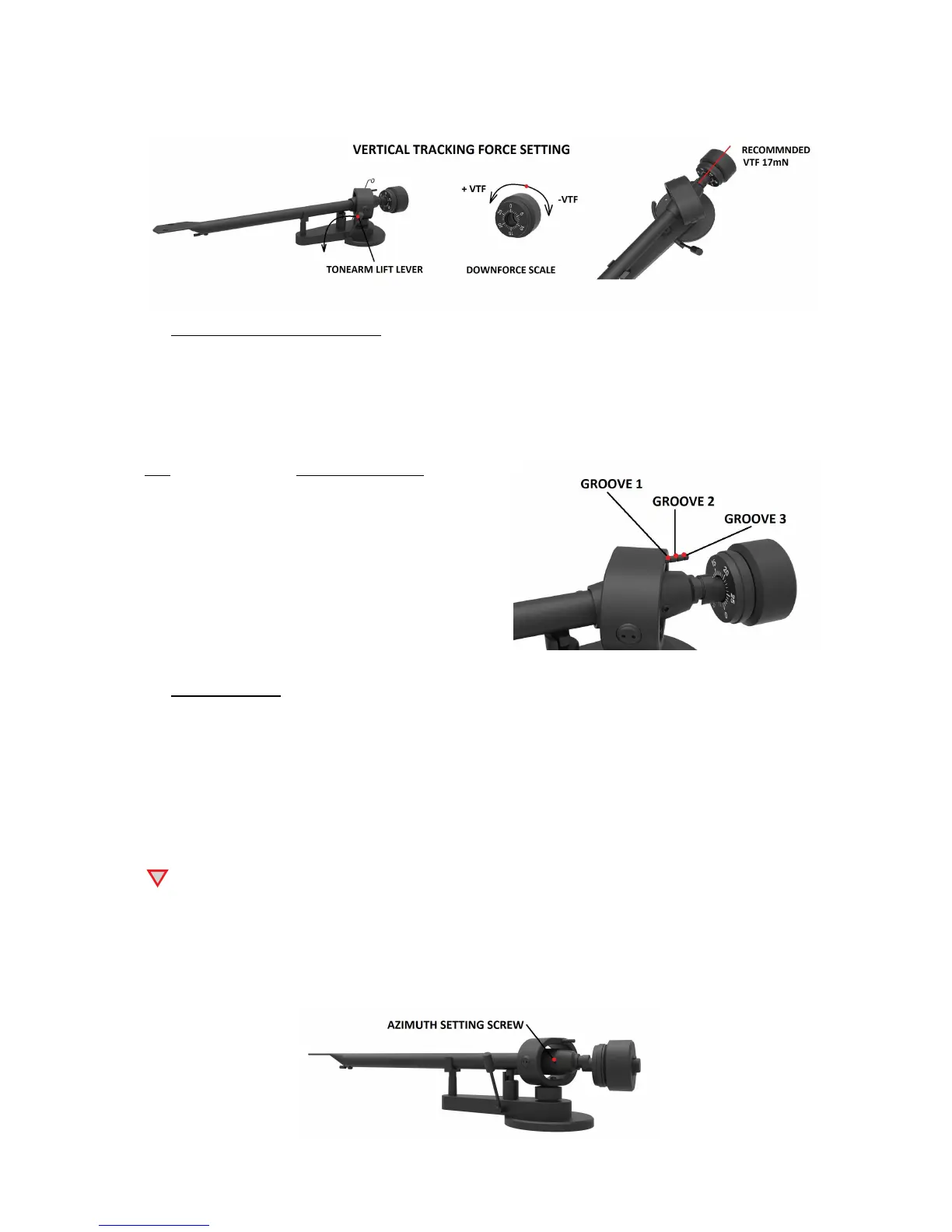
Please note: Adjust the VTF prior to installing the anti-skating weight.
4. Anti-skating force adjustment
Hang the loop of the thread of the anti-skating weight in the groove of the anti-skating stub
corresponding to the downforce applied to your cartridge and feed the thread through the loop of the
wire support.
The anti-skating force must be adjusted corresponding to the downforce as follows:
VTF Groove in the stub
10 - 14mN 1
st
from bearing rings
15 - 19mN 2
nd
" " "
20mN and bigger
3
rd
" " "
5. Azimuth setting
The cartridge needle must be perpendicular to the record in order to trace the groove wall
modulations correctly.
The azimuth (angle) is precisely set by the factory. In the event that you need to modify this setting,
however, follow the instructions below.
Loosen the small azimuth screw, again using the 1.5 mm allen key.
!
DO NOT REMOVE THE AZIMUTH SET SCREW COMPLETELY!
Loosen the screw just enough to be able to gently rotate the arm tube and set the azimuth to the
correct position. The correct position can be checked from the front view, preferably with the needle
placed on a mirror placed on the platter. Once the azimuth setting is correct, gently re-tighten the
azimuth setting screw.


 To Next Page