All Info Copyright © Pro Spot International Inc.
4 - Operation
Page 14
i5
4.2.3 i5 Login and User Log
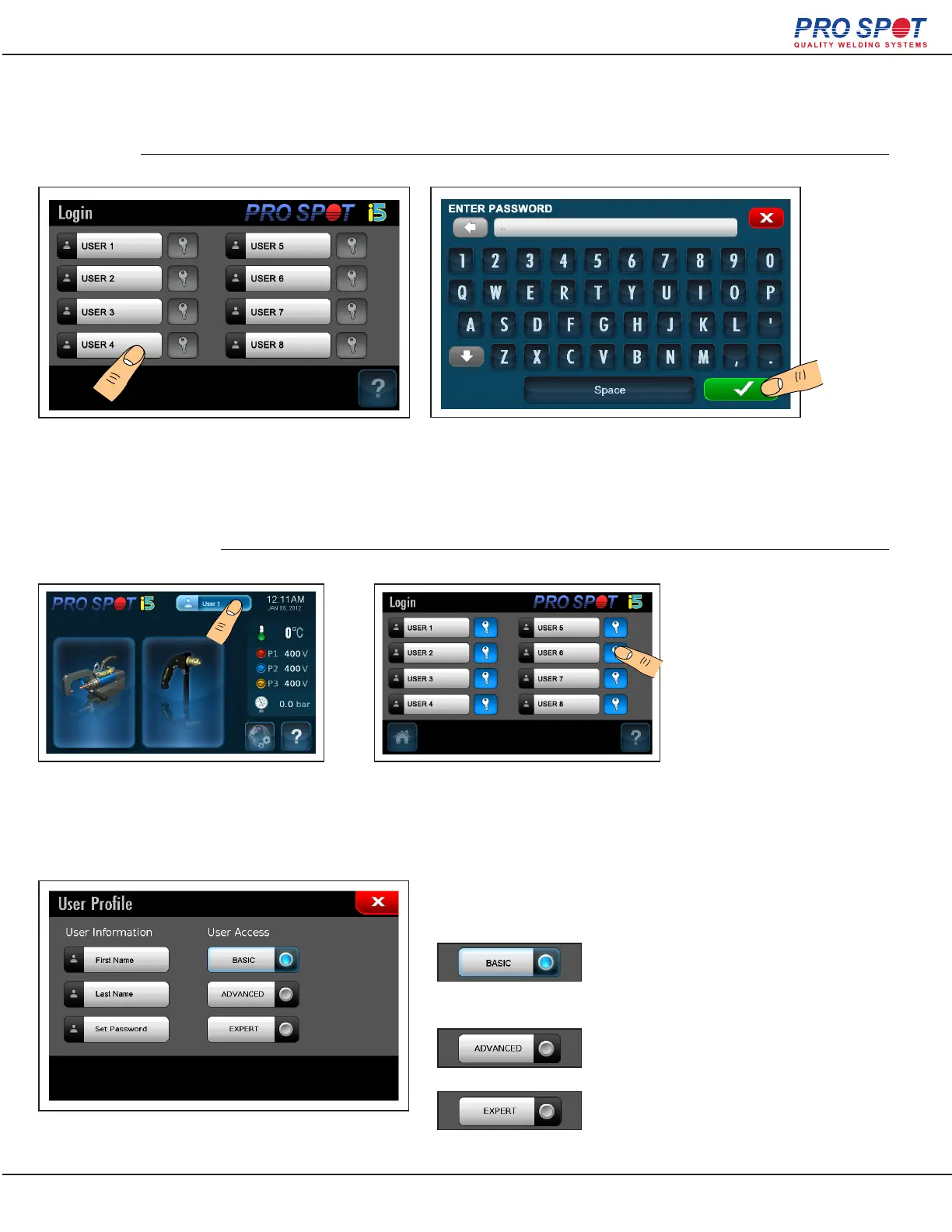
When the i5 is turned on the user is presented with a
login screen. Select the desired user name or space
where a new user is to be added.
Once the administrator’s password has
been entered, user prole information can
be altered by pressing on the user’s but-
Select the blue key button next to the user
prole to be edited. Proles can only be
removed from the global settings acces-
sible from the home screen.
From the user prole page user prole information and permissions
can be set. These settings can only be done by an administrator.
In basic mode the user can weld but may not
make any adjustments to weld settings. This
is the mode the user enters with the default
password.
Advanced mode allows for the changing of
basic settings such as time and current.
Expert mode gives access to time and cur-
rent settings as well as rise and fall times and
some system settings.
Starting Up
User Administration
Enter the user password to begin welding with that
user or the administrator password to modify, add, or
delete a user. Then press the green check mark to
continue to the i5’s home screen.
NOTE: Default user password is - 1234
15



 To Next Page