Page 3
All Info Copyright © Pro Spot International Inc.
Quick start instructions
i5
WARNING! Read this manual in it’s entirety before attempting to weld with the i5 for the rst time. Before turning the welder on, make sure
it is connected to the proper electricity by certied professionals. The water tank should be lled with a 50/50 water & antifreeze solution, and
make sure to properly secure all water hoses.
!
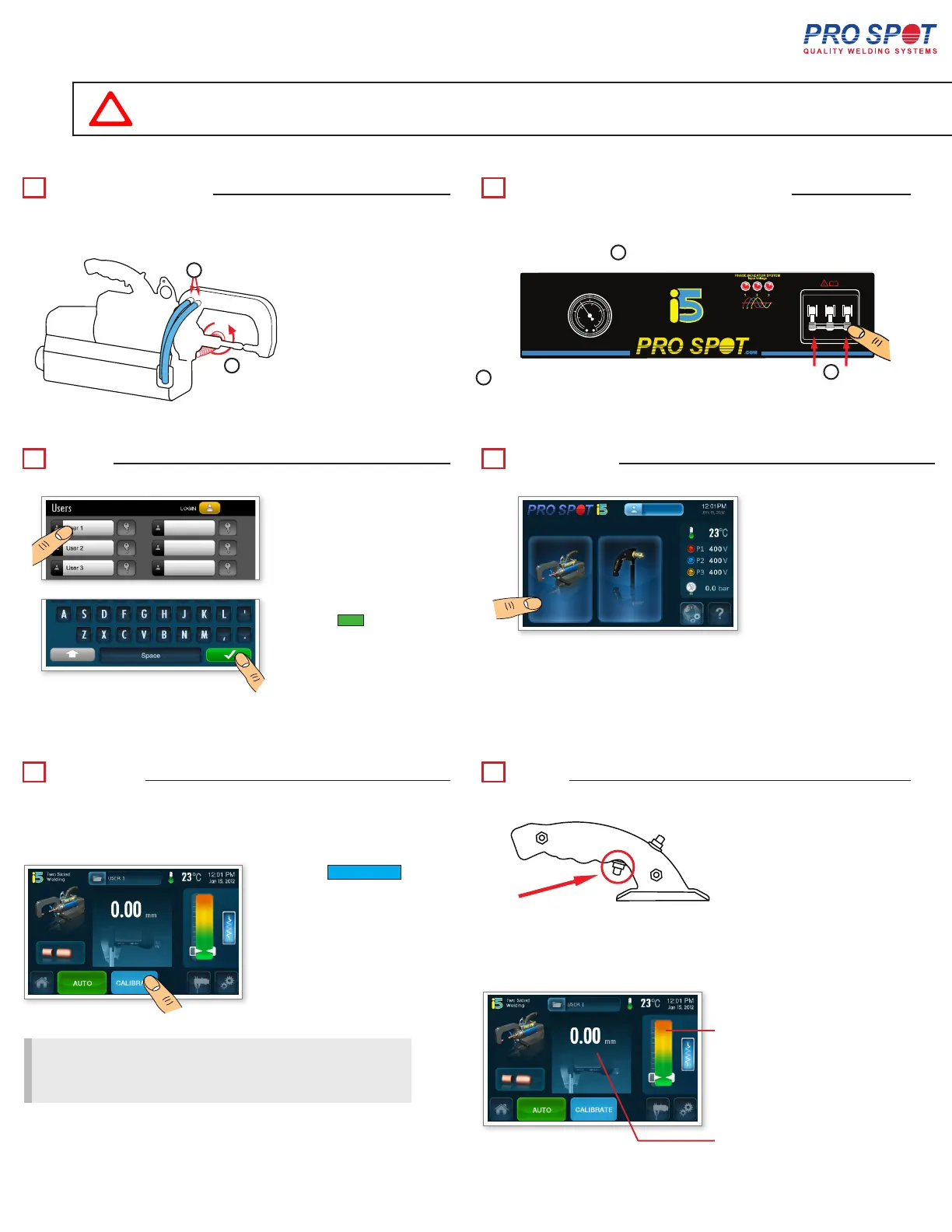
Weld Gun Check
Calibrate
System Checks and Power On
Weld
Login
1
a
b
2
cba
OFF
ON
a
b
c
3
5
Navigation
4
Enter the password and
select the ü button
Press the CALIBRATE
button to calibrate the
weld gun.
NOTE: The default user password is - 1234
Select a user to login.
Calibrate:
• Every 100 welds
• Every arm exchange
• Every time auto mode is entered
Select the double sided
gun.
* CAUTION!
No material between electrodes during calibration.
6
Press the trigger button on
the trans. gun to weld.
THE DISPLAY SHOWS:
RESISTANCE INDICATOR
MEASURED THICKNESS
Verify that hoses are secured in place.
Verify that the weld-arm handle is
tightly screwed on.
Verify all 3-Phase lights are illuminated.
Verify the presence of air pressure.
Turn on the i5’s
power.
5



 To Next Page