5 - Double-Sided Welding
Page 21
All Info Copyright © Pro Spot International Inc.
5.4 Removing Welding Electrodes
Removing Extension Arm Electrode and Weld Cap
i5
IMPORTANT! N’essayez pas de retirer l’électrode en la frappant.
Cela pourrait endommager l’électrode et le “pistolet”.
IMPORTANT! Do not attempt to remove the electrode by hitting it.
This could damage the electrode and/or the spot gun.
1
2
3
4
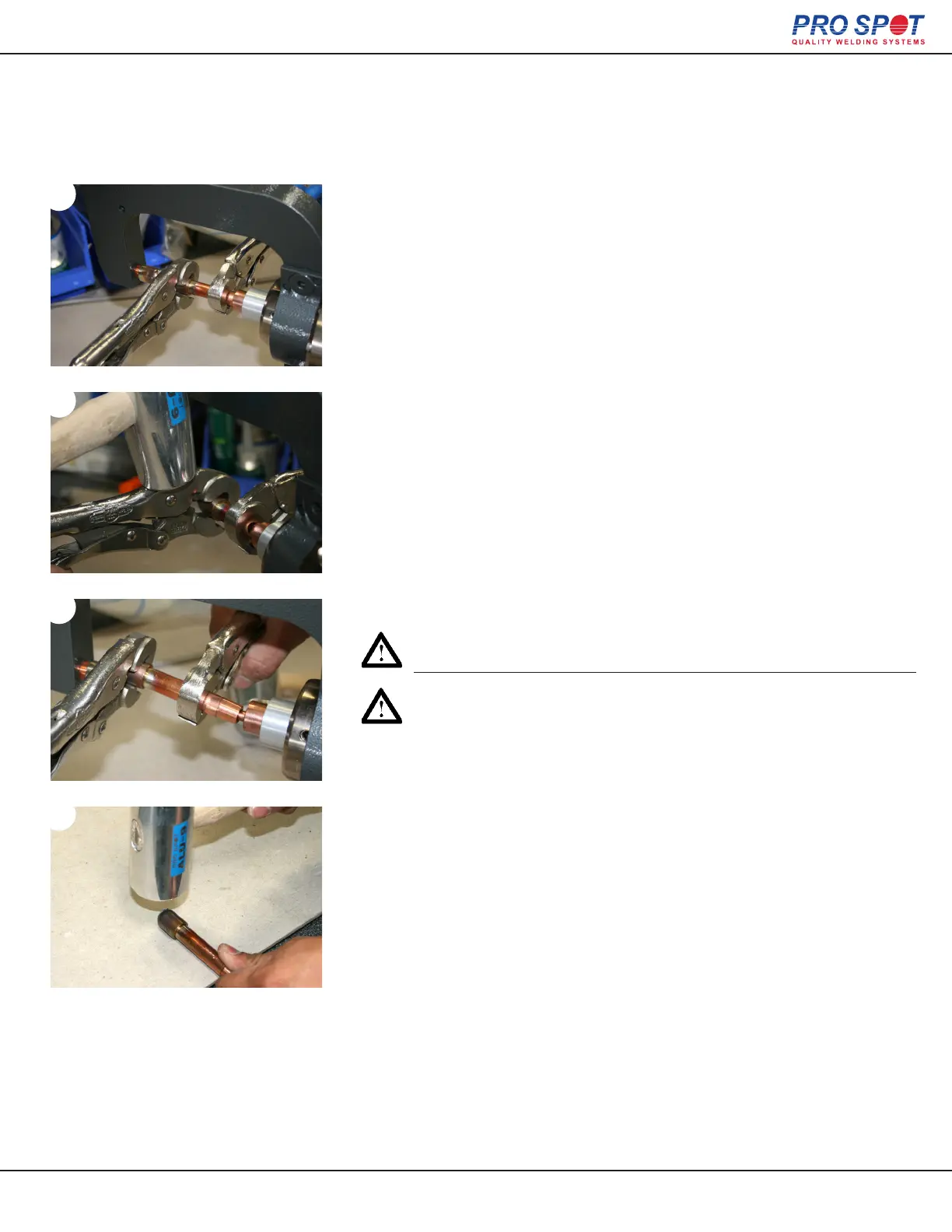
1. Attach vice grips to the weld cap and electrode that is being re-
moved. Grip the handles and twist them in opposite directions.
2. If twisting the cap and electrode doesn’t work you can gently tap
them with a hammer (Pro Spot ALU-9 Aluminum Hammer shown) while
maintaining control of the electrode by holding one of the vice grips
rmly with one hand.
3. Carefully remove the electrode and allow the excess water to drain
from it. You can now release the vice grips from the electrode and weld
cap if you choose or you can continue on to the following step with a
vice grip still attached to the electrode shaft for a better grip.
4. Finally if the weld cap has not loosened hold on to the electrode,
gently tap the weld cap off with a hammer and rotate the electrode with
your other hand. Make sure that when you are tapping at the weld cap
to aim your hammer outward (not just down) away from the electrode.
38



 To Next Page