23
english
PROGRAMMING THE CYCLECOMPUTER
MANUALLY SETTING WHEEL SIZE
Repeat steps 1-3 and continue to scroll through pre-programmed values until
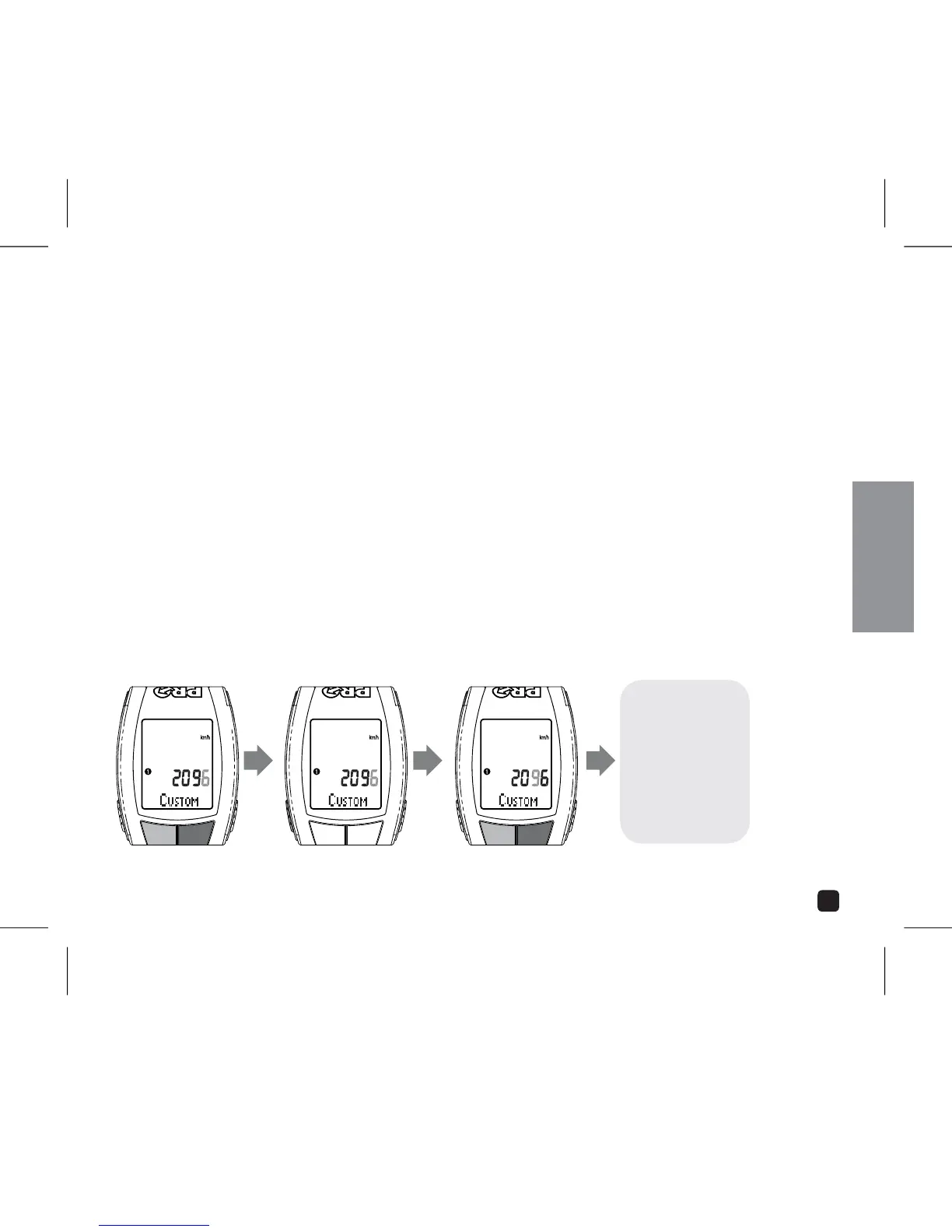
CUSTOM appears in the display.
Press the SELECT key. The far left digit will begin to flash.
7. Adjust digit by Pressing OPTION or EL key.
Set value and advance to next digit by Pressing the SELECT key.
9. Once all fields have been adjusted, Press the MODE key to return to Setting Menu.
10. To set Wheel 2, Repeat Steps 1 through 9.
ADJUST:
PRESS OPTION OR EL
SET:
PRESS SELECT
ADJUST:
PRESS OPTION OR EL
CONTINUE THROUGH
ALL FIELDS
PRESS OPTION OR EL
TO ADVANCE TO NEXT
SETTING



 To Next Page