6
english
REPLACING THE BATTERY
PRO Scio Cyclecomputers are powered by a CR2032 3v Lithium Battery. Under normal condi-
tions, this battery should last approximately one year.
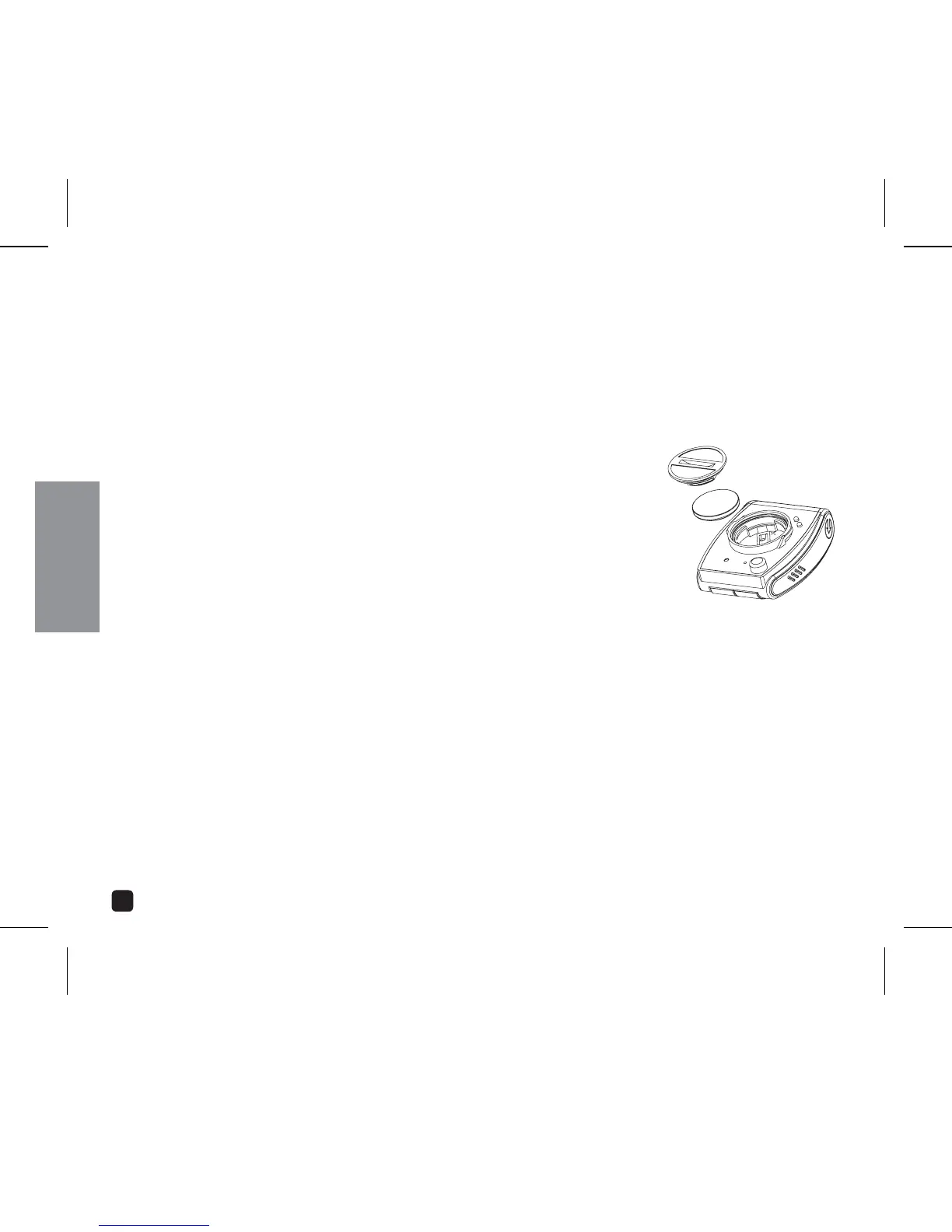
REPLACING THE COMPUTER BATTERY
Using a coin, turn the battery door counter clockwise until the
door comes free.
2. Take care not to damage the O-ring seal for the battery com-
partment and carefully remove the old battery.
3. Place a new battery in the battery compartment with the posi-
tive (+) side toward the battery door. Be extremely careful not
to bend the battery contact when inserting a new battery.
4. Place the battery door over the opening and tighten it down by using a coin and turn-
ing in a clockwise direction.
5. If the O-ring has been damaged, replace it before reinstalling the battery door.
#!54)/.Extreme care should be taken when replacing the battery to ensure the unit
remains fully water resistant. Failure to properly replace the battery and correctly seal the
unit may cause the unit to become damaged and may void the warranty.



 To Next Page