37
english
VIEWING LAP DATA
PRO Scio Cyclecomputers have an advanced memory that allows you to view detailed ride
information by individual laps.
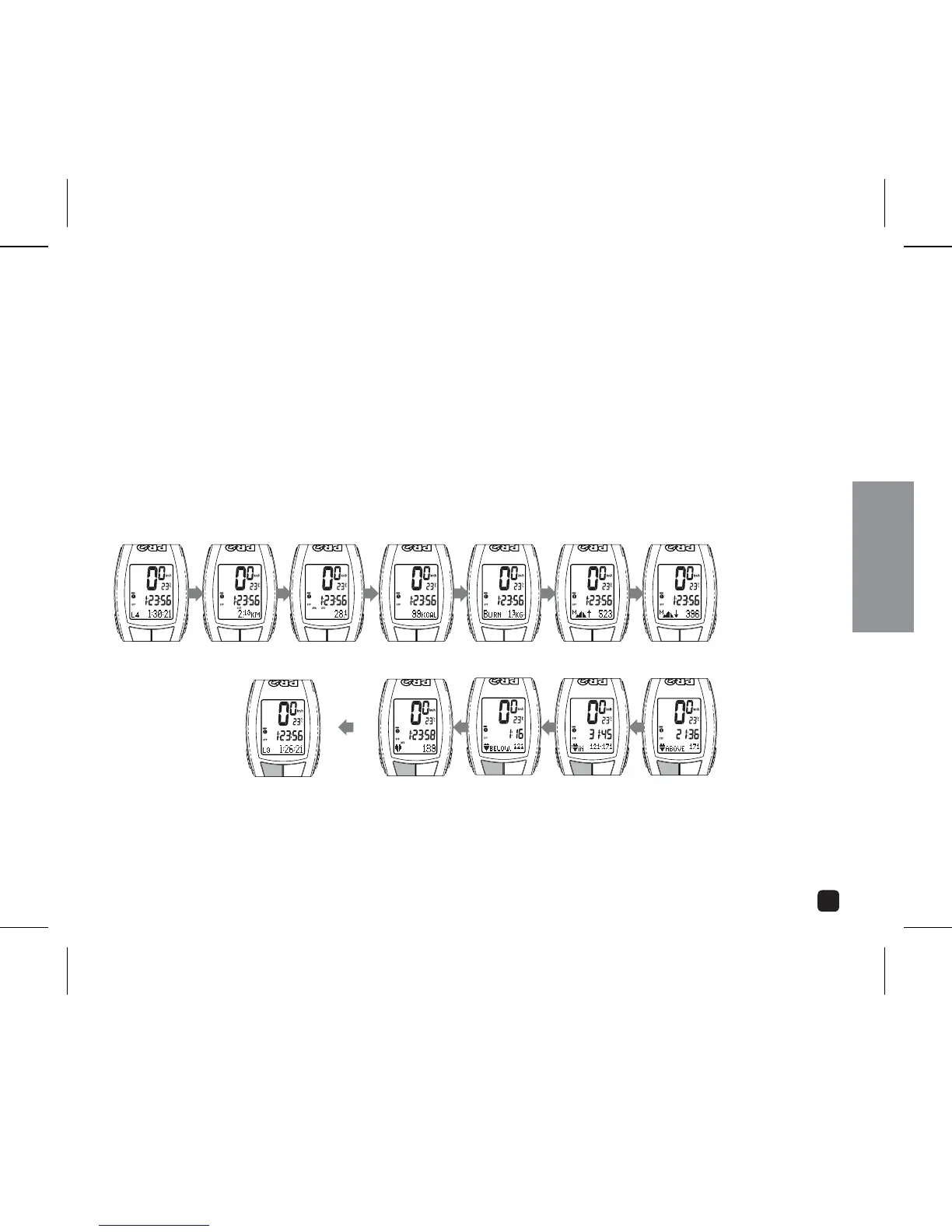
With Stopwatch stopped, press the OPTION key begin the memory sequence.
2. Scroll through individual lap data (starting with latest lap in descending order)
by pressing the OPTION key. Lap data will automatically display in the following
sequence:
3. Press SELECT to resume timing. Press MODE to exit data recall and resume normal
operating mode.
OPERATING THE CYCLOCOMPUTER
TIME DISTANCE AVERAGE SPEED CALORIES BURNED
AVERAGE HR (4.1)
FAT BURNED
TIME BELOW HR
ZONE (4.1)
VIEW NEXT LAP:
PRESS OPTION
VERTICAL ASCENT
(3.5 & 4.1)
TIME IN HR
ZONE (4.1)
VERTICAL DESCENT
(3.5 & 4.1)
TIME ABOVE HR
ZONE (4.1)



 To Next Page