42
english
OPERATING THE EL/BACKLIGHT SYSTEM
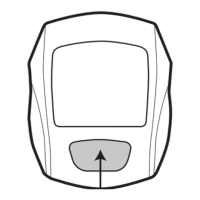
PRO Scio cyclecomputers are equipped with an EL/Backlight for viewing in low light
conditions. Press the EL key to iluminate the display for approximately 5 seconds.
.OTEExcessive use of backlight will reduce baterry life.
SMART EL ON/OFF
When active, the SMART EL system will continue to illuminate the screen as long as keys
are contimually being pressed such as a Programming Sequence.
To activate the SMART EL system press & hold the EL key for 2 seconds. Display will
indicate SMART EL ON.
To deactivate, press & hold EL key for 2 seconds. Display will indicate SMART EL OFF.
OPERATING THE CYCLOCOMPUTER



 To Next Page