OB7 Collaborative Robot User Manual Version 0.6
Meet OB7 / 55
JOG
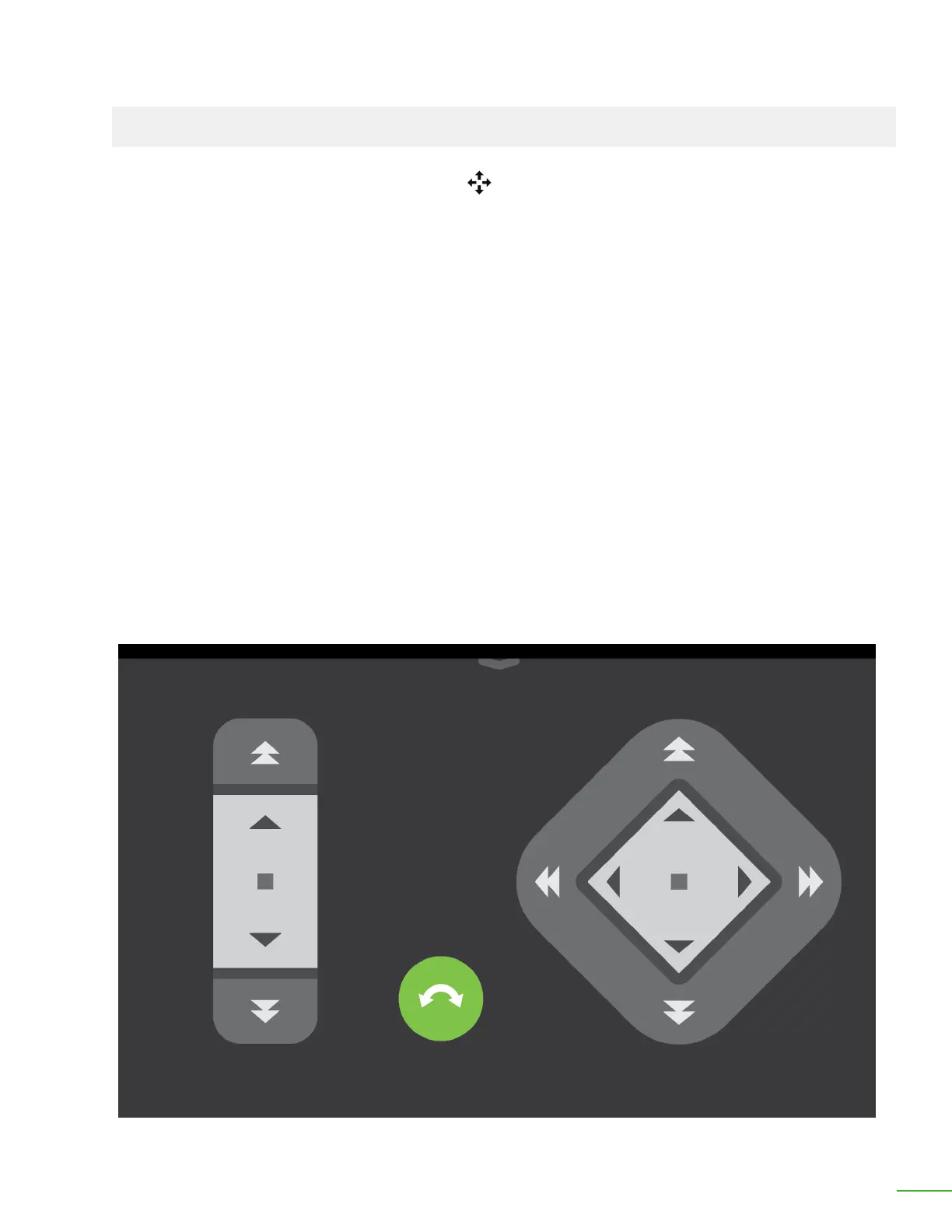
The jog controls are accessed by pressing the "+" icon during Learning. The jog controls cause OB7 to
lock and allow ne adjustments to position.
The jog controls move the position of the gripper on OB7. They do not specically control the joints
individually. Rather, OB7 coordinates the movement of all the joints so that the gripper moves in a
straight line in X, Y or Z (vertically), as the jog controls are pressed.
When the jogging operation is changed from linear moves (X, Y and Z) to rotational moves, OB7
coordinates the movement of the joints so that the object being gripped rotates in its current
position. The jog controls are intended for ne positioning. Larger position movements of OB7 are
made by manually positioning the robot.
Each control direction has two speeds of movement. Pressing closer to the center of the control
causes OB7 to move slowly. Pressing at the outside of the control causes OB7 to move at a higher
speed.
Each control has two methods of operation, Incremental movement, and Continuous Movement.
Tapping the control will cause OB7 to move in a small increment in the direction specied. Tapping
close to the center of the control will cause OB7 to move in steps of 0.1mm. Tapping at the outside of
the control will cause OB7 to move in steps of 1mm. When the rotational controls are used, tapping
the control will cause OB7 to move in increments of 0.5 degrees and 2 degrees respectively.
The Jog screen, showing straight line movement controls



 To Next Page