OB7 Collaborative Robot User Manual Version 0.6
Meet OB7 / 58
LEARN
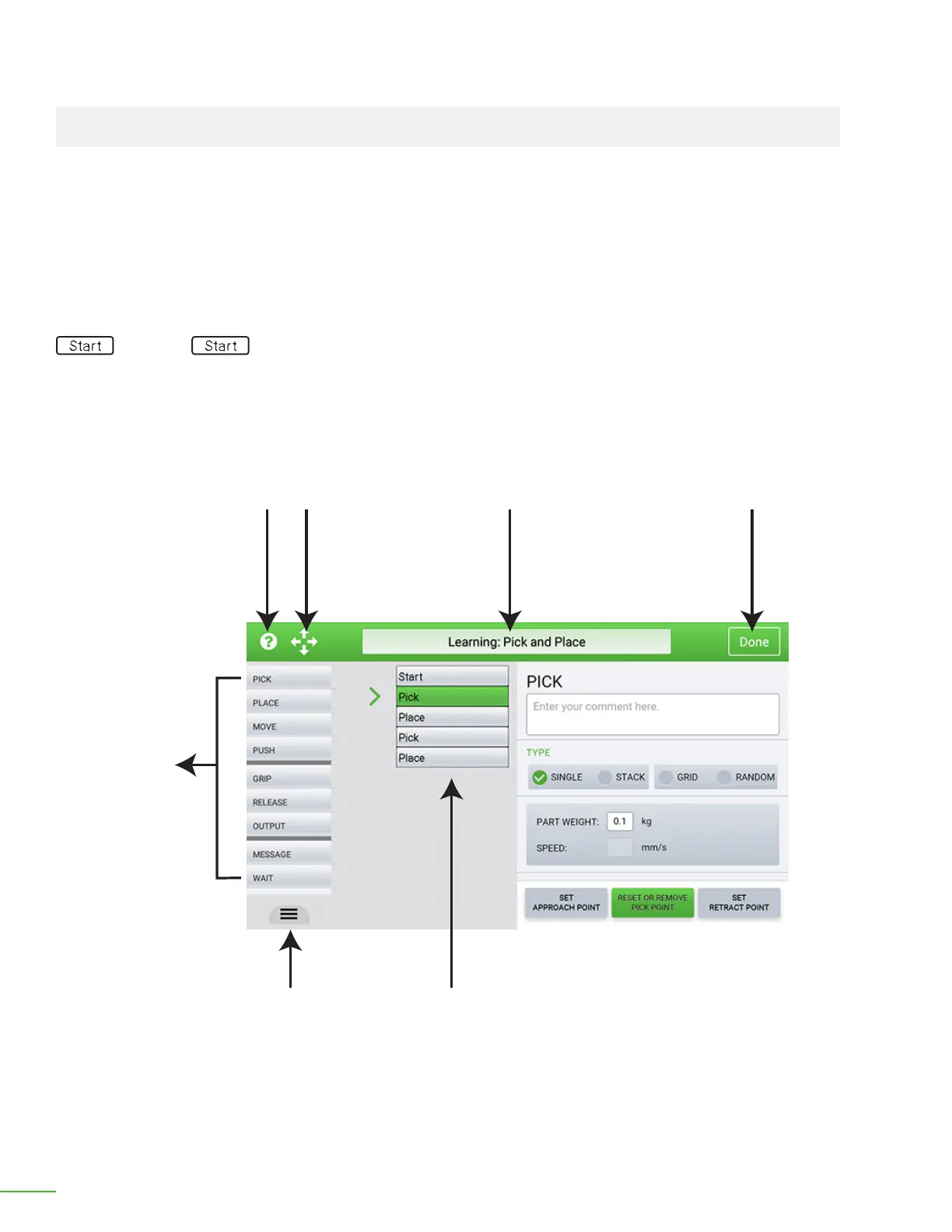
OB7 learns by using "control tiles". Each control tile (or more simply called, "tile") is named with the
type of operation that OB7 will perform.
There is a separate control tile for each operation that OB7 understands, and they are all located in
the column on the le side of the screen.
The column of tiles in the middle of the screen are all the operations that OB7 has learned for this job.
In the picture shown here, only the "Start" operation has been learned so far. All jobs begin with a
"Start" tile. The start tile species the general information about the job.
The right half of the screen contains the details for each tile in the job. As OB7 learns, it automatically
lls in these details. Some details of an operation will be entered directly in this area by you. For
example: you might enter the number of times you wish OB7 to repeat the job.
Learn Screen
Help Jog Job Name Done
Control
Tiles
Available
For Use
“Learned”
Control Tiles
for this job
Access Job
Preview Control



 To Next Page