Document # MAN0001 Issue 4.29 Page 21 of 34
Lock Drive Mode
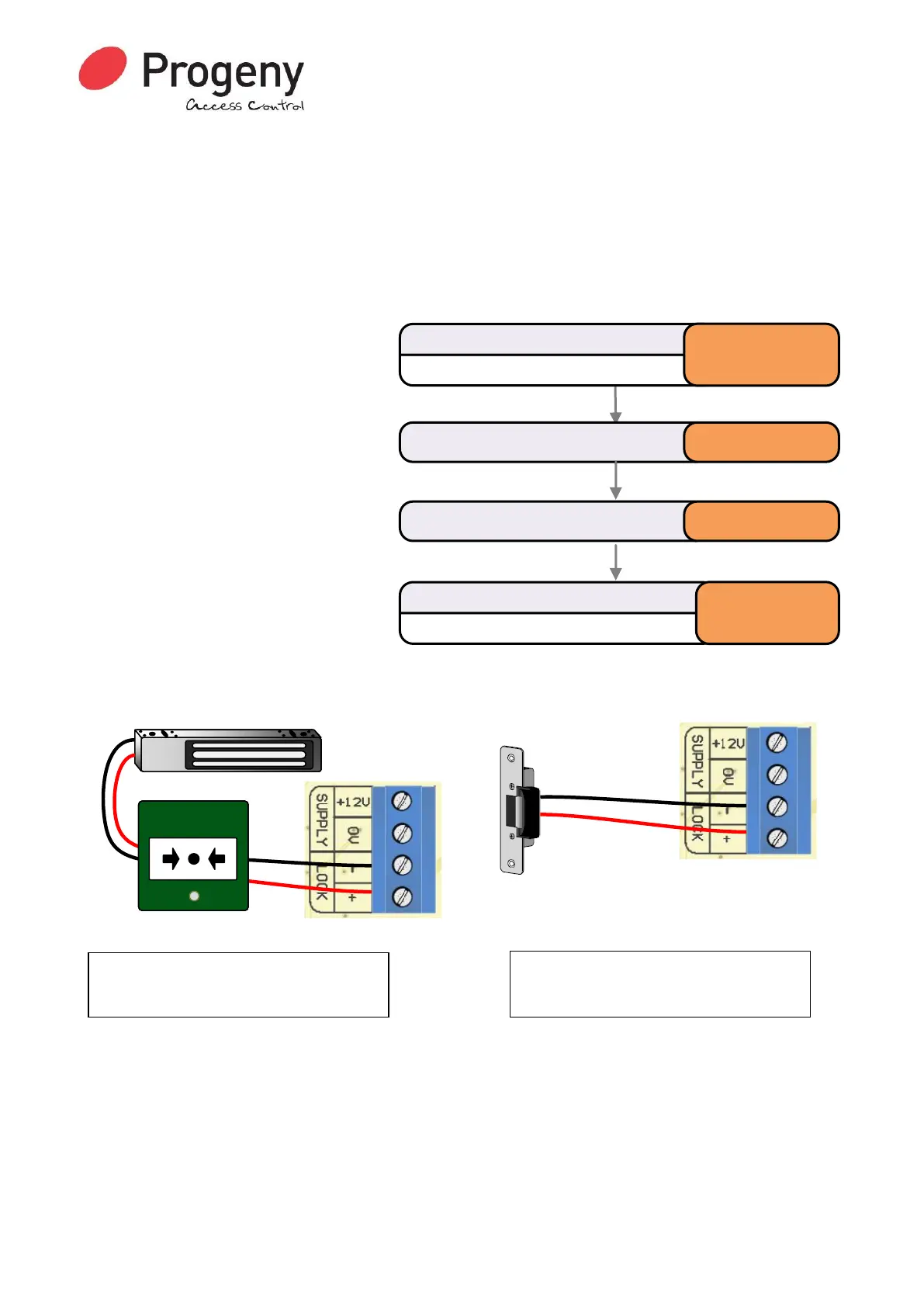
The electronic lock drive from a C4 controller switches the negative supply to the lock. By default,
the output is programmed to drive a “Fail Secure” locking device. Power is only applied to the lock
during the lock release time.
• “Fail-Secure” = Power to release
• “Fail-Open” = Power to hold locked
If you are connecting a “Fail-Open” locking device such as a Door Magnet, then you will need to
change the “Lock Drive Mode”
Range of Values:
Mode 1 = Fail Open
Mode 2 = Fail Secure
Default Value:
2 = Fail Secure
Related Engineer Menus:
• 02 Lock Release time
Lock Drive Modes 1 & 2
Status LED will Flash
Enter Engineer Password
* 1 2 3 4 5 6
Select Lock Drive Modemenu * 1 4
Status LED will stop Flashing
Complete & Exit Programming Mode
#
Enter Code for desired mode 2


 To Next Page