CYBER 192
6
- 2 - INSTALLATION / CONNECTIONS
2.1 INSTALLATION
Install the CYBER192 on a plane surface or install it in a rack (482mm/19”). Rack installation: this device is
built for 2-units rack. You can x the controller with four screws M6 in the rack.
2.2 CONNECTION OF THE DMX LINE
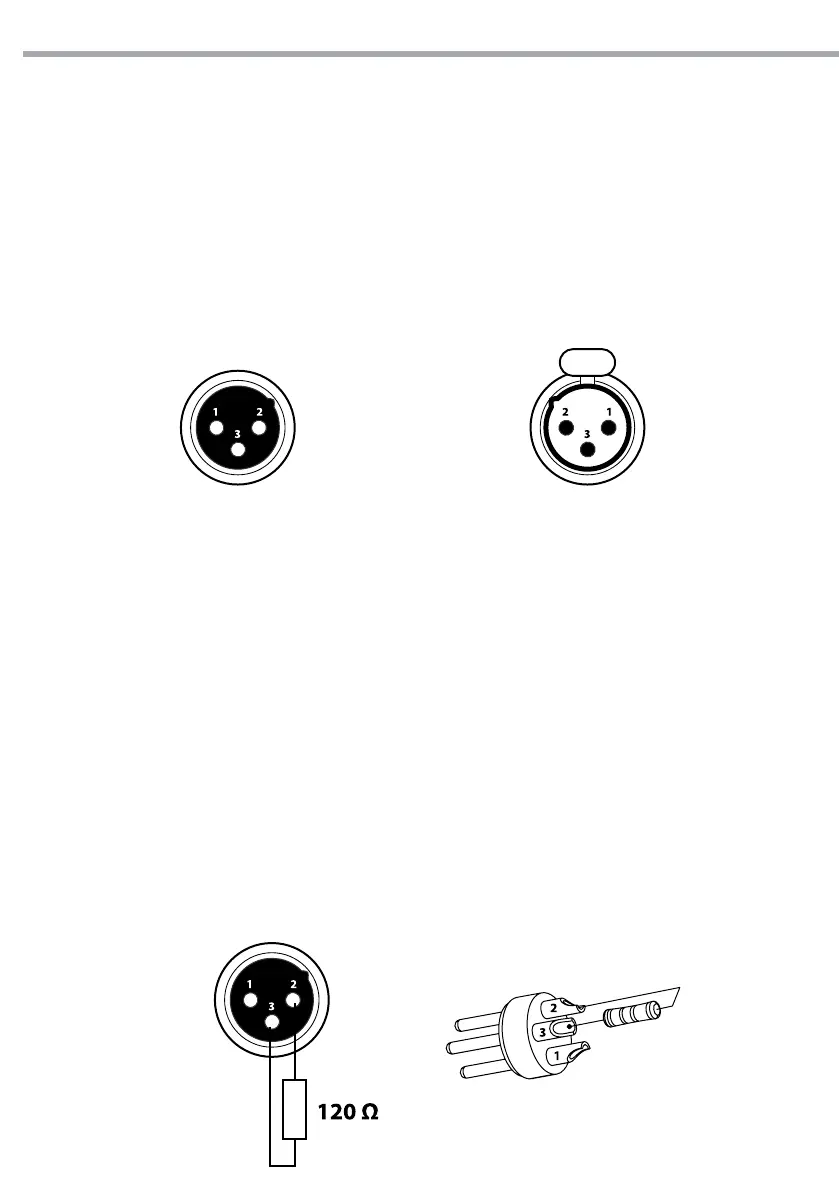
DMX connection employs standard XLR connectors. Use shielded pair-twisted cables with 120Ω imped-
ance and low capacity.
The following diagram shows the connection mode:
Pin1 : GND - Shield
Pin2 : - Negative
Pin3 : + Positive
Fig.2
ATTENTION
The screened parts of the cable (sleeve) must never be connected to the system’s earth, as this would
cause faulty xture and controller operation.
Over long runs can be necessary to insert a DMX level matching amplier.
For those connections the use of balanced microphone cable is not recommended because it cannot
transmit control DMX data reliably.
• Connect the controller DMX input to the DMX output of the rst unit.
• Connect the DMX output to the DMX input of the following unit. Connect again the output to the input
of the following unit until all the units are connected in chain.
• When the signal cable has to run longer distance is recommended to insert a DMX termination on the
last unit.
2.3 CONSTRUCTION OF THE DMX TERMINATION
The termination avoids the risk of DMX 512 signals being reected back along the cable when they reach-
es the end of the line: under certain conditions and with certain cable lengths, this could cause them to
cancel the original signals.
The termination is prepared by soldering a 120Ω 1/4 W resistor between pins 2 and 3 of the 5-pin male XLR
connector, as shown in gure.
Example:
3 pin XLR connector
Fig.3
DMX - OUTPUT
XLR socket
DMX - INPUT
XLR plug


 To Next Page